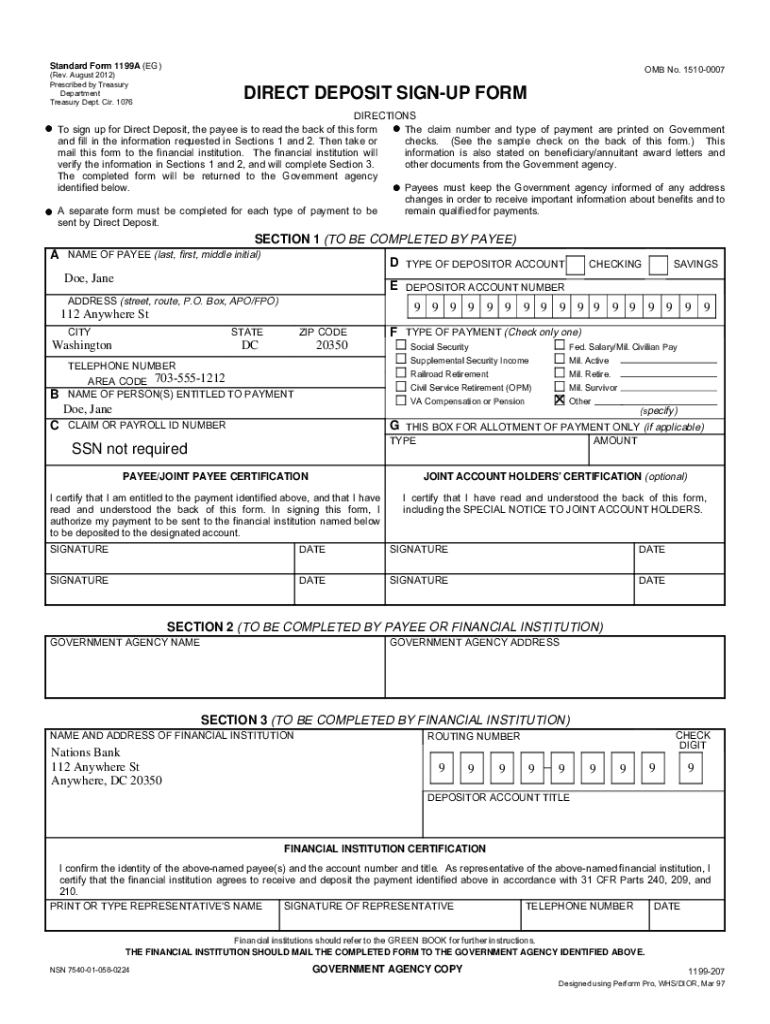







Definition & Purpose of the 2 Form SF 1199A
The Standard Form 1199A, commonly referred to as the Direct Deposit Sign-Up Form, is primarily used to authorize federal payments to be deposited directly into a payee's bank account. This form is essential in facilitating the electronic transfer of payments, such as social security or federal salary deposits, directly, thus ensuring timely and secure access to funds. By using SF 1199A, payees eliminate the need for paper checks and streamline their financial transactions.
How to Use the 2 Form SF 1199A Online
The 2 Form SF 1199A can be filled out online, leveraging platforms like DocHub for a seamless experience. Users can access the form digitally, ensuring flexibility and convenience:
- Import the Form: Start by uploading the form from your computer or cloud storage services like Google Drive or Dropbox to DocHub.
- Complete the Fields: Fill in the necessary fields, including personal information, account details, and financial institution certification.
- Add Digital Signatures: Utilize DocHub's electronic signature feature to ensure authenticity and legality.
- Save and Share: Once completed, save the form to your preferred location or directly share it with relevant parties via email.
Obtaining the 2 Form SF 1199A
Accessing the SF 1199A is straightforward. Government websites and financial institutions often provide this form for download. Users can also utilize online document platforms, which offer fillable and printable versions. Here’s how you can obtain the form:
- Official Government Sites: Visit sites like the Social Security Administration to download the form directly.
- Bank Services: Local banks often supply this form for customers setting up a direct deposit.
- Document Management Platforms: Websites like DocHub provide an online interface to fill out, sign, and manage the form efficiently.
Steps to Complete the 2 Form SF 1199A
To complete the SF 1199A accurately, follow these steps:
- Personal Information: Provide your full name, social security number, and other identifying details.
- Bank Account Details: Enter the bank name, routing number, and account number where funds should be deposited.
- Certification: Obtain certification from your financial institution, confirming the details and authorizing the direct deposit.
- Review and Sign: Check for any errors and sign the form to authorize the direct deposit process.
Who Typically Uses the 2 Form SF 1199A
The SF 1199A is utilized by various individuals eligible for federal payments:
- Retirees: Individuals receiving social security benefits often use this form to set up direct deposits.
- Federal Employees: Staff paid by the federal government use SF 1199A for salary deposits.
- Veterans: Those receiving benefits from the Department of Veterans Affairs.
- Social Security Beneficiaries: Individuals who qualify for direct social security income.


Important Terms Related to SF 1199A
Familiarizing oneself with key terms can facilitate a more comprehensive understanding:
- Direct Deposit: An electronic funds transfer directly into a bank account.
- Payee: The individual receiving the deposit.
- Routing Number: A bank-specific number identifying the financial institution.
- Certification: Endorsement by the financial institution verifying account details.
Legal Use of the 2 Form SF 1199A
The legal framework surrounding the use of SF 1199A is predicated on ensuring secure and authorized access to federal payments. The ESIGN Act supports its electronic signing capability, emphasizing the importance of data integrity and legal compliance. Users must ensure:
- All information provided is truthful and accurate.
- The form is signed and certified by authorized personnel.
- Proper documentation is retained for records and in case of audits.
Key Elements of the 2 Form SF 1199A
Understanding the components of SF 1199A ensures correct completion and submission:
- Payee Identification: Clearly indicate the receiving party through personal details.
- Deposit Instructions: Specify the bank and account for the transfer.
- Certification Section: Required signatory endorsements from both the payee and financial institution.
- Privacy Notices and Instructions: Information on the form’s usage and steps for making changes to deposit arrangements.