







Definition & Meaning
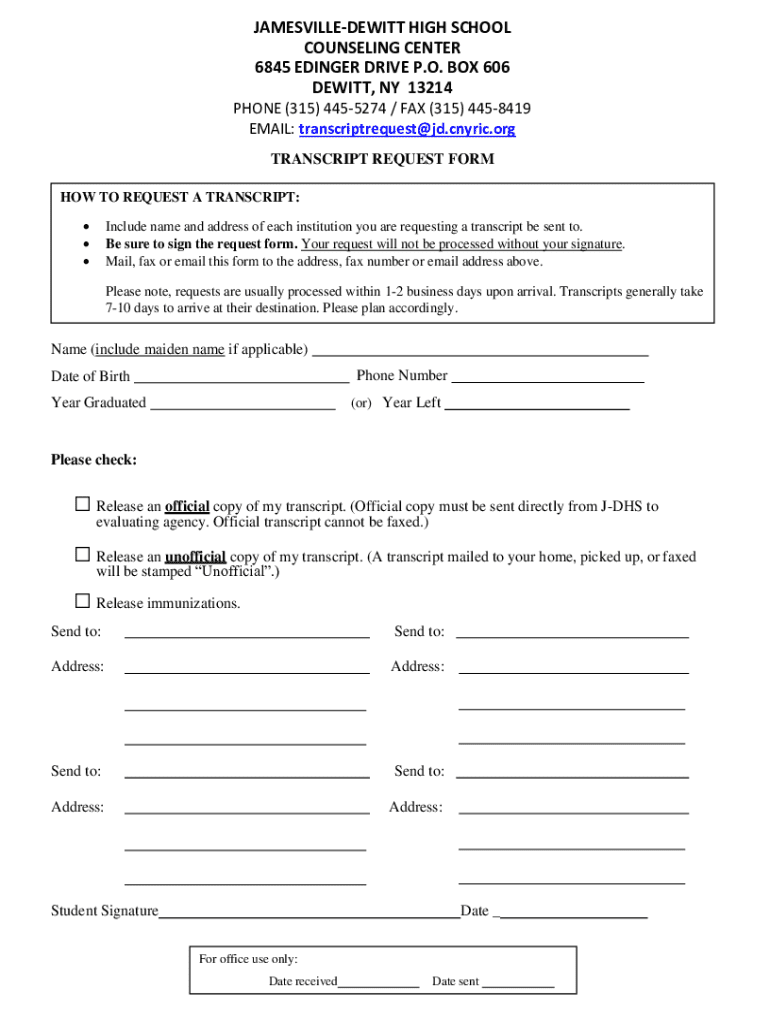
In today's digital age, the term "form online" denotes electronic documents that can be completed, submitted, and processed over the internet. This transition from paper to digital offers a streamlined approach to collecting and managing information. Online forms can range from simple data collection interfaces to complex, interactive forms designed for detailed data input, verification, and submission. The convenience of accessing and completing these forms via web browsers on multiple devices has made them an integral part of administrative and business operations.
- Electronic Forms: Unlike traditional paper forms, online forms can incorporate interactive elements such as drop-down menus, checkboxes, and text fields, enhancing user experience and accuracy.
- Data Management: Online forms help in automating data collection, thereby reducing manual entry errors and improving data integrity.
- Real-Time Processing: Immediate submission and processing of forms online facilitate faster response times and decision-making.
Steps to Complete the Form Online
Completing a form online involves a few straightforward steps that leverage user-friendly digital tools to guide users through the process. Below is a typical process for completing a form online:
- Access the Form: Locate the form through a direct URL or a designated portal.
- Read Instructions: Begin by carefully reading any instructions provided to understand requirements and guidelines.
- Input Information: Enter the required data into designated fields, ensuring accuracy and completeness.
- Review Entries: Double-check entered information for errors or omissions.
- Submit: Finalize and submit the form electronically, often with the click of a button.
- Confirm Submission: After submitting, users may receive an instant confirmation or acknowledgment via email.
- Attachments: Some forms may require uploading supplementary documents as part of the completion process.
Creating and Managing Fillable Forms
Creating and managing fillable forms online is a seamless process with platforms like DocHub. These forms are designed for interactive engagement and data input, essential for formal processes such as applications, surveys, or assessments.
- Form Fields: Use tools to insert text boxes, checkboxes, and signature fields, making the form interactive and easy to navigate.
- Template Conversion: Existing documents can often be converted into digital forms, enabling the preservation of original content while adding interactive elements.
- Field Assignment: Assign specific fields to designated recipients, streamlining information collection from multiple parties.
Legal Use of the Form Online
The legality of online forms and electronic signatures has been reinforced by laws such as the ESIGN Act. Such forms are recognized as valid and legally binding in various contexts when appropriately executed.
- Electronic Signatures: Digital signatures are equivalent to traditional wet ink signatures, offering convenience without compromising legal standing.
- Compliance: Ensure forms adhere to federal and state regulations, particularly when handling sensitive information.
- Audit Trails: Detailed records track document access and signature, providing legal proof of transactions.
Form Submission Methods (Online / Mail / In-Person)
While online submission is increasingly preferred for its immediacy and convenience, other submission methods are still relevant.
- Online Submission: Offers instant transmission and processing, ideal for most digital users.
- Mail Submission: Physical forms are filled out and sent via postal service, required for some traditional or legally specific documents.
- In-Person Submission: Direct submission of physical forms at designated locations, often necessary for mandates requiring personal verification.
Integration with Digital Tools
DocHub and similar platforms provide seamless integration with prevailing digital ecosystems, enhancing the functional utility of online forms.
- Software Compatibility: Ensure forms are compatible with commonly used software such as TurboTax or QuickBooks for streamlined business processes.
- Cloud Storage Integration: Connect directly with cloud services like Google Drive for easy import and export of documents.
- API Support: Enables embedding form functionalities within other business software applications.
Eligibility Criteria
Before engaging with an online form, ensure you meet the necessary eligibility requirements relevant to the form's purpose.
- Target Audience: Understand if the form is intended for individuals, businesses, or specific groups.
- Pre-requisites: Some forms may require prior documentation or registration numbers.
- Compliance: Confirm adherence to stipulated guidelines to avoid delays or rejections.

Examples of Using the Form Online
Online forms are widely applicable across various sectors, simplifying processes by providing succinct and structured pathways for information capture.
- Educational Institutions: Students apply for admissions or request transcripts effortlessly.
- Business Applications: Entrepreneurs can submit business registration forms or license applications online.
- Government Services: Citizens can report taxes, apply for benefits, or renew licenses seamlessly.
The effective deployment and utilization of online forms enhance operational efficiency, streamline workflows, and empower users by providing intuitive and accessible digital solutions.




