




01. Edit your form online
Type text, add images, blackout confidential details, add comments, highlights and more.

Type text, add images, blackout confidential details, add comments, highlights and more.

Draw your signature, type it, upload its image, or use your mobile device as a signature pad.

Send it via email, link, or fax. You can also download it, export it or print it out.
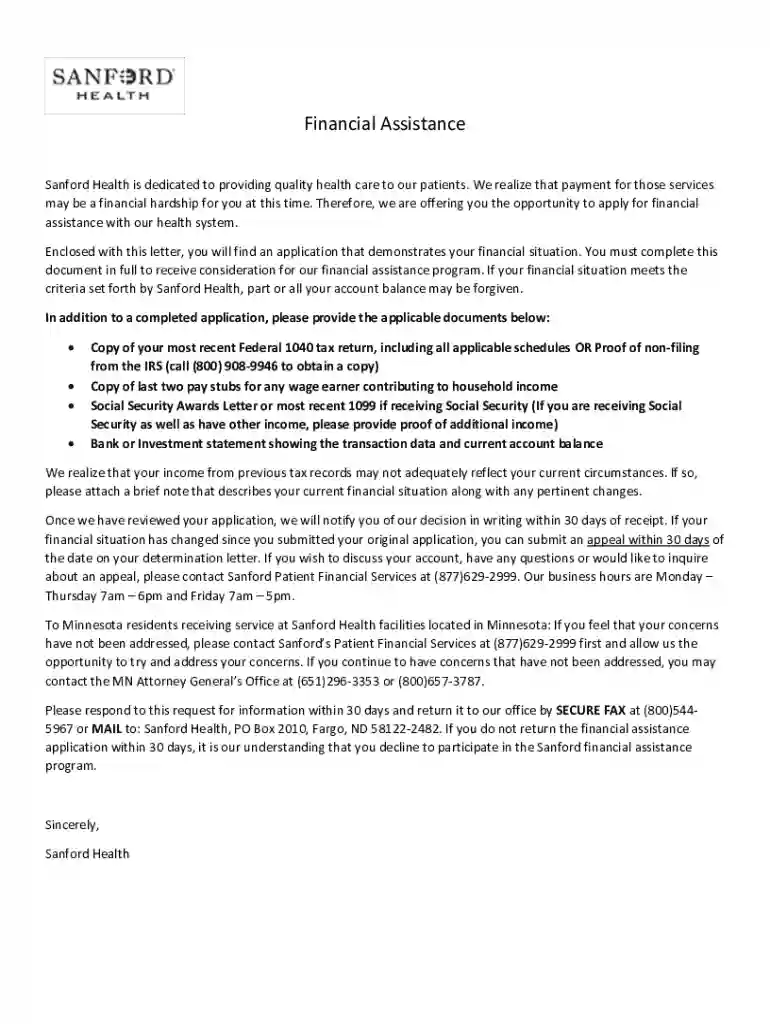
Sanford Health's financial assistance program is designed to support patients facing financial hardship when it comes to paying for healthcare services. The program requires an application process to determine eligibility and collect necessary documentation. Understanding this program is crucial for applicants seeking aid.
To qualify for Sanford financial assistance, applicants must meet specific criteria that assess their financial situation. This includes:
Eligibility is determined by evaluating these factors, ensuring that only those in genuine need receive assistance. Applicants should verify their status before applying to avoid unnecessary delays.


Gather Required Documents: Before starting the application, collect essential documents such as tax returns, pay stubs, and bank statements. These documents provide proof of financial status.
Access the Application Form: The form can be accessed online via platforms like DocHub, where it can be filled out and signed digitally. Alternatively, physical forms may be available at Sanford Health facilities.
Fill Out Personal and Financial Information: Provide details about your identity, employment, family size, and financial income.
Attach Supporting Documents: Upload or attach copies of all necessary supporting documents to complete the application.
Review and Submit: Double-check the information provided, ensuring accuracy before submitting. Errors can result in processing delays.
The application review period typically lasts up to thirty days. During this time, applicants may receive requests for additional information or clarification. It is vital to respond promptly to avoid disqualification.
Applicants must prepare several documents to complete the financial assistance application:
These documents collectively validate the applicant's need for financial aid and must be accurate and up-to-date.
The use of the Sanford financial assistance form requires adherence to legal standards to ensure authenticity and confidentiality:
Familiarity with these legal requirements helps applicants understand their rights and responsibilities.
DocHub is a versatile platform that caters to a range of document-related needs, including the ability to fill out and sign the Sanford financial assistance form online. Its features include:
Using DocHub helps streamline the application process, offering tools that allow users to edit, collaborate, and sign documents efficiently.
While traditional paper submissions are possible, online submission presents numerous advantages:
Applicants who leverage online resources enjoy a smoother, more efficient application experience.
The collaboration feature allows multiple parties—such as family members or Sanford financial advisors—to work on a single application:
For families completing applications together, these features enhance coordination and reduce errors.
Sanford's financial assistance program is commonly utilized by:
These scenarios highlight diverse applicant backgrounds, emphasizing the program's broad applicability and significance.
We've got more versions of the Sanford financial assistance: Fill out and sign online form. Select the right Sanford financial assistance: Fill out and sign online version from the list and start editing it straight away!
At DocHub, your data security is our priority. We follow HIPAA, SOC2, GDPR, and other standards, so you can work on your documents with confidence.



find links to the Free Application to Federal Student Aid (FAFSA), Contact The Office of Financial Aid and Scholarships Phone: 407.708.2045 Fax: 407.708.2323
Financial Assistance is offered for Rental or Mortgage and/or Utility Services through the Prevention Assistance Program for qualified Seminole County residentsRead more


