Vrs-75 2026

Get Form
Vrs-75 Preview on Page 1

Here's how it works

01. Edit your form online
Type text, add images, blackout confidential details, add comments, highlights and more.

02. Sign it in a few clicks
Draw your signature, type it, upload its image, or use your mobile device as a signature pad.

03. Share your form with others
Send it via email, link, or fax. You can also download it, export it or print it out.

Definition and Purpose of Vrs-75

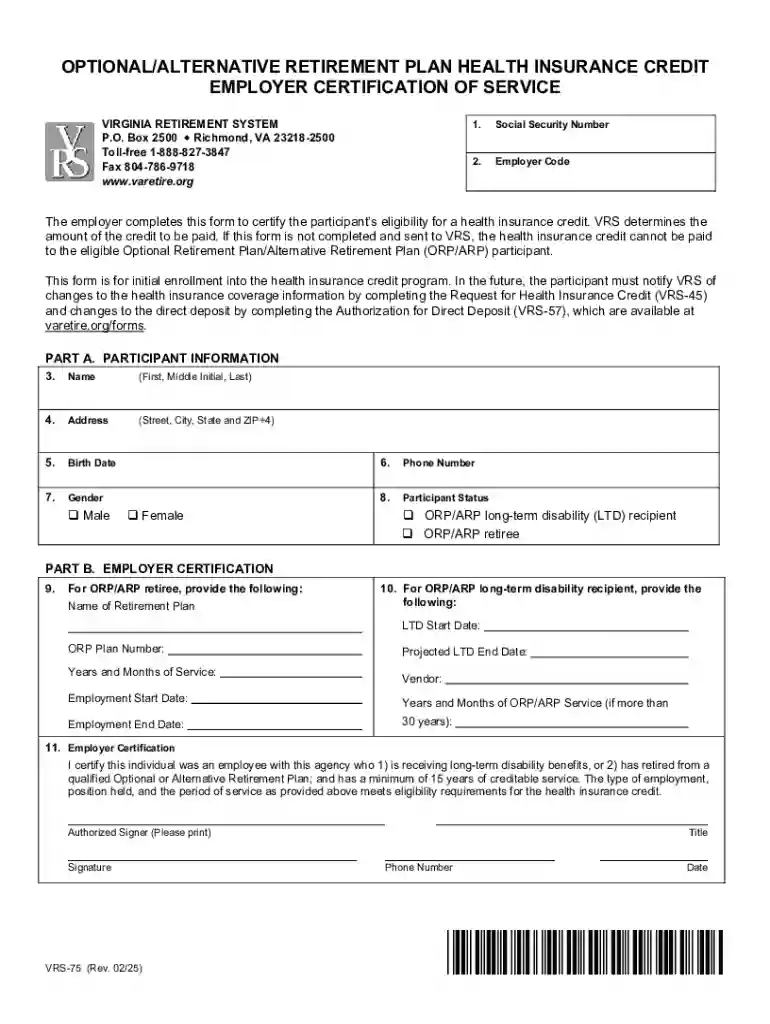
The Vrs-75 form is an Employer Certification document utilized by the Virginia Retirement System. Its primary role is to certify a participant's eligibility for a health insurance credit under the Optional/Alternative Retirement Plan. This form is integral for employees to receive the appropriate credit, and it requires a collaboration between the employer and participant to provide all necessary details.

The Vrs-75 encompasses various types of information, including personal details of the employee, employment history, Medicare coverage status, and specific insurance policy information. The accuracy of these details is paramount to ensure that the health insurance credits are distributed correctly.

Key Benefits

  • Provides a documented certification for insurance credit eligibility.
  • Ensures employers and employees have clarity on retirement benefits.
  • Functions as a formal record to support retirement plans and benefits.

How to Use the Vrs-75

Individuals and employers must collaborate to complete the Vrs-75 form correctly. Generally, the employer initiates the process by gathering necessary data from their records and the employee to fill out the form accurately.

Step-by-Step Usage Guide

  1. Gather Information: Collect all relevant personal and employment data, including employment history and insurance policy details.
  2. Complete the Employer Section: Employers must enter details such as business name, contact information, and employee details.
  3. Verify and Certify: Recheck all information for accuracy. The employer certifies the correctness of the data by signing the form.
  4. Submission: Once completed, the form is typically submitted to the Virginia Retirement System for processing.

How to Obtain the Vrs-75

Obtaining the Vrs-75 is a straightforward process. It is typically distributed by employers to participants who are part of the Virginia Retirement System. Additionally, the form can be accessed through various means such as online portals or direct requests through HR departments.

Sources for Accessing the Form

  • Employer: Requested directly through the employer or the HR department.
  • Online Portals: Many companies have secure employee portals where forms can be downloaded.
  • Virginia Retirement System: The official website or contact center may also provide access to the form for participants.

Steps to Complete the Vrs-75

The completion of the Vrs-75 requires attention to detail and precise information input. Here is a guideline to aid in filling out the form meticulously.

Detailed Procedure

  1. Personal Information: Enter the participant’s personal details, including full name, address, and contact information.
  2. Employment History: Document the employment history accurately, focusing on the current employer relationship.
  3. Medicare Details: Input current Medicare coverage information, as this impacts the insurance credit.
  4. Insurance Information: Include specific insurance policy details relevant to the health insurance credit.
  5. Certification: The form must be signed by both the employer and employee to validate the information provided.

Key Elements of the Vrs-75

The Vrs-75 form consists of several key components that are critical for its purpose. Each section serves a different function and must be completed diligently.

Essential Components

  • Personal Information Section: Collects participant personal data.
  • Employer Information Section: Documents business-related data and certifies employment.
  • Coverage and Policy Details: Focuses on health insurance and Medicare coverage.
  • Certification and Signatures: Certifies the form’s accuracy and participant eligibility.

Important Terms Related to Vrs-75

Understanding the terminologies used in the Vrs-75 form is essential for both the employer and employee. Here are some of the crucial terms defined:

  • Health Insurance Credit: A subsidy provided to participants towards their health insurance costs.
  • Optional/Alternative Retirement Plan: A retirement plan option within the Virginia Retirement System.
  • Certification: The official endorsement of the form indicating its completion and accuracy.

Examples of Using the Vrs-75

Several scenarios highlight the use of the Vrs-75 form, emphasizing its practical implications. Here are a few examples:

Real-World Scenarios

  • Scenario One: An employee nearing retirement uses the form to document their eligibility for health insurance credits, coordinating closely with their HR department to ensure all data is accurate.
  • Scenario Two: An employer manages multiple employee retirements, facilitating the Vrs-75 forms as part of their retirement package distribution.
  • Scenario Three: A participant transitioning to Medicare utilizes the form to reflect this change, ensuring continued eligibility under the retirement system.

Legal Use of the Vrs-75

The legal use of the Vrs-75 is governed by specific Virginia state laws and regulations. Adhering to these guidelines ensures compliance and proper certification for the health insurance credit.

Legal Considerations

  • Adherence to State Regulations: Employers must ensure the form complies with Virginia’s legal requirements.
  • Accuracy of Information: Providing false or misleading information can lead to penalties or denial of benefits.
  • Authorized Use: Only authorized personnel should complete and submit the form to protect participant information.

By understanding the full scope of the Vrs-75, employers and employees can effectively manage their retirement-related health insurance credits, ensuring all necessary processes are completed smoothly and accurately.

be ready to get more

Complete this form in 5 minutes or less

Get form

Got questions?

We have answers to the most popular questions from our customers. If you can't find an answer to your question, please contact us.
Contact us
In most situations, receiving SSDI does not impact your pension benefits. That said, your pension payments may decrease what you get each month in SSDI or Social Security retirement. It depends on the source of your pension, whether you paid into the Social Security system, and other factors.
However, it will never be reduced by more than 50% of your Basic Benefit amount. Note: This option does not affect the amount of your Social Security benefit. You may also draw your Social Security when you are eligible for it, regardless of the age you choose for your VRS benefit to reduce.
Important Note The selection of the Advance Pension Option does not affect your Social Security benefit amount. You may draw your Social Security when you are eligible, regardless of the age you choose for your VRS benefit to reduce. You cannot elect the Advance Pension Option with another benefit payout option.
Provides a tax-deferred savings plan in addition to your defined benefit pension. Provides a balance to draw from during retirement. Your balance is based on contributions by you and your employer to the plan and the investment performance of those contributions.
The annuitys formula is 2% times years served times the high 3, or the average of the highest 36 months of basic pay received. The BRS annuity is close to the legacy retirement formula, which uses 2.5% as the multiplier. Find out more about the calculations behind the annuity-based payment.

Security and compliance

At DocHub, your data security is our priority. We follow HIPAA, SOC2, GDPR, and other standards, so you can work on your documents with confidence.
Learn more
ccpa2
pci-dss
gdpr-compliance
hipaa
soc-compliance

People also ask

Your military pension does not affect your Social Security benefits. Youll get your full Social Security benefit based on your earnings.

Related links