







Definition and Meaning
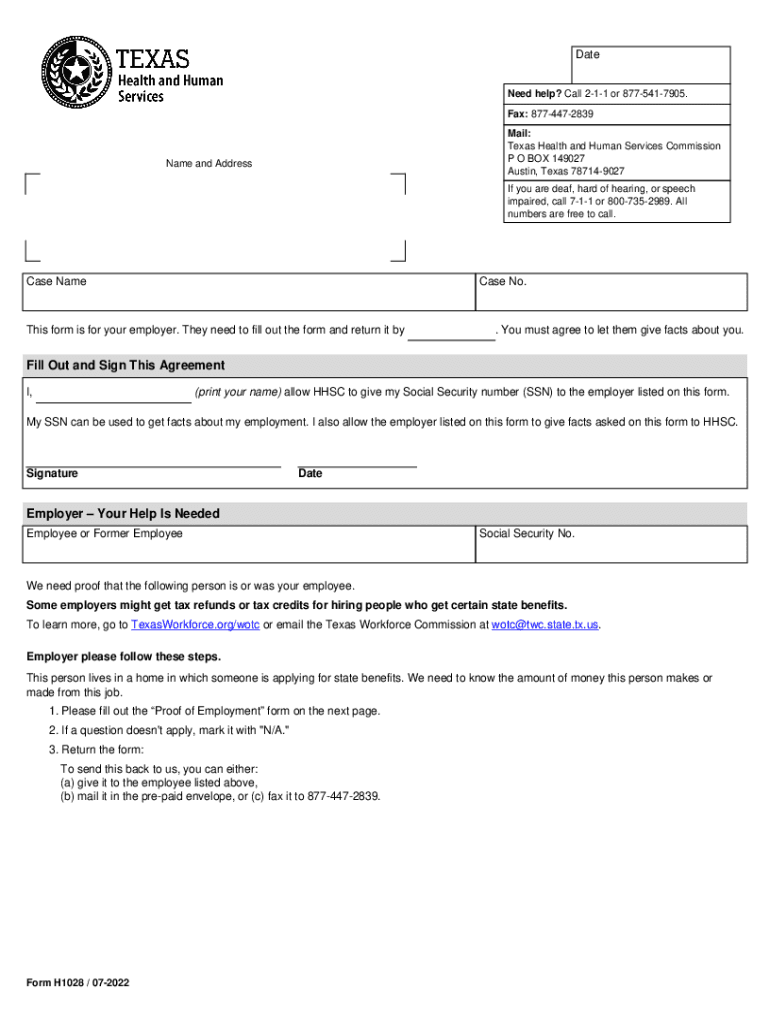
The Form H1028, also known as the Employment Verification form, is a document used primarily in Texas to verify an individual's past or current employment status. This form is essential when an employee or former employee is applying for state benefits, such as unemployment insurance. The purpose of the form is to confirm details about the individual's employment, including job position, salary information, and employment status. This helps the state determine the applicant's eligibility for benefits.
How to Use the Form H1028
To effectively use the Form H1028, an employer must accurately fill in all required sections of the form, which include the employee's job title, pay rate, and employment duration. Given that the form is used to verify employment for the purpose of receiving state benefits, every detail must be precise to avoid processing delays. Employers should follow these steps:
- Obtain the Form: Make sure to get the latest version of the form to ensure compliance.
- Complete Employer Section: Fill out all employer-related fields, including the business name, address, and contact information.
- Provide Employee Details: Enter all relevant employee information accurately, such as job title, beginnings and end dates of employment, and salary details.
- Sign and Date: The employer must sign and date the form to verify the information provided.
- Submit: Submit the completed form to the requesting employee or directly to the relevant state agency.
How to Obtain the Form H1028
The Form H1028 can typically be obtained through several methods, depending on the requirements of the Texas state agency handling the benefits:
- Directly From the Employee: Often, the employee who is applying for benefits will provide the necessary blank form to the employer for completion.
- State Agency Website: Download the form from the official Texas state agency's website responsible for employment verification.
- Request by Mail: Some state agencies offer to mail the form upon request, although this may take additional processing time.
Steps to Complete the Form H1028
Completing the Form H1028 requires attention to detail. Follow these authoritative steps to avoid errors:
- Employee Information: Clearly enter the employee's name, social security number, and employment details.
- Employment Details: Provide specific information about the employment period, including dates and salary.
- Verification: Double-check all information for accuracy before signing.
- Employer Certification: The employer must certify that all information is accurate and complete.
- Return the Form: Once completed, return the form to the employee or send it directly to the relevant agency.
Who Typically Uses the Form H1028
Form H1028 is generally used by:
- Employers in Texas: To confirm an employee's job details when requested for benefits.
- Employees or Former Employees: When applying for state benefits requiring employment confirmation.
- State Agencies: To process and evaluate benefit claims based on verified employment information.


Key Elements of the Form H1028
The crucial elements of Form H1028 include:
- Employer and Employee Identification: Names and contact information that accurately relate to the parties involved.
- Employment Details: Information detailing the employee's position, pay rate, and employment duration.
- Verification Signature: An employer's signature authenticating the truthfulness of the provided information.
Important Terms Related to Form H1028
Understanding specific terminology related to Form H1028 is vital for accurate completion:
- Employment Status: Indicates if the employment is current, terminated, or on leave.
- Verification: The act of confirming the accuracy of the employment details provided.
- State Benefits: Government-provided assistance requiring employment verification for eligibility.
Legal Use of the Form H1028
Legally, Form H1028 must be completed accurately and truthfully. Providing false information can lead to penalties for both the employee and employer. Additionally, as this form involves the use of personal data, it is subject to privacy laws dictated by the state of Texas. Employers must ensure compliance with these laws when handling and submitting the form.




