




Here's how it works

01. Edit your massachusetts form m 3 online
Type text, add images, blackout confidential details, add comments, highlights and more.

02. Sign it in a few clicks
Draw your signature, type it, upload its image, or use your mobile device as a signature pad.

03. Share your form with others
Send form m 3 massachusetts via email, link, or fax. You can also download it, export it or print it out.
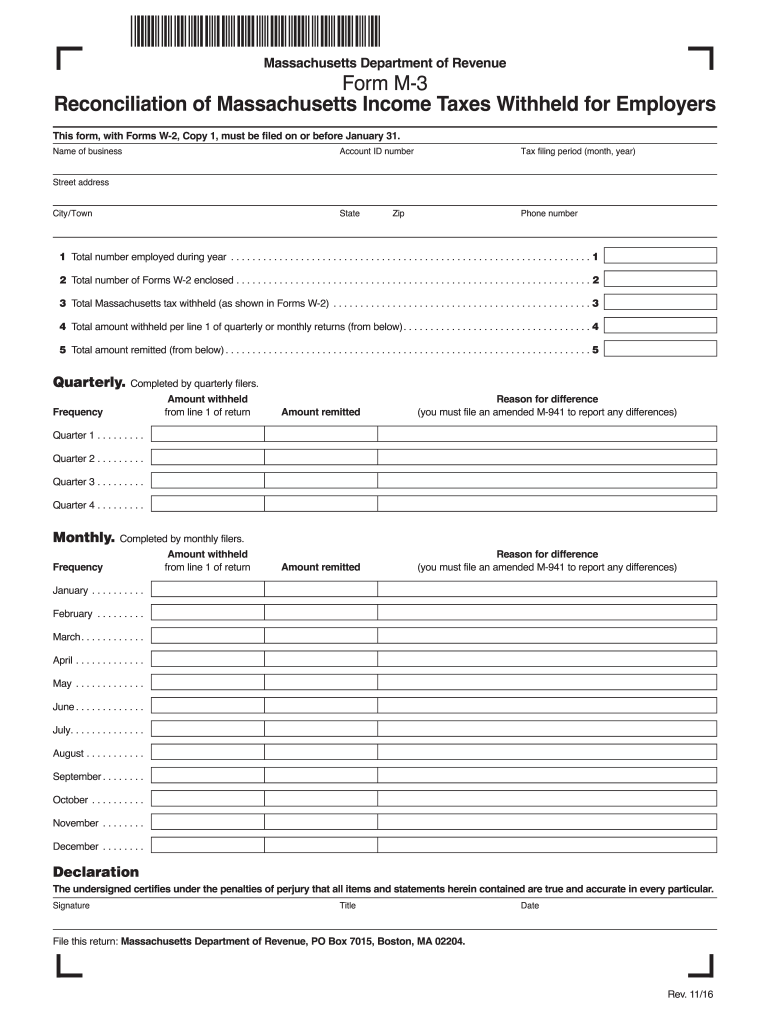
How to use or fill out m a m3 with our platform

- Click ‘Get Form’ to open the M-3 form in the editor.
- Begin by entering your business name and Account ID number at the top of the form. Ensure that these details are accurate for proper identification.
- Fill in the tax filing period, including the month and year, along with your state, phone number, street address, city/town, and zip code.
- In section 11, input the total number of employees during the year. This is crucial for calculating tax obligations.
- For section 12, indicate the total number of Forms W-2 you are enclosing. This helps verify income reporting.
- Complete section 13 by entering the total Massachusetts tax withheld as shown on your Forms W-2.
- Proceed to sections 14 and 15 to report amounts withheld and remitted based on your quarterly or monthly returns.
- Finally, sign and date the declaration at the bottom of the form to certify accuracy before submission.
Start using our platform today for free to streamline your M-3 form completion!
Fill out m a m3 online
It's free
It's free
See more m a m3 versions
We've got more versions of the m a m3 form. Select the right m a m3 version from the list and start editing it straight away!
| Versions | Form popularity | Fillable & printable |
|---|---|---|
| 2016 | 4.9 Satisfied (49 Votes) |
Security and compliance
At DocHub, your data security is our priority. We follow HIPAA, SOC2, GDPR, and other standards, so you can work on your documents with confidence.
Learn more


