01. Edit your form online
Type text, add images, blackout confidential details, add comments, highlights and more.

Type text, add images, blackout confidential details, add comments, highlights and more.

Draw your signature, type it, upload its image, or use your mobile device as a signature pad.

Send it via email, link, or fax. You can also download it, export it or print it out.
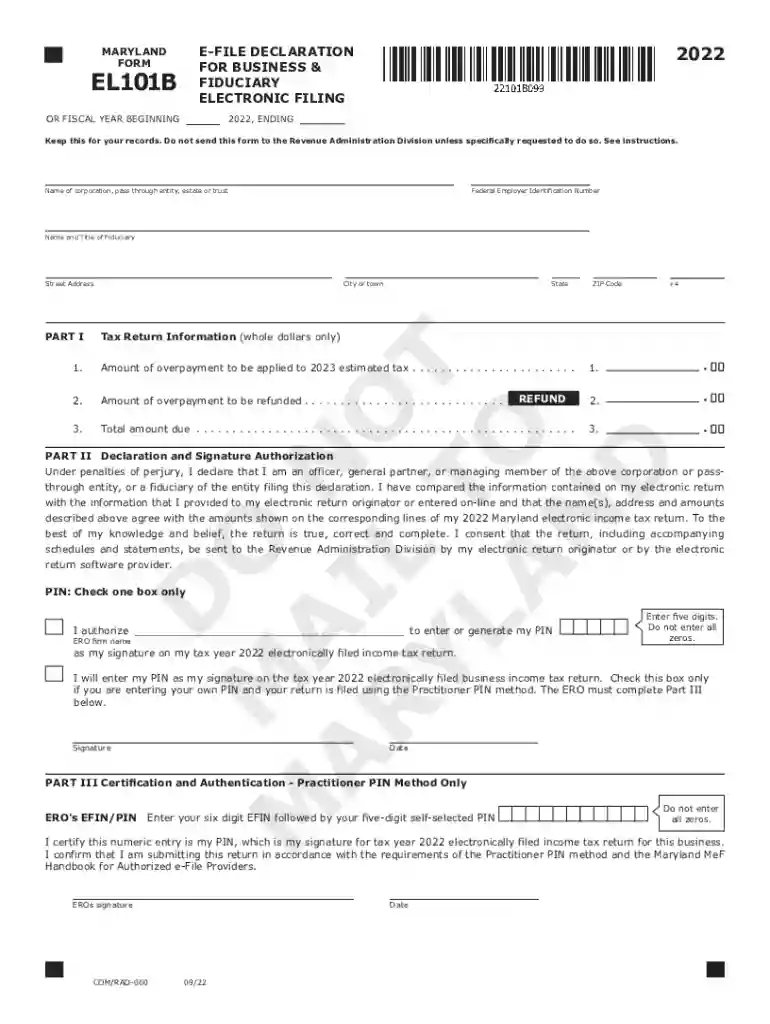
Form EL101B, known as the Income Tax Declaration for Businesses, serves as an E-file Declaration for Businesses and Fiduciary Electronic Filing. It acts as a statement of responsibility and authorization for electronically filed tax returns. The form ensures that the Electronic Return Originator (ERO) and the business entity fully understand their roles and obligations in the process. Specifically, while the Practitioner PIN method might be employed, the business must not submit the physical document to the state unless explicitly instructed. This form must be retained by the ERO for three years, ensuring accountability and smooth retrieval if necessary.
Acquiring Form EL101B is a straightforward process. Businesses typically receive it from their tax preparation software or directly from their IRS-registered Electronic Return Originator. Some states may provide downloadable versions of this form via their official tax department websites. Businesses should verify that they're using the most recent version to enforce proper compliance, as outdated forms might not meet current regulations or requirements.
Identify the ERO and Business: Clearly state the identities of the Electronic Return Originator and the business entity. Verify that all identification numbers, such as the ERO's EFIN, are correct.
Declare Filing Information: Enter specifics regarding the fiscal year, detailing all relevant filing metrics, such as total gross income and tax liabilities.
Signature Authorization: Indicate whether the Practitioner PIN or any other method is used for signing. Provide necessary authorizations for each filer involved.
Review and Finalize: Ensure all fields are filled out accurately and confirm that the form reflects the correct data before submission.
Retention: Keep the form duly signed and filed for three years with the ERO, awaiting any state taxation authority's request.
The Form EL101B primarily serves businesses and fiduciaries looking to execute their income tax declarations electronically. Businesses ranging in size from small to large are potential users, as long as they participate in electronic filings managed by an ERO. Companies that opt for the Practitioner PIN method for signature authorization will also find this form pertinent. Fiduciary entities, such as trusts, reflecting whom they are filing for, are likewise covered under this scheme.
Although IRS procedures generally apply, individual states may have variations on how Form EL101B should be processed. States may use different identification numbers or require additional compliance checks for specific financial metrics declared. Businesses should consult state taxation departments to ensure all unique requirements are fulfilled. Awareness of any state-specific retention rules beyond the three-year federal standard is also critical.
Failing to properly file Form EL101B can result in significant penalties, including financial fines and a higher likelihood of audits. Non-compliance might stem from inaccurately completing the form or not maintaining the necessary records as prescribed. Additionally, businesses that fail to use this document as required might face e-filing privileges' revocation until compliance is regained. It is essential to adhere strictly to both federal and state guidelines to avoid these repercussions.
Understanding key terminology related to Form EL101B is vital:
The IRS provides comprehensive guidelines for submitting business electronic tax declarations using Form EL101B. They include instructions on using the Practitioner PIN method, details on electronic storage requirements, and steps for verifying the information provided. Businesses should regularly refer to IRS publications or official updates to ensure all filings reflect current practice and regulatory changes.
We've got more versions of the Form EL101B Income Tax Declaration for Businesses - Fill Out and form. Select the right Form EL101B Income Tax Declaration for Businesses - Fill Out and version from the list and start editing it straight away!
At DocHub, your data security is our priority. We follow HIPAA, SOC2, GDPR, and other standards, so you can work on your documents with confidence.