Type text, add images, blackout confidential details, add comments, highlights and more.
02. Sign it in a few clicks
Draw your signature, type it, upload its image, or use your mobile device as a signature pad.
03. Share your form with others
Send ncui 685 via email, link, or fax. You can also download it, export it or print it out.
How to use or fill out ncui 685 with our platform
Ease of Setup
DocHub User Ratings on G2
Ease of Use
DocHub User Ratings on G2
Click ‘Get Form’ to open it in the editor.
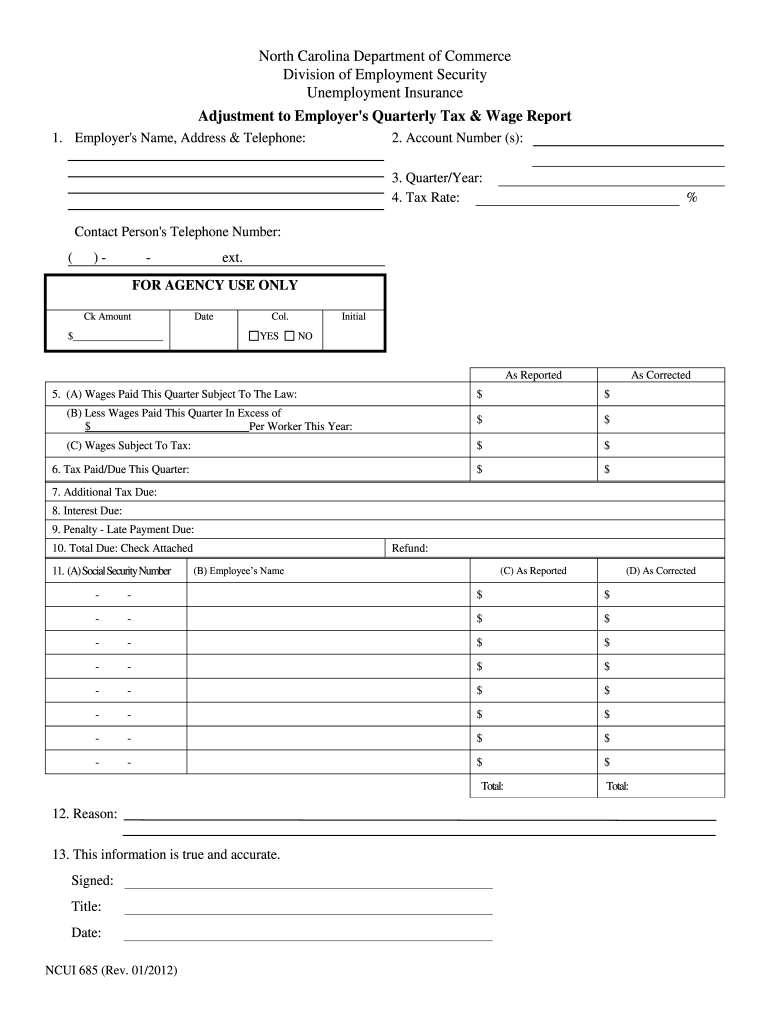
Begin by entering the employer's name, address, and contact person's telephone number in the designated fields.
Input the employer account number assigned by the agency. If applicable, include both the consolidated and branch account numbers.
Specify the quarter and year for correction using the format Q-YYYY (e.g., 1-2001). Remember, a separate form is needed for each quarter.
Enter the applicable tax rate for the year being corrected.
(A) Fill in wages paid this quarter subject to law; (B) deduct any excess wages per worker; (C) calculate wages subject to tax in both 'as reported' and 'as corrected' columns.
Complete sections for tax due, additional tax due, interest due, and late payment penalties as necessary.
For individual employee corrections, enter their Social Security Number, name, previously reported wages, and correct amounts.
Provide a reason for adjustments and ensure you sign and date the form before submission.
Start editing your ncui 685 form online for free today!
685, 5, Institute of Pesticide Formulation Technology, Mangesh A. Pande 3rd Floor,NCUI Bldg.,3, 1126513204, headq@apeda.com. 829, Deputy General ManagerRead more
Instructions for Completing the Adjustment to Employers Quarterly Tax and Wage Report. (Form NCUI 685). 1. Enter the employers name, mailing address andRead more
Page 685. North Carolina Community College System. Institutional Support the Employers Quarterly Tax and Wage Report (Form NCUI 101). NC DepartmentRead more
Cookie consent notice
This site uses cookies to enhance site navigation and personalize your experience.
By using this site you agree to our use of cookies as described in our Privacy Notice.
You can modify your selections by visiting our Cookie and Advertising Notice.