






Definition & Meaning
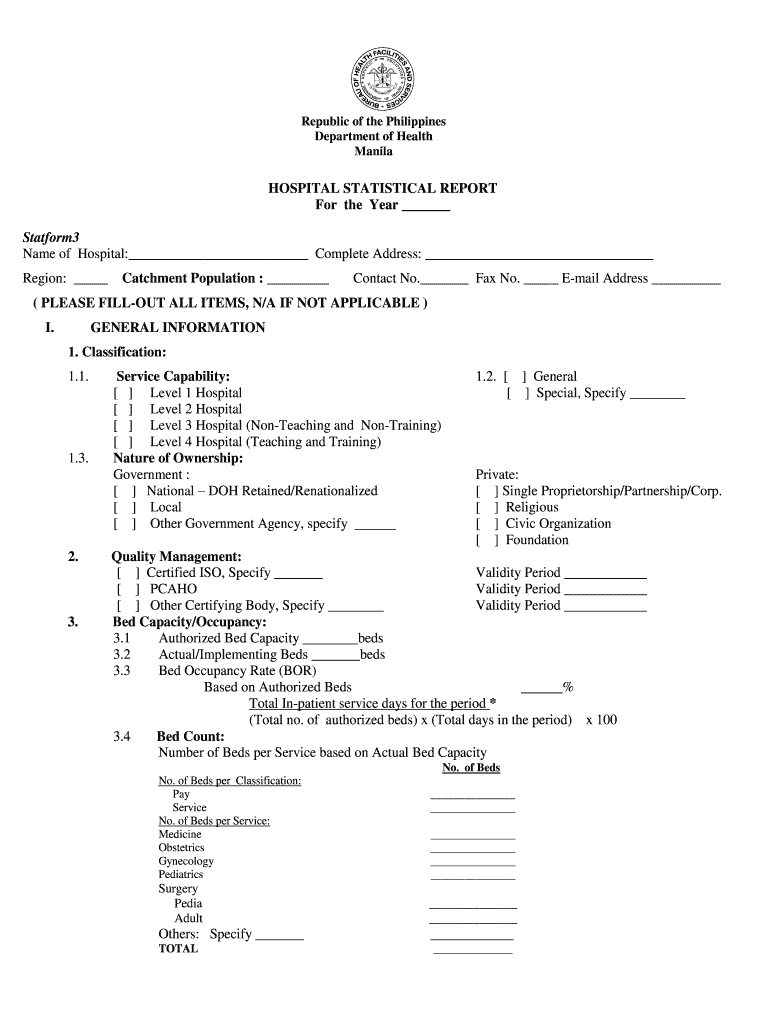
The "online health facility statistical report system" is a digital platform utilized by healthcare organizations to document, analyze, and report various operational statistics. This system aggregates data relating to hospital operations, which may include patient statistics, staffing patterns, financials, infection rates, bed occupancy rates, and other performance metrics. Its primary aim is to provide comprehensive insights into the functioning and efficiency of health facilities by compiling and structuring relevant data. This information not only aids in internal assessments but can also be necessary for compliance with external regulatory standards.
How to Use the Online Health Facility Statistical Report System
Utilizing the online health facility statistical report system involves several methodical steps to ensure accurate and comprehensive data collection and reporting.
- Access the System: Obtain the required login credentials from your healthcare facility's management to access the system.
- Data Entry: Input relevant operational data, which may include patient admission details, staffing numbers, and financial reports.
- Data Verification: Ensure the accuracy and completeness of entered data by cross-referencing with other internal records such as patient charts or financial statements.
- Report Generation: Use the system's tools to compile and generate various reports based on entered data. These reports can outline specific metrics like occupancy rates and average length of stay.
- Analysis and Interpretation: Analyze the generated reports to identify trends, anomalies, and areas of improvement within the facility.
- Submission: Depending on regulatory requirements, submit the finalized reports to the appropriate oversight bodies or internal stakeholders as needed.
By following these structured steps, healthcare administrators and staff can efficiently manage and utilize the statistical data for operational improvements and compliance.
Key Elements of the Online Health Facility Statistical Report System
Several essential components ensure the efficacy and utility of the online health facility statistical report system:
- Data Collection Modules: Sections or tools within the system designed for the input of diverse data categories such as patient demographics, staffing details, and financial metrics.
- Analytics Tools: Built-in functionalities that provide aggregate data analysis, enabling users to draw insights from trends and patterns across different metrics.
- Report Customization Options: Features allowing users to tailor reports according to specific needs, filtering data by department, time frame, or other parameters.
- Compliance Checklist: Tools or guides integrated within the system to ensure all necessary regulatory information is captured and reported accurately.
- Real-Time Updates: Functions that allow immediate adjustments and updates to data as they occur, ensuring reports always reflect the most current information.
These elements collaborate harmoniously to deliver a robust reporting experience, essential for maintaining transparency and efficiency within health facilities.
Steps to Complete the Online Health Facility Statistical Report System
Effective usage of the statistical report system follows a systematic process to achieve accurate data reporting:
- Preparation: Gather all necessary documents and data related to hospital operations that need to be reported.
- Data Input: Systematically enter all collected data, double-checking for errors or omissions.
- Data Review: Perform a thorough review of all inputs to ensure data integrity and accuracy.
- Report Generation: Select the desired report type and format; customize details as needed.
- Approval Process: Submit reports for internal approval or verification, adhering to any workflow processes your facility may have.
- Final Submission: Dispatch the report to the appropriate entities or agencies, ensuring all deadlines are met.
This procedure facilitates the consistent generation of high-quality reports crucial for operational oversight and regulatory compliance.
Important Terms Related to the Online Health Facility Statistical Report System
Understanding key terminology within the system is crucial for its effective use:
- Bed Occupancy Rate: A metric indicating the percentage of occupied beds in a hospital over a specific period.
- Average Length of Stay (ALOS): The typical duration of patient hospitalization, measured from admission to discharge.
- Patient Statistics: Data concerning the number of admissions, discharges, and patient demographics.
- Service Capability: The range and extent of medical services a facility can offer, based on available resources and personnel.
- Infection Rate: A statistical measure representing the frequency of hospital-acquired infections amongst patients.
These definitions play a vital role in accurately navigating and utilizing the report system.
Examples of Using the Online Health Facility Statistical Report System
Real-world scenarios illustrate the system's utility:
- Case Study: Reducing Idle Bed Time: A hospital used the report system to identify a drop in occupancy rates. By analyzing patient admission data, they optimized scheduling and staffing, subsequently increasing efficiency and reducing idle bed time.
- Financial Performance Monitoring: Financial managers used the system to track revenue changes and expenditure on staffing, resulting in improved budget allocations.
- Policy Making: Public health officials leveraged aggregated data from multiple facilities to craft policies aimed at reducing infection rates across the state.
These examples demonstrate the practical benefits of systematic data analysis facilitated by the report system.
Legal Use of the Online Health Facility Statistical Report System
Legal compliance is a crucial aspect of the system's implementation:
- Data Privacy Standards: Adhere to HIPAA guidelines ensuring the confidentiality and security of patient information within statistical reports.
- Regulatory Reporting Requirements: Maintain compliance with state and federal reporting mandates, ensuring timely submission of applicable reports.
- Audit Compliance: Facilitate easy access and verification of all entered data to support periodic audits by regulatory bodies.
These legal considerations ensure that the statistical reporting process respects patient privacy and meets all regulatory standards.
Software Compatibility
The online health facility statistical report system must integrate seamlessly with other organizational software to maximize efficiency:
- Electronic Health Records (EHR): System compatibility with EHRs allows for automatic data importation, reducing manual input and errors.
- Financial Management Systems: Integration with financial systems like QuickBooks enables the direct import of financial data for comprehensive financial reporting.
- Data Export Formats: Compatibility with formats such as CSV and XML is essential for data sharing and external analysis.
Proper software compatibility ensures streamlined operations and accurate data synchronization across all digital platforms used by healthcare facilities.