Definition & Meaning
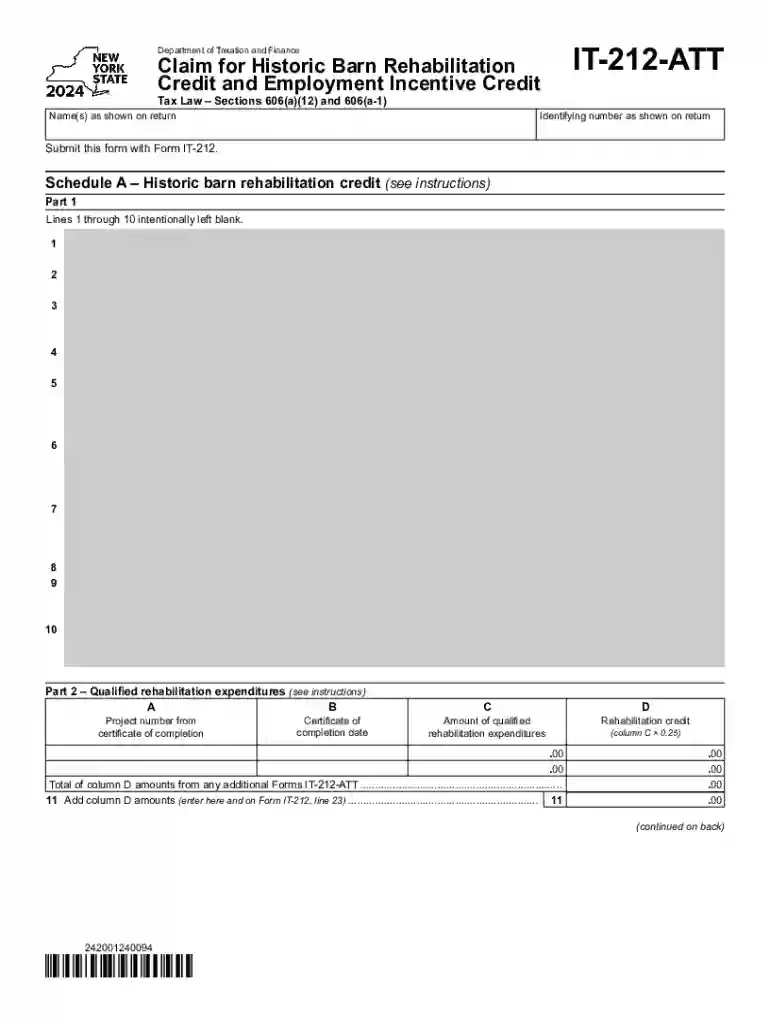
The Form IT-212-ATT is a crucial tax document employed by individuals and businesses in New York State to claim credits related to historic barn rehabilitation and employment incentives. This form is designed to facilitate tax credit benefits for those investing in the restoration of historic barns, as well as for businesses that demonstrate growth in employment over specific time frames. Understanding the form's definition and purpose is vital for maximizing potential tax benefits.
Purposes of the Form
- Historic Barn Rehabilitation Credit: Supports preservation efforts by providing financial incentives for rehabilitating historic barns, encouraging their maintenance and continued use.
- Employment Incentive Credit: Aims to bolster workforce development by offering tax credits to businesses that increase their employee numbers in qualifying periods.
Who Should Use It
- Individuals or Businesses: Engaged in renovating historic barns or expanding employment.
- Accountants and Tax Professionals: Assisting clients in leveraging these specific tax credits.
How to Use the Form IT-212-ATT
To effectively utilize Form IT-212-ATT, it is essential to understand both the information required and the process of completing the form. Accurate completion ensures eligibility for the relevant credits.
Steps in Using the Form
- Gather Necessary Information: Collect details of rehabilitation expenditures and employment data.
- Fill Out the Form: Carefully enter the required information in designated sections, ensuring accuracy.
- Calculate Credits: Use provided instructions to determine eligible credit amounts for both rehabilitation and employment incentives.
- Submit the Form: File alongside your New York State tax return to claim the credits.
Important Considerations
- Documentation: Maintain thorough records of all claimed expenditures and employment statistics.
- Review Eligibility: Ensure all activities meet the program's eligibility criteria to avoid disqualification.
How to Obtain the Form IT-212-ATT
Accessing the Form IT-212-ATT is straightforward through several channels which provide flexibility based on preference or necessity.
Available Methods
- Online Download: The form is available for download in PDF format from the New York State Department of Taxation and Finance website.
- Tax Preparation Software: Many software options like TurboTax or QuickBooks may include the form for electronic filing.
- Local Tax Offices: Visit a local tax office to obtain a physical copy if preferred or needed for paper submissions.
Tips for Acquisition
- Check for Updates: Confirm you are downloading the latest version of the form each tax year.
- Verify with Software Providers: Ensure compatibility with tax preparation platforms if opting for a digital completion.
Steps to Complete the Form IT-212-ATT
Filling out the IT-212-ATT requires careful attention to specific details and adherence to guidelines to ensure compliance and eligibility for the claimed credits.
Step-by-Step Completion
- Review Instructions: Begin by thoroughly reading the accompanying instructions provided with the form.
- Enter General Information: Provide personal or business details, including name, address, and tax identification number.
- Detail Rehabilitation Expenditures: List and describe each expenditure related to historic barn rehabilitation.
- Calculate and Enter Employment Data: Provide employment statistics for applicable years to determine and claim employment credits.
- Verify Totals: Double-check calculations to ensure all figures are accurate and reflective of eligible credits.
Common Mistakes to Avoid
- Incomplete Information: Failing to fill out all required sections fully can lead to processing delays or denial of credits.
- Miscalculations: Ensure all mathematical calculations are correct and verified.
Important Terms Related to Form IT-212-ATT
Understanding key terminology associated with Form IT-212-ATT can help in correctly completing and submitting the form.
Key Terms
- Qualified Rehabilitation Expenditures: Costs that meet specified criteria for rehabilitation credits.
- Base Employment Data: Employee numbers from designated baseline years required for employment credit calculations.
- Eligible Property: Items or projects qualifying for credits under state guidelines.
Clarifications
- Historic Definition: A barn must meet specific age or historical significance criteria to be eligible.
- Employment Base Year: Typically refers to a past year used as a benchmark for calculating employment growth.
Legal Use of the Form IT-212-ATT
Understanding the legal implications and requirements of using Form IT-212-ATT ensures compliance and proper claiming of benefits.
Legal Considerations
- Accuracy and Honesty: Legally, all information must be true and correct to the best of knowledge.
- Audit Potential: Be prepared for potential audits by maintaining comprehensive documentation and records.
Compliance Tips
- Consultation: Engaging a tax professional can assist in compliance and accurate filing.
- Documentation Accessibility: Ensure easy access to all supporting documents for periods specified in state tax law.
Eligibility Criteria
Eligibility for the credits offered through Form IT-212-ATT hinges on meeting specific criteria related to both restoration and employment activities.

Rehabilitation Credit Criteria
- Historic Barns: The barn must have been constructed before a certain date and deemed historic.
- Documented Expenses: Only certain types of expenditures qualify, such as those directly related to structural improvements or preservation work.
Employment Incentive Criteria
- Increased Employment: Businesses must demonstrate an increase in employment over the specified base year.
- Continuous Employment: Employment increases must not be temporary or seasonal.
Steps for Submitting the Form IT-212-ATT
Properly submitting Form IT-212-ATT is crucial to ensure that claimed credits are processed without issues.
Submission Methods
- E-Filing: Many taxpayers submit the form electronically through tax software or online portals provided by the state.
- Mail Submission: Physical copies can be sent via mail to the appropriate New York State Tax Department address.
Submission Tips
- Check for Confirmation: When e-filing, ensure you receive confirmation of submission.
- Mail Follow-Up: For paper submissions, use certified mail to verify receipt and track the document's arrival.
This comprehensive guide aids in navigating Form IT-212-ATT, ensuring successful completion, filing, and compliance for claiming historic barn and employment incentive credits.