






Definition & Meaning
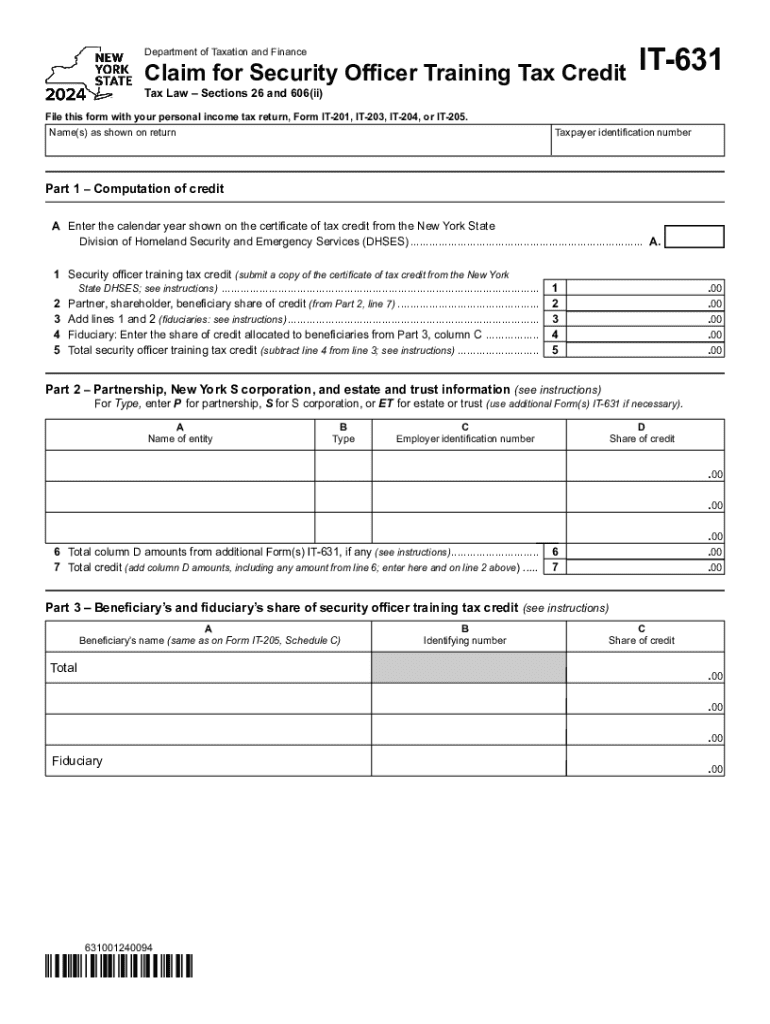
The "Form IT-631 Claim for Security Officer Training Tax Credit Tax Year 2024" is a tax form used by individuals or entities to claim the Security Officer Training Tax Credit for the 2024 tax year. This form is specifically designed for building owners who employ security officers and seek to benefit from tax incentives related to their training programs. The form assists in calculating the eligible tax credits based on the expenses incurred for qualifying security officer training activities.
Eligibility Criteria
To qualify for the Security Officer Training Tax Credit using Form IT-631, the primary requirement is that the claimant must be a building owner who employs security officers. Additionally, the training programs must meet specific standards set by regulatory bodies to be eligible for the tax credit. Expenses related to initial training, as well as ongoing certification and professional development, may qualify. Proper documentation of the training costs is crucial to substantiate the claim during the tax audit process.


Key Elements of the Form IT-631
Form IT-631 requires several key details for successful completion:
- Employer Information: Includes the legal name, address, and identification number of the building owner claiming the credit.
- Training Program Details: Provides information about the security training programs, including names, certification levels, and completion dates.
- Expense Breakdown: An itemized list of training-related expenses incurred during the tax year, categorized into tuition fees, materials, and other eligible costs.
- Credit Calculation: A detailed computation of the total credit amount based on eligible expenses, often capped at a specific percentage or maximum dollar amount.
Steps to Complete the Form IT-631
- Gather Necessary Information: Collect all documentation related to security officer training expenses, including invoices, proof of payment, and training program details.
- Fill Out Employer Information: Enter the building owner's name, business address, and identification number.
- Document Training Program Details: List all the training programs completed or attended by security officers during the tax year.
- Calculate Eligible Expenses: Provide an itemized breakdown of all training-related costs.
- Compute the Tax Credit: Use the provided formulas or guidelines on the form to determine the total credit amount.
- Review for Accuracy: Double-check all entries for accuracy and completeness.
- Submit with Tax Return: Attach the completed Form IT-631 to the annual tax return and submit it by the set deadline.
Filing Deadlines / Important Dates
The filing deadline for Form IT-631 coincides with the annual tax filing deadline, typically April 15 for most taxpayers. Extensions may be available upon request, but it’s important to confirm any changes or updates to tax deadlines through official IRS announcements. Filing the form timely is critical to avoid penalties or delays in credit processing.
Required Documents
Submitting Form IT-631 requires several accompanying documents, including:
- Copies of invoices and receipts for training expenses.
- Documentation from training providers, confirming completion and costs.
- Employee records indicating enrollment and participation in training programs.
- Financial summaries, if the expenses are elevated or involve substantial claims.
Taxpayer Scenarios and Business Entity Types
This form is primarily utilized by business entities such as corporations, partnerships, and limited liability companies (LLCs) involved in property management or commercial real estate. Self-employed individuals who own buildings and personally manage security protocols may also be eligible under specific circumstances. Businesses often integrate this credit into overall tax strategies to minimize their taxable income and enhance workforce training.

State-Specific Rules for the Form IT-631
While Form IT-631 is federally recognized, some states may have additional regulations or requirements about claiming this credit. It is essential for claimants to verify state-specific guidelines to ensure compliance. Different states may also offer supplementary credits or incentives for security training, which can be claimed concurrently with the federal credit.
Software Compatibility
Popular tax software like TurboTax and QuickBooks allow for seamless integration of Form IT-631 into tax filing processes. These platforms often provide guided steps for entering the required details and calculating the credit, reducing the risk of errors. Always ensure that the software version used is updated to include the most recent changes in tax regulation, especially for the tax year 2024.
Form Submission Methods
Taxpayers have multiple options for submitting Form IT-631:
- Online Filing: Through IRS e-file services, offering quick processing and confirmation.
- Mail Submission: Sending the completed form with the physical tax return by postal service is a traditional method.
- In-Person Filing: Available at certain IRS office locations, though it is less common due to increased digital capabilities.
Selecting the appropriate method can depend on one's preferences, convenience, and access to required technology.