




01. Edit your 3533 b form online
Type text, add images, blackout confidential details, add comments, highlights and more.

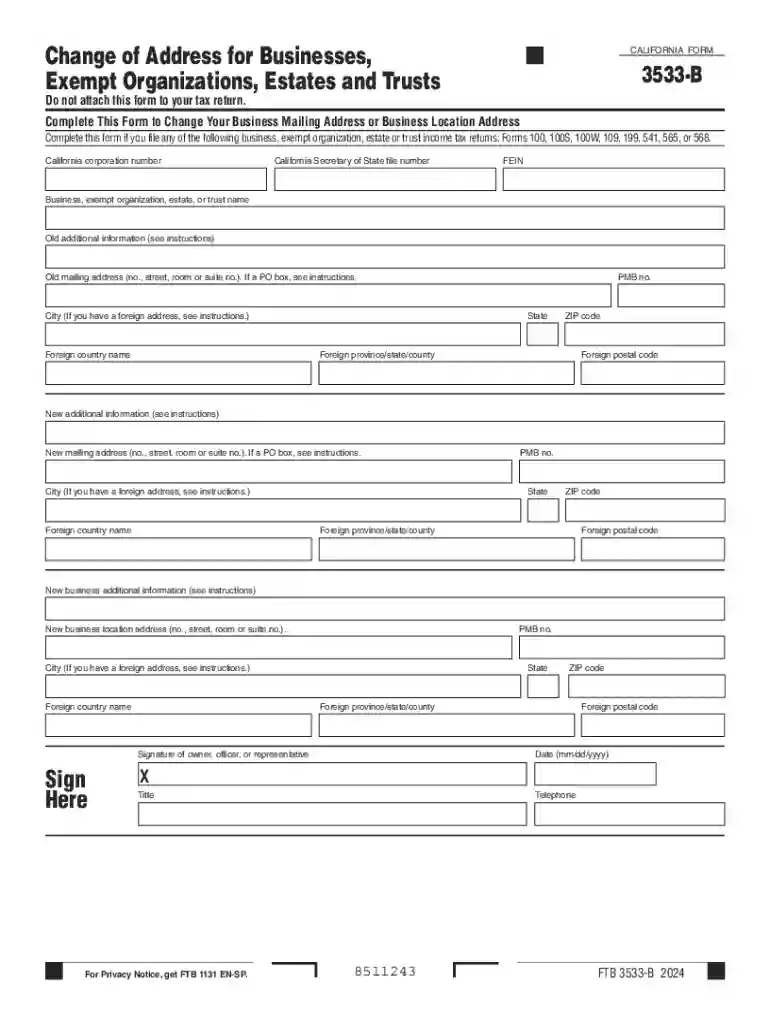
Type text, add images, blackout confidential details, add comments, highlights and more.

Draw your signature, type it, upload its image, or use your mobile device as a signature pad.

Send it via email, link, or fax. You can also download it, export it or print it out.
A "change of address for businesses, exempt organizations, estates and trusts" form is a standardized document used to notify relevant authorities about the change in the mailing or physical address of businesses, exempt organizations, estates, and trusts. This ensures that all communications, legal notices, and tax documentation are sent to the correct location. Proper use of this form helps maintain compliance with state and federal regulations, avoiding potential miscommunication and administrative challenges.
Identify the Appropriate Version: Depending on your entity type and state regulations, the specific form may vary. The California Form 3533-B is an example tailored for businesses within California.
Collect Necessary Information: Gather relevant details, including the current and new address, entity name, and tax identification number, to ensure accurate completion.
Complete the Form: Fill out the form accurately, ensuring that all required fields are duly completed. This typically includes details about the old and new addresses and any entity-specific information.
Submit the Form: Depending on the state, you can submit the form via mail, online, or sometimes in person. Ensure that the submission method adheres to your local requirements.
Download the Form: Obtain the form from the official website of the issuing agency, such as the IRS or the relevant state department.
Enter Basic Information: Include the entity's official name, EIN (Employer Identification Number), and contact information.
Provide Address Details: Clearly print or type the previous and new addresses to avoid any misinterpretation.
State the Reason for Change: Some forms may require you to specify the reason for the address change.
Sign and Date the Form: The form must be signed by an authorized representative to validate the information provided.
Legal Compliance: Keeping your address updated with the respective authorities ensures you comply with state and federal laws.
Accurate Mail Delivery: Ensures that critical documents, such as tax forms and legal notices, are received without delay.
Avoid Penalties: Timely filing can prevent potential penalties associated with failing to update your contact information with authorities.
Businesses: Corporations, LLCs, and partnerships that relocate their premises or change their mailing addresses.
Exempt Organizations: Non-profits and other tax-exempt entities needing to maintain current contact details with government agencies.
Estates and Trusts: Executors or trustees altering the address of record during estate administration.


Form Use: The IRS has specific forms like Form 8822-B for businesses and entities to notify them of an address change.
Submission: The form must be sent to the IRS within a reasonable time after the change to avoid communication delays.
Timing: It is recommended to file the form promptly as it can take several weeks for the IRS to update their records.
Entity Information: Includes the name, EIN, and contact details of the entity.
Current and New Addresses: Specifies locations that are transitioning from and to.
Authorized Signature: The form must be signed by an official representative of the entity, such as a CEO or trustee.
Online: Many forms allow electronic submissions directly through government portals, ensuring quick processing.
Mail: Traditional paper forms can be mailed to the designated government address.
In-Person: Some jurisdictions may still permit in-person submissions, though this is becoming less common.
EIN: Employer Identification Number, a unique identifier for businesses in the United States.
Authorized Representative: An individual with the legal authority to sign documents on behalf of the entity.
Legal Address: The official address recorded for legal and tax purposes.
We've got more versions of the 3533 b form form. Select the right 3533 b form version from the list and start editing it straight away!
| Versions | Form popularity | Fillable & printable |
|---|---|---|
| 2025 | 4.6 Satisfied (36 Votes) | |
| 2024 | 4.2 Satisfied (27 Votes) | |
| 2023 | 4.9 Satisfied (58 Votes) | |
| 2022 | 4.2 Satisfied (32 Votes) | |
| 2021 | 4.8 Satisfied (264 Votes) | |
| 2020 | 4.4 Satisfied (173 Votes) | |
| 2019 | 4.2 Satisfied (92 Votes) | |
| 2018 | 4.3 Satisfied (90 Votes) | |
| 2017 | 4.3 Satisfied (121 Votes) | |
| 2016 | 4.4 Satisfied (53 Votes) |
At DocHub, your data security is our priority. We follow HIPAA, SOC2, GDPR, and other standards, so you can work on your documents with confidence.

Use form FTB 3533-B, Change of Address for Businesses, Exempt Organizations, Estates and Trusts, to change your business mailing address or your businessRead more
Check box if address changed. Exempt under section 501( )( ) Number, street, and room or suite no. Check box if an amended return. For a foreign address.


