01. Edit your form online
Type text, add images, blackout confidential details, add comments, highlights and more.

Type text, add images, blackout confidential details, add comments, highlights and more.

Draw your signature, type it, upload its image, or use your mobile device as a signature pad.

Send it via email, link, or fax. You can also download it, export it or print it out.
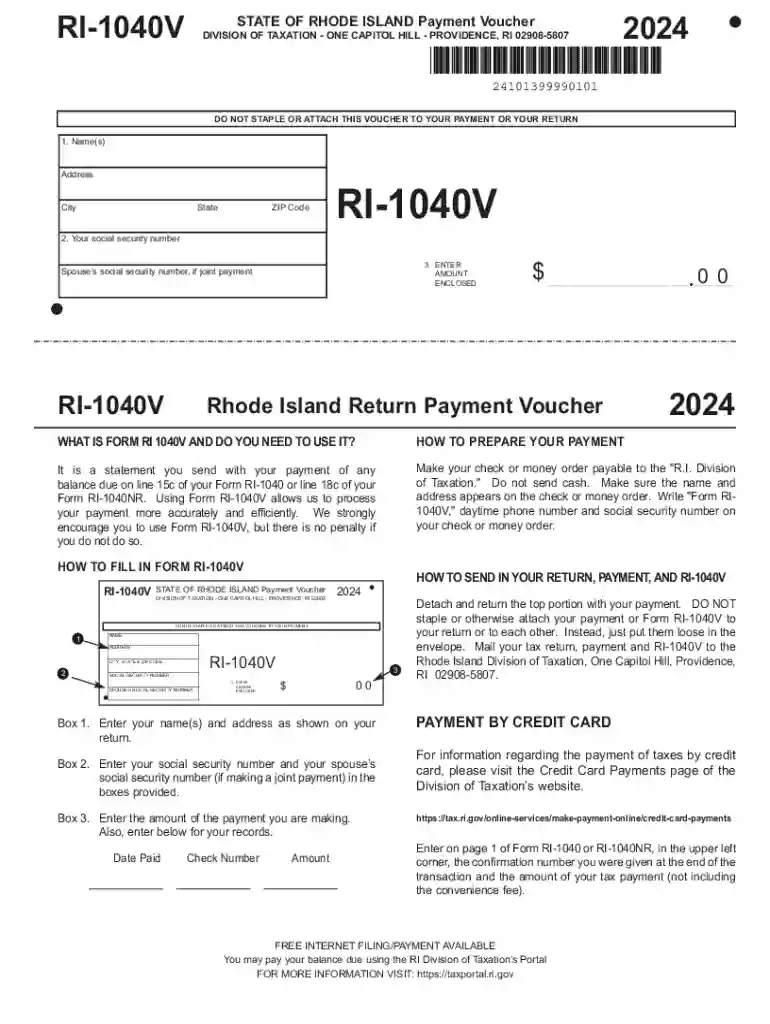
Form RI-1040V, officially known as the Personal Income Tax Payment Voucher, is a document used by taxpayers in the state of Rhode Island to submit payments for any amount owed on their income tax returns. This form serves a crucial role in ensuring accurate processing and application of payments to the correct tax accounts. By accompanying the payment with Form RI-1040V, taxpayers can clarify their intent and prevent misallocation of funds, which helps maintain transparent financial records with the state’s Division of Taxation.
When utilizing the RI-1040V form, taxpayers must follow specific steps to ensure their payment is processed correctly. First, print a copy of the voucher and fill out the personal information section, which typically includes your name, social security number, and mailing address. Next, calculate the total amount due and enter this figure accurately on the form. Attach your check or money order, made payable to "Rhode Island Division of Taxation," ensuring it matches the total you entered on the voucher. Finally, send the filled-out form along with your payment to the designated mailing address for Rhode Island tax payments.
The RI-1040V form includes several critical components that taxpayers must accurately complete:
The RI-1040V form is primarily used by individuals residing in Rhode Island who owe additional income taxes at the end of the tax year. This commonly includes self-employed individuals, retirees, or those who have not had enough withholding from their income throughout the year. Additionally, part-year residents and non-residents with Rhode Island tax liabilities must also use this form when sending payments.


The RI-1040V payment voucher should be submitted by the filing deadline for Rhode Island state income taxes, typically April 15th. This deadline coincides with the federal tax filing deadline, allowing taxpayers to manage both state and federal obligations simultaneously. Late submissions may incur penalties and interest, so it’s essential to file on time.
Failure to correctly submit the RI-1040V form and payment by the prescribed deadline may result in penalties, including late payment fees and accruement of interest on the unpaid balance. The Rhode Island Division of Taxation enforces these penalties to ensure compliance and encourage timely taxpayer submissions. Additionally, taxpayers may face further complications during future tax filings if current obligations remain unresolved.
While the RI-1040V form itself is not completed electronically, it is compatible with various tax preparation software systems like TurboTax and QuickBooks. These platforms aid users in calculating their tax liabilities, generating payment amounts, and printing the necessary forms. Users can rely on these tools to streamline the filing process and maximize accuracy in their tax submissions.
We've got more versions of the RI-1040V - Personal Income Tax Payment Voucher form. Select the right RI-1040V - Personal Income Tax Payment Voucher version from the list and start editing it straight away!
At DocHub, your data security is our priority. We follow HIPAA, SOC2, GDPR, and other standards, so you can work on your documents with confidence.