





Definition and Meaning
"Form online" refers to a digital representation of a traditional paper form that can be accessed, completed, and submitted through the internet. These forms are designed to streamline processes that would typically require manual filling, eliminating the need for physical copies and in-person submissions. Commonly used for applications, taxes, and data collection, online forms facilitate interactions between individuals and organizations by providing a convenient, efficient, and secure method for information exchange.
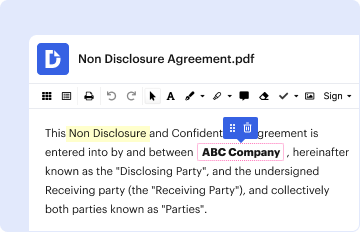
In the context of platforms like DocHub, "form online" encompasses an ecosystem where forms can be edited, signed, and shared online. This includes the ability to integrate fillable fields that transform static documents into interactive tools for collecting high-quality data. The ability to save and reuse forms also allows users to simplify recurring processes and maintain organized records for future reference.
How to Use the Form Online
Using a form online involves several steps that are designed to be user-friendly and efficient. Here's a typical workflow:
-
Access the Platform: Navigate to a website or service, such as DocHub, that hosts the online form you need. You can often find these forms through a simple search on the platform or via a direct link.
-
Select the Form: Look for the specific form you wish to complete. This might involve browsing a catalog or using a search feature to filter by category, such as tax forms or application documents.
-
Edit and Fill Out the Form: Use the platform’s tools to enter your information. Online forms will typically provide text fields, checkboxes, and dropdown menus to capture data accurately. Platforms like DocHub enhance this process by allowing users to add text, images, and annotations to clarify or emphasize specific sections.
-
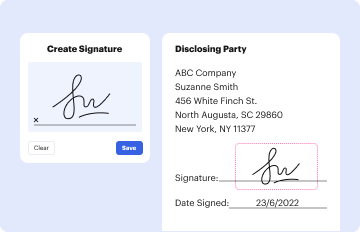
Review and Sign: After entering all necessary information, review your entries for accuracy. Many platforms offer legally binding e-signature capabilities, letting users sign documents directly within the interface.
-
Submit or Share: Once completed, you can submit the form electronically, often directly through the platform itself. If required, you can also share it with other stakeholders by email or a secure link.
Steps to Complete the Form Online
-
Gather Necessary Information: Before starting, make sure you have all required details and documents at hand. This may include personal identification information, financial records, or any other relevant data needed to complete the form.
-
Choose a Trusted Platform: Log into a secure, reputable service that offers form creation and management, like DocHub. Ensure the platform uses encryption to protect your data.
-
Fill Out the Form: Enter your details using the provided fillable fields. Make use of all available features, such as dropdowns and checkboxes, to input information efficiently and without errors.
-
Utilize Annotation Tools: If the form requires additional explanations, use text boxes to add notes or comments. Use highlighters and drawing tools to emphasize key areas if needed.
-
Apply an E-Signature: Depending on the requirement, insert your electronic signature using the platform’s signature tool. This could be drawn, typed, or uploaded, depending on your preference or legal requirements.
-
Submit or Download: After double-checking for any incomplete sections or errors, finalize the process by submitting the form online. You may also download a copy for your records if needed.
Key Elements of the Form Online
Forms online typically consist of several main components that facilitate data input and processing:
-
Form Fields: These are interactive elements where users enter information—common fields include text boxes, checkboxes, radio buttons, and dropdown menus.
-
Instructional Text: Clear instructions guide users on how to complete each section, reducing errors and streamlining the filling process.
-
Validation Rules: Built-in mechanisms ensure that data entries meet specific criteria, such as format or length, preventing incomplete or incorrect submissions.
-
Signature Fields: Locations designated for electronic signatures, confirming authenticity and approval.
-
Submit and Reset Buttons: Functional elements that allow users to either submit their form once it's complete or reset the form to its original state if they need to start over.
Legal Use of the Form Online
Legal compliance is a key consideration when using forms online, especially in contexts like tax filing or legal contracts. Forms must meet specific standards to ensure they are recognized by the relevant authorities:
-
Compliance with Regulatory Standards: Make sure the form complies with relevant legal standards, such as the ESIGN Act for electronic signatures. This ensures any agreement made or information submitted is legally binding.
-
Data Protection Laws: Consider laws like GDPR or CCPA if you're collecting sensitive data, ensuring you have adequate measures for user consent and data privacy.
-
Audit Trails: Maintain records of all transactions and modifications made to digital forms. Platforms like DocHub usually provide detailed logs that capture when and how forms are accessed or altered.
Why You Should Form Online
The transition to using forms online offers several compelling advantages:
-
Efficiency and Speed: Online forms reduce the time and resources required to distribute, fill, and process documents. They eliminate mailing delays and paperwork clutter.
-
Accessibility: Forms online can be accessed anywhere with an internet connection, allowing for greater flexibility and convenience for users on the go.
-
Cost-Effectiveness: Reducing reliance on paper forms saves costs associated with printing, postage, and storage.
-
Enhanced Data Accuracy: Built-in validation checks and clear entry fields help minimize user errors, leading to more accurate data collection.
-
Sustainability: By reducing paper consumption, online forms contribute to environmental sustainability efforts.
Examples of Using the Form Online
Numerous scenarios exemplify the utility of online forms:
-
Tax Filing: Individuals and businesses can use online tax forms to gather figures, calculate taxes, and file electronically.
-
Job Applications: Companies often utilize online application forms for potential hires to streamline the recruitment process.
-
Surveys and Feedback: Organizations can collect responses easily via online forms, allowing for efficient data gathering and analysis.
-
Event Registrations: Event organizers use online forms to register attendees, capturing RSVP details and preferences.
State-Specific Rules for the Form Online
Forms online may need to be tailored to align with state-specific regulations or requirements, especially for state-related documents like taxes or licensing:
-
Tax Forms: Each state may have unique requirements for their tax forms, affecting which forms are needed, submission deadlines, and specific data required.
-
Professional Licensing: The application process for certain professional licenses may vary, requiring awareness of state-specific documentation.
-
Reporting Requirements: Some states may have additional disclosure obligations that need to be considered when completing online forms.
Keep these variances in mind when dealing with forms relevant to specific locations or governmental departments.




