
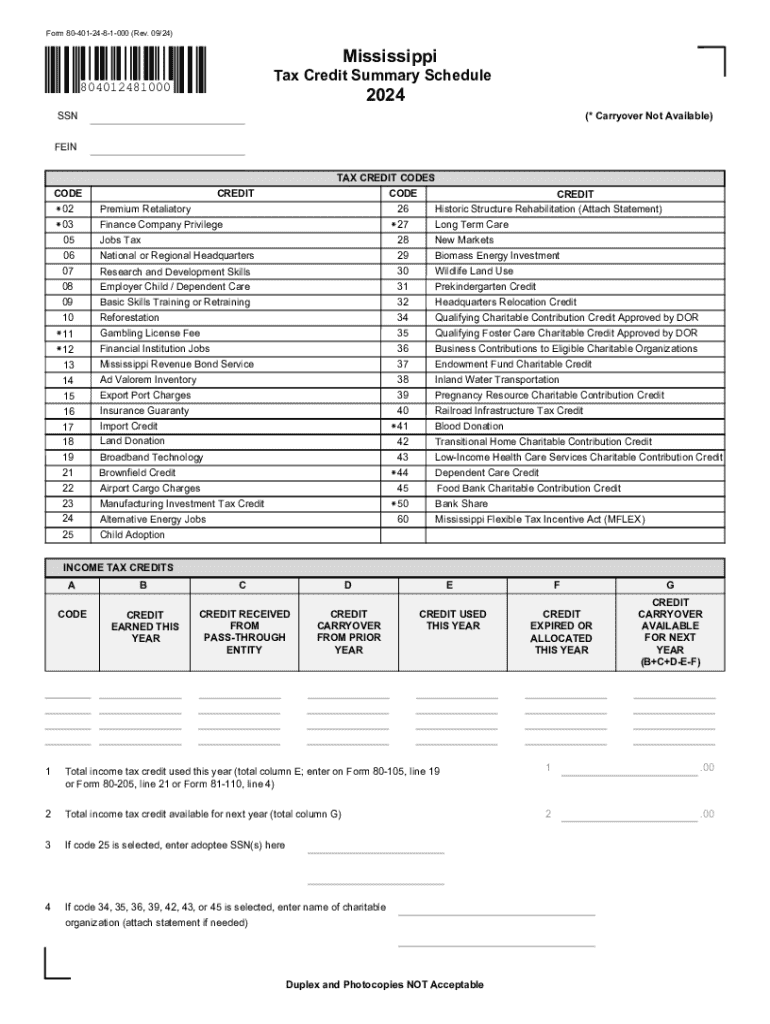







Definition and Meaning
The form 80401248 is a Tax Credit Summary Schedule utilized in the state of Mississippi. It's essential for detailing various tax credits applicable for the year 2024. Taxpayers use this form to report earned income tax credits, those received from pass-through entities, carryovers from previous years, and anticipated credits for the next year.
Steps to Complete the 80401248
-
Gather Required Information: Before filling out form 80401248, collect all relevant financial documents, including records of historic structure rehabilitation, jobs tax credits, and charitable contributions.
-
Fill Out Personal Information: Start by entering your personal details, such as name, address, and Taxpayer Identification Number.
-
Report Earned Income Tax Credits: Calculate the tax credits you've earned during the year and document them in the designated section.
-
List Credits from Pass-Through Entities: Include any credits received through partnerships, S-corporations, or estates.
-
Account for Carryovers: Note any tax credits brought forward from previous years, ensuring full documentation.
-
Finalize and Review: Thoroughly check your entries for accuracy before submission, ensuring all required fields are completed.
How to Obtain the 80401248
The form 80401248 can be obtained directly from the Mississippi Department of Revenue. Individuals can download a digital version from the department's website or request a paper form by mail. For those preferring a physical copy, contacting a local tax office is advisable.
Important Terms Related to 80401248
-
Income Tax Credits: Reductions in tax owed, allowing for a decrease in liabilities based on specific activities or contributions.
-
Pass-Through Entity: Business structures where income, deductions, and credits pass through to the individual owners.
-
Carryovers: Tax credits that have not been used in prior years and can be applied to future tax liabilities.
Legal Use of the 80401248
Using form 80401248 is essential for legally claiming eligible tax credits within Mississippi. It provides a structured approach for taxpayers to record credits systematically, ensuring compliance with state tax regulations. This form also acts as a record-keeping tool in case of audits or reviews by tax authorities.
Key Elements of the 80401248
-
Historic Structure Rehabilitation Credits: Credits available for maintaining and restoring historic buildings, fostering preservation efforts.
-
Jobs Tax Credits: Benefits given to businesses that create jobs, spurring economic development.
-
Charitable Contributions: Deductions for donations made to qualifying charities, incentivizing public and social welfare contributions.
Filing Deadlines and Important Dates
The 80401248 form must be filed in alignment with Mississippi's tax filing deadlines for the 2024 fiscal year. It's critical to observe these deadlines to avoid penalties. Typically, the state follows federal guidelines, with extensions available under certain circumstances.
Required Documents
-
Supporting Documentation for Each Credit Claimed: Detailed records verifying eligibility for each credit type claimed on the form.
-
Previous Years' Tax Return Records: Necessary for calculating carryovers and confirming credits already applied in past years.
-
Proof of Contributions or Payments: Receipts or confirmations for charitable donations, job creation, or preservation efforts.
Form Submission Methods
Form 80401248 can be submitted through several methods:
-
Online: Electronic filing via the Mississippi Department of Revenue's portal is efficient and ensures timely processing.
-
Mail: Traditional submission via postal services is available, although it may involve longer processing times.
-
In-Person: For those preferring personal interaction, forms can be submitted directly at a local tax office, providing an opportunity for immediate assistance with any queries.
These options cater to different taxpayer preferences, ensuring accessibility and convenience in fulfilling tax obligations.




