




01. Edit your it 141 wv form online
Type text, add images, blackout confidential details, add comments, highlights and more.

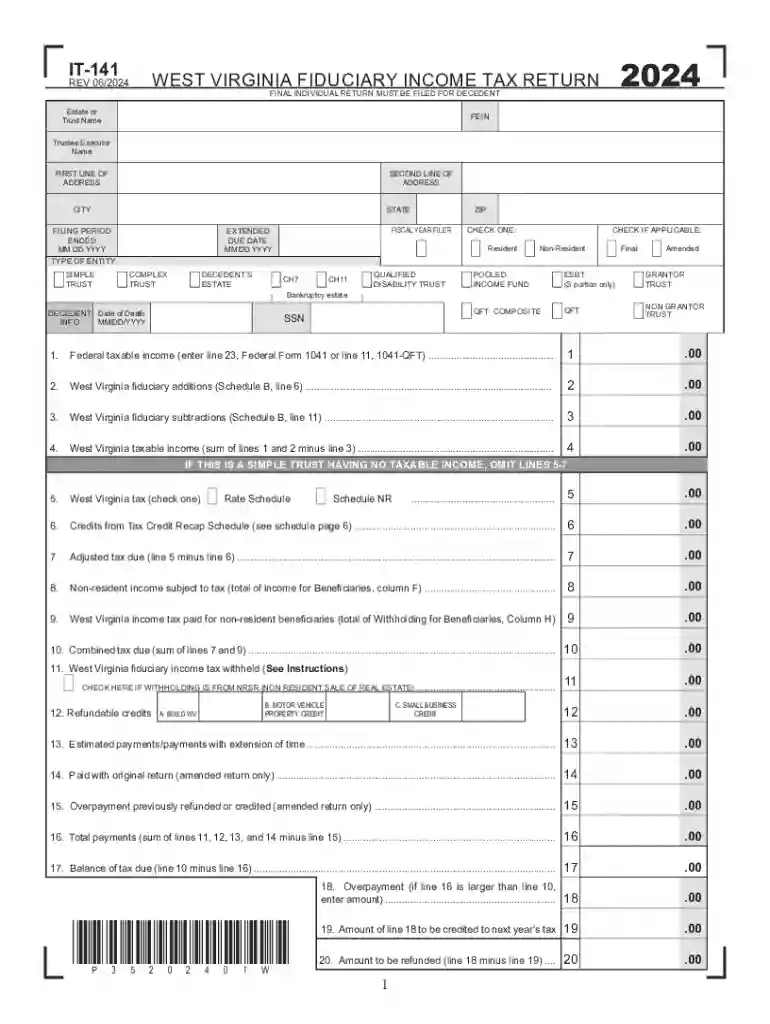
Type text, add images, blackout confidential details, add comments, highlights and more.

Draw your signature, type it, upload its image, or use your mobile device as a signature pad.

Send wv form it 141 via email, link, or fax. You can also download it, export it or print it out.
West Virginia Form IT-141 is the fiduciary income tax return form specifically designed for the state of West Virginia. It is utilized by estates and trusts to report income, calculate tax obligations, and claim any applicable credits related to fiduciary responsibilities. This form ensures that trustees and executors comply with both state and federal tax filing requirements, capturing necessary financial activities and reporting.
Gather Required Information: Before filling out WV Form IT-141, compile all pertinent documents, such as federal tax returns, records of income, and any relevant legal documents for estates or trusts.
Report Federal Taxable Income: Use the federal return information to fill the corresponding section on WV Form IT-141. This data serves as the baseline for state tax calculations.
Adjust for State Modifications: Make necessary state-specific adjustments to the federal taxable income. This may include additions or deductions specific to West Virginia tax law.
Calculate Tax Due or Refund: Using the adjusted income, calculate the estate or trust's tax obligation or potential refund by considering applicable credits and prepayments.
Complete Income & Deduction Sections: Carefully fill out all sections related to income sources, deductions, and any tax credits for which the estate or trust may be eligible.
Sign and Submit: Ensure the return is signed by the trustee or executor before submission. Check whether submission is required via mail, online, or through another approved method.
WV Form IT-141 is used legally to fulfill West Virginia's tax filing requirements for estates and trusts. The form must be accurately completed and submitted in compliance with state guidelines to avoid penalties. Executors and trustees are charged with ensuring the accuracy and timeliness of this form in reflection of all fiscal activities related to the fiduciary capacity.
WV Form IT-141 should be filed by the 15th day of the fourth month following the close of the taxable year. It is vital to adhere to this deadline to avoid any late filing penalties or interest charges. Extensions may be requested following state guidelines, although any taxes owed must still be paid by the original due date.
Failing to comply with filing requirements for WV Form IT-141 can result in monetary penalties and interest charges. Additionally, incomplete or inaccurate submissions may trigger audits or further inquiry from the West Virginia State Tax Department.
WV Form IT-141 can often be completed via tax preparation software that supports fiduciary returns, such as TurboTax or QuickBooks. Submission methods typically include online filing through state-approved portals, via mail, or occasionally in person at designated tax offices. Opting for electronic filing can streamline the process and reduce errors.
We've got more versions of the it 141 wv form form. Select the right it 141 wv form version from the list and start editing it straight away!
| Versions | Form popularity | Fillable & printable |
|---|---|---|
| 2024 | 4.4 Satisfied (21 Votes) | |
| 2023 | 4.7 Satisfied (21 Votes) | |
| 2022 | 4.8 Satisfied (37 Votes) | |
| 2021 | 4.8 Satisfied (67 Votes) | |
| 2020 | 4.4 Satisfied (224 Votes) | |
| 2019 | 4.1 Satisfied (39 Votes) | |
| 2018 | 4.3 Satisfied (90 Votes) | |
| 2017 | 4.3 Satisfied (100 Votes) | |
| 2016 | 4.4 Satisfied (542 Votes) | |
| 2015 | 4.3 Satisfied (50 Votes) | |
| 2014 | 4 Satisfied (29 Votes) | |
| 2013 | 4 Satisfied (58 Votes) | |
| 2012 | 4.3 Satisfied (73 Votes) | |
| 2009 | 4.3 Satisfied (183 Votes) | |
| 2008 | 4 Satisfied (57 Votes) |
At DocHub, your data security is our priority. We follow HIPAA, SOC2, GDPR, and other standards, so you can work on your documents with confidence.






IT-141 Fiduciary Income Tax Return (for resident and non-resident estates and trusts) you can download it here. 141 EXT Extension of Time to File Fiduciary and
Use the same form as originally filed (IT-140, IT-141,. IT-140NRS, etc.) and mark the amended return box on page 1. Complete the return with the correctedRead more
West Virginia is the second-biggest coal-producing state in the country (after Montana), with 152.4 million tons of coal mined in 2006 (13.1% of the U.S.


