







Definition & Overview of the State Agency Transfer Form
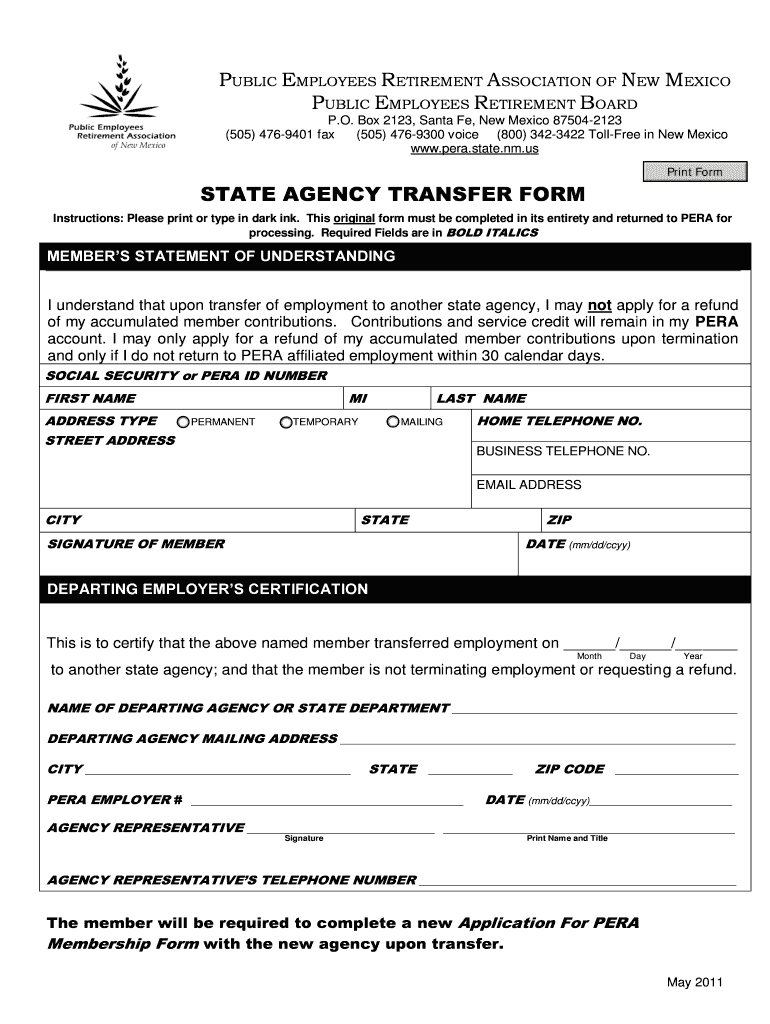
The State Agency Transfer Form is a specialized document used by employees transitioning between state agencies within New Mexico. Managed by the Public Employees Retirement Association (PERA), it facilitates the transfer of employment and ensures the continuity of employee benefits, such as service credits and retirement contributions. Employees must accurately complete this form to maintain their membership status and benefit eligibility after the transfer.
Purpose and Use Case
- Facilitates smooth employment transition between state agencies
- Ensures service credits and contributions are accurately recorded
- Maintains clear communication between departing and new agencies
Key Features
- Statement of Understanding: Employees declare understanding of terms related to contributions and service credits.
- Certification Requirements: Includes verification from the departing employer to confirm the employee’s credentials and contributions.
Steps to Complete the State Agency Transfer Form
To ensure proper completion of the State Agency Transfer Form, adhere to the following steps:
-
Read the Instructions Carefully:
- Thoroughly review the guidelines provided with the form to understand the requirements.
-
Complete Personal Information:
- Enter your full name, contact information, and Social Security number as required.
-
Select Transfer Details:
- Specify the transferring agency, the new agency, and expected transfer date.
-
Review the Statement of Understanding:
- Affirm your understanding of how your service credits and contributions will be managed during and after the transfer.
-
Obtain Employer Certification:
- Request that your current employer completes the certification section, verifying your employment information.
-
Final Review and Submission:
- Double-check all details and submit the completed form to PERA for processing.
Eligibility and Participants Using the State Agency Transfer Form
Typically, employees currently working with a New Mexico state agency who plan to transfer to another state agency use this form. Knowing the eligibility criteria is vital for correct form submission:
- Eligibility Requirements:
- Current state employees with upcoming employment transitions
- Must be members of the Public Employees Retirement Association
Key Participants
- Transferring Employee: Responsible for filling out personal and employment details.
- Departing Agency: Confirms employment history and contributions.
- Receiving Agency: Prepares to integrate the transferring employee.
Important Terms Related to the State Agency Transfer Form
Understanding the terminologies associated with the State Agency Transfer Form can improve comprehension and accuracy:
- Service Credits: Time recorded as working within the state system, contributing to retirement benefits.
- Contributions: Monetary inputs made towards the employee’s retirement benefits.
Additional Terms
- Certification: Official acknowledgement from the employer verifying details provided in the form.
- Statement of Understanding: Acknowledgment from the employee about the terms and conditions associated with their service credits and contributions during the transition.
Required Documents for the State Agency Transfer Form
To successfully complete and submit the form, ensure that the following documents are gathered:
- Personal Identification: Valid ID, such as a driver’s license or state ID.
- Current Employment Verification: Recent pay stubs or employment confirmation letters.
- Transfer Approval Letter: Confirmation from the receiving agency indicating acceptance of transfer.
Submission Methods for the State Agency Transfer Form
The form can be submitted through various methods, depending on convenience and personal preference. Ensure you choose the method that best suits your needs:
Submission Options
- Online Submission: Scan and email the completed form to PERA's designated email address.
- Mail: Send the original, completed form via postal service to PERA's mailing address.
- In-Person: Hand-deliver to the PERA office.
Considerations and Timeliness
- Verify submission guidelines, as delays or errors can affect the transition process.
- Maintain copies of submitted documents for personal records.
Key Elements of the State Agency Transfer Form
The form contains several critical components that must be properly addressed to facilitate an effective transition:
- Employee Information Section: Records details like name, contact information, and social security number.
- Agency Transfer Details: Documents current and new agency, as well as the effective transfer date.
- Certification Section: Must be completed by the departing agency to verify employment status and contributions.
Common Pitfalls
- Incomplete information: Ensure all fields are complete to avoid delays.
- Incorrect transfer dates: Double-check dates to ensure alignment with transition planning.
Compliance and Legal Use of the State Agency Transfer Form
The legal framework and compliance protocols surrounding the State Agency Transfer Form ensure that the process benefits both the employee and the agencies involved.
Compliance Actions
- Confirming all sections are filled and authenticated before submission.
- Ensuring secure handling of personal data, in line with legal standards.
Legal Considerations
- Confidentiality: Sensitive employee information must remain confidential.
- Audit Trails: Ensure there is a record of submission dates and document versions for reference.
Penalties and Non-Compliance
- Inaccurate Information: Providing false information can lead to administrative delays or penalties.
- Late Submission: Delays in submitting the form can affect the timing of benefits and employment status changes.




