Type text, add images, blackout confidential details, add comments, highlights and more.
02. Sign it in a few clicks
Draw your signature, type it, upload its image, or use your mobile device as a signature pad.
03. Share your form with others
Send it via email, link, or fax. You can also download it, export it or print it out.
How to use or fill out DPMC-20z, Contractor Close-Out Progress Report with DocHub
Ease of Setup
DocHub User Ratings on G2
Ease of Use
DocHub User Ratings on G2
Click ‘Get Form’ to open the DPMC-20z in our platform's editor.
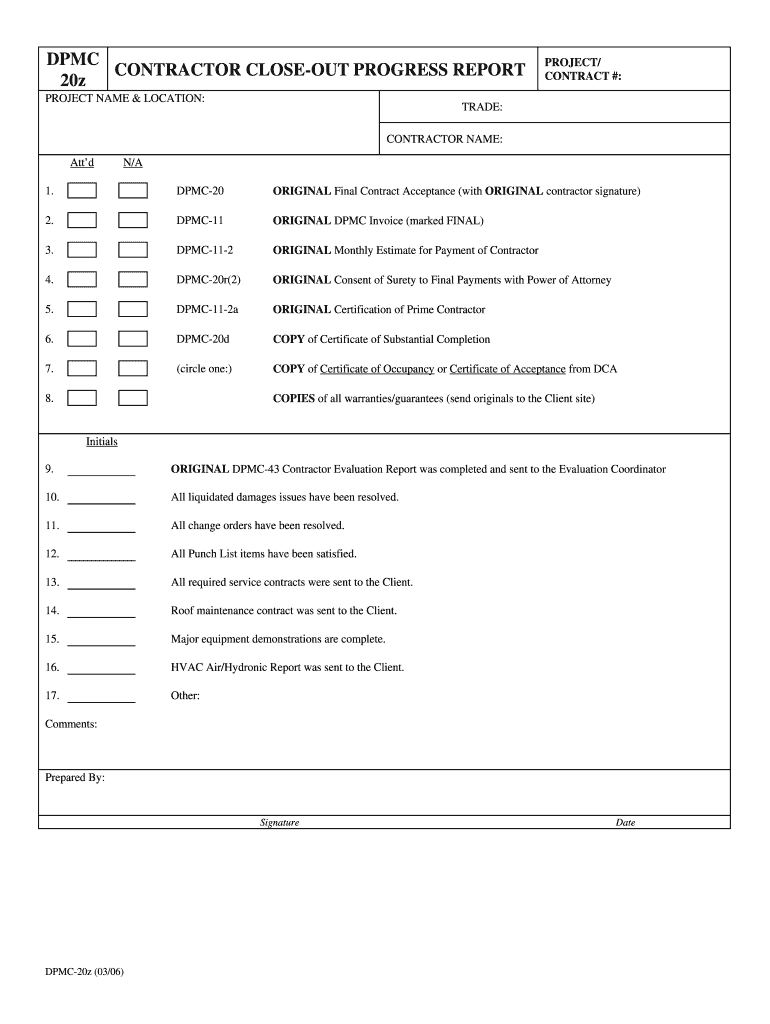
Begin by entering the 'Project Name & Location' and 'Project/Contract #' at the top of the form. This information is crucial for identifying your project.
Fill in the 'Trade' and 'Contractor Name' fields to specify your role and company involved in the project.
For each item listed (1 through 17), ensure you attach the required documents as indicated. Use our platform’s upload feature to easily add files like the original contract acceptance or invoices.
Review each section carefully, ensuring all items are checked off and any necessary comments are added in the designated area.
Finally, sign and date the form at the bottom. Utilize our platform’s signature tool for a quick and secure signing process.
Start using our platform today to streamline your document editing and completion process for free!
Fill out DPMC-20z, Contractor Close-Out Progress Report online It's free
Follow these steps to make a construction daily report: Format the report. Fill in site information. Fill in work progress. Fill in workers and visitors present at the site. Include equipment and material updates. Add information about events. Check and affirm the information. Send daily reports to stakeholders.
How to read a contractor WIP report?
Generally, WIP reports should include: The total current value of the contract. The amount of revenue received to date. The total original estimated costs. The amount billed to date. Revised estimated costs. Percentage completion of the project. The total costs to date. Whether a project is currently over or underbilled.
Related Searches
Dpmc 20z contractor close out progress report templateDpmc 20z contractor close out progress report pdfDpmc 20z contractor close out progress report 2021DPMC FormsNJ DPMCDPMC Form 2DPMC application
Cookie consent notice
This site uses cookies to enhance site navigation and personalize your experience.
By using this site you agree to our use of cookies as described in our Privacy Notice.
You can modify your selections by visiting our Cookie and Advertising Notice.