01. Edit your form online
Type text, add images, blackout confidential details, add comments, highlights and more.

Type text, add images, blackout confidential details, add comments, highlights and more.

Draw your signature, type it, upload its image, or use your mobile device as a signature pad.

Send it via email, link, or fax. You can also download it, export it or print it out.
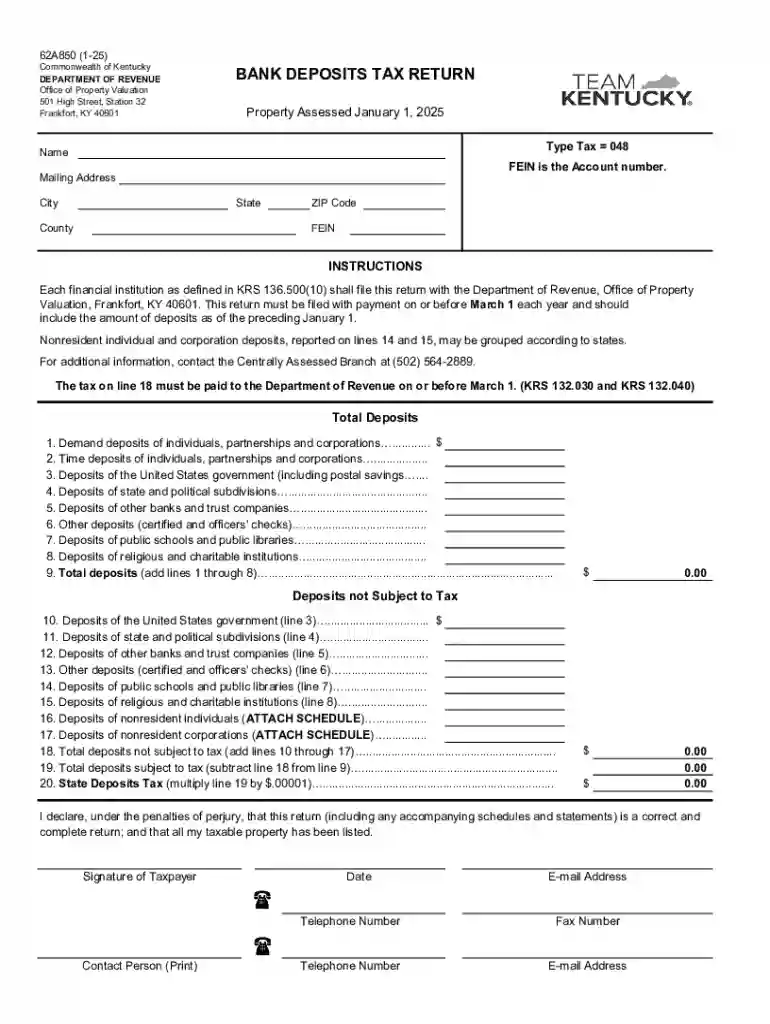
The "30b184efcd12d02cc55e8c5c83438745eead082f19dcff6e0c6d17e01aecda4d xlsx" refers to a specific Excel spreadsheet format utilized by the Commonwealth of Kentucky’s Department of Revenue for collecting and reporting bank deposits tax information. This form is vital for financial institutions as it captures essential data regarding their deposits as of the beginning of each year.
This unique identifier is likely associated with a secure document meant for precise reporting, reflecting the need for accuracy and diligence in tax-related documentation. Understanding its purpose is critical for compliance and effective data management by financial entities operating within Kentucky.
Review Filing Instructions: Begin by thoroughly understanding the instructions provided by the Kentucky Department of Revenue to ensure that the data inputs meet official requirements. This will help in avoiding potential errors or omissions.
Data Entry: Accurately enter the deposit data for the specified date, January 1, 2025, using the Excel format. Ensure that all required fields are filled out correctly to comply with tax obligations.
Verification and Validation: Double-check all entries for accuracy. Use built-in formulae or validation tools in Excel to ensure the figures balance with institutional records.
Save and Backup: Save the completed form on a secure system and create a backup to prevent data loss. Given the sensitive nature of the data, consider using encrypted storage solutions.
Submission: Once verified, submit the form by the deadline, March 1, using the prescribed method by the Department of Revenue—whether through mail or an online portal.
Open the Spreadsheet: Access the document using a compatible software such as Microsoft Excel or any alternative supporting .xlsx format.
Enter Institutional Information: Fill in the basic details of your financial institution, such as the name, address, and tax identification number.
Input Financial Data: Enter the required data on taxable and non-taxable deposits. This includes breaking down deposits by categories defined by the Department of Revenue.
Review Income Sources: Evaluate the sources of your deposits to accurately differentiate between what is taxable and non-taxable.
Consult Tax Professionals: If complexities arise, consult with a tax professional familiar with Kentucky tax regulations to ensure compliance.
Finalize the Form: Conduct a final check, ensuring every field is complete and accurate. Sign the form if a physical or digital signature is required.
Submission and Confirmation: After submission, obtain confirmation of receipt from the Department of Revenue to verify the form has been successfully filed.
The filing deadline for the "30b184efcd12d02cc55e8c5c83438745eead082f19dcff6e0c6d17e01aecda4d xlsx" is March 1 each year. Meeting this date is essential to avoid penalties and ensure compliance with state tax laws. Institutions should mark calendars and prioritize form completion early to allow time for review and correction of any errors before submission. Planning ahead is crucial to overcoming potential delays that may arise during the preparation process.
Collecting and preparing necessary documentation is a critical step when dealing with the "30b184efcd12d02cc55e8c5c83438745eead082f19dcff6e0c6d17e01aecda4d xlsx". Some required documents include:
Utilizing this form legally involves adhering strictly to the definitions and guidelines set by Kentucky state law. Financial institutions must:
Failure to properly complete and submit the "30b184efcd12d02cc55e8c5c83438745eead082f19dcff6e0c6d17e01aecda4d xlsx" by the deadline or errors within the document can lead to penalties such as:
Financial institutions should prioritize accurate and timely submissions to avoid such repercussions.
We've got more versions of the 30b184efcd12d02cc55e8c5c83438745eead082f19dcff6e0c6d17e01aecda4d xlsx form. Select the right 30b184efcd12d02cc55e8c5c83438745eead082f19dcff6e0c6d17e01aecda4d xlsx version from the list and start editing it straight away!
At DocHub, your data security is our priority. We follow HIPAA, SOC2, GDPR, and other standards, so you can work on your documents with confidence.