Definition & Meaning
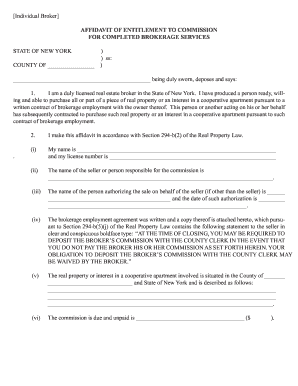
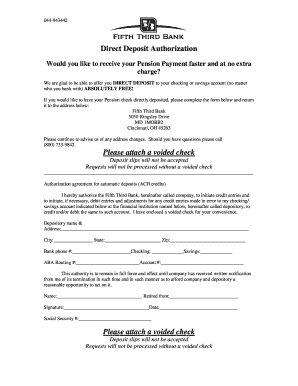
"Form online" refers to the digital versions of documents that users can fill out using electronic devices. These forms provide a convenient way to input, submit, and process information without the need for paper. By utilizing tools like DocHub, users can create, manage, and distribute forms efficiently, while ensuring data is accurate and secure. Unlike physical forms, online versions allow for interactivity, such as automatic calculations and dropdown menus, enhancing usability.
Examples of Digital Forms
- Tax Documents: IRS forms like the W-9 or 1040, which taxpayers can fill and submit to report income or claim deductions.
- Application Forms: Job applications or college admission forms that require detailed applicant information.
- Consent Forms: Medical or legal documents needing signatures to authorize procedures or disclosures.
Advantages
- Efficiency: Online forms streamline data entry, reducing manual handling.
- Accuracy: Built-in validation helps prevent errors during data entry.
- Accessibility: Can be completed on various devices, including tablets and smartphones.
Steps to Complete the Form Online
Filing forms online can be straightforward when using platforms like DocHub. Here’s a step-by-step guide to help you through the process:
- Select the Form: Begin by choosing the relevant form from your file storage or cloud services such as Google Drive.
- Edit and Fill Out: Use the editing tools to input your information directly into the appropriate fields. Ensure all required sections are completed correctly.
- Review Your Input: Double-check for any errors or omissions to maintain accuracy.
- Add Annotations or Signatures: Use annotation tools for notes or the signature field for signing.
- Save and Export: Save your completed document and export it to your preferred destination or send it directly via email.
Tips for Successful Completion
- Make Required Fields Mandatory: Platforms like DocHub allow marking essential fields to ensure they are not skipped.
- Use Guidance Texts: Include descriptions or hints to help understand what information is needed.
Key Elements of the Form Online
Several core components make an online form effective. Understanding these can enhance its functionality:
- Interactive Fields: Text boxes, checkboxes, and dropdown menus that guide the user through completing the form.
- Security Features: Options for password protection and encrypted access to safeguard private information.
- Validation Rules: Mechanisms to ensure that data entered meets certain criteria (e.g., email formats, numerical values).
- Integration Options: Compatibility with cloud storage services for seamless data management.
Common Features
- Auto Calculations: Instantly compute totals or other calculations based on entered data.
- Responsive Design: Ensure the layout adapts to different device screens without loss of functionality.
Legal Use of the Form Online
Ensuring that online forms are legally compliant is crucial, especially for applications requiring signatures or sensitive information. Platforms like DocHub help uphold these standards:
- Electronic Signatures: Legal under acts such as the ESIGN Act, ensuring that digital agreements hold the same weight as handwritten ones.
- Audit Trails: Provide a documented history of when and by whom a document was viewed or signed, adding a layer of accountability.
- Compliance with U.S. Laws: Forms adhere to federal regulations and industry standards for electronic transactions.
Benefits in Legal Context
- Traceability: Easy tracking of document progress and signer actions.
- Standardization: Consistent application of legal standards across documents in different jurisdictions.
General Public
- Taxpayers: Individuals and businesses use forms for tax filings and financial disclosures.
- Job Seekers: Fill out employment forms or resumes efficiently using digital platforms.
Professionals
- Accountants and Lawyers: Prepare and submit client documents securely, ensuring legal compliance and confidentiality.
- Educators and Administrators: Manage student information and class registrations through streamlined digital forms.
State-Specific Rules for the Form Online
Every state can have its specific regulations and best practices for using online forms. Keeping these in mind is critical for compliance:
- California: Must follow the California Consumer Privacy Act (CCPA) when collecting personal data.
- New York: Requires adherence to cybersecurity regulations for forms containing financial information.
Regional Variations
- Data Privacy Laws: Each state may vary in data handling rules, requiring tailored compliance strategies.
- Additional Certifications: Some states might require specific certifications or disclosures beyond federal requirements.
Filing Deadlines / Important Dates
Ensuring timely submission of forms is crucial to avoid penalties and ensure compliance:
- Tax Filing Season: Typically, federal and state tax forms are due by April 15, unless extensions are filed.
- Business Licenses Renewals: Vary by state, often requiring annual updates to maintain compliance.
Consequences of Missing Deadlines
- Late Fees: Financial penalties imposed for late submissions.
- Loss of Benefits: Missing deadlines may result in forfeiture of entitlements or benefits.
Digital vs. Paper Version
Each format offers distinct advantages, and choosing the right one depends on user needs and capabilities:
Digital Forms
- Pros: Faster submission, immediate data processing, and reduced environmental impact.
- Cons: Requires access to digital devices and internet connectivity.
Paper Forms
- Pros: Tangible record, suitable for those less comfortable with technology.
- Cons: Slower processing times and higher chance of error during manual input.
Choosing the Optimal Format
Consider factors such as user accessibility, familiarity with digital tools, and the volume of forms processed to determine the most effective format for your needs.