




01. Edit your form online
Type text, add images, blackout confidential details, add comments, highlights and more.

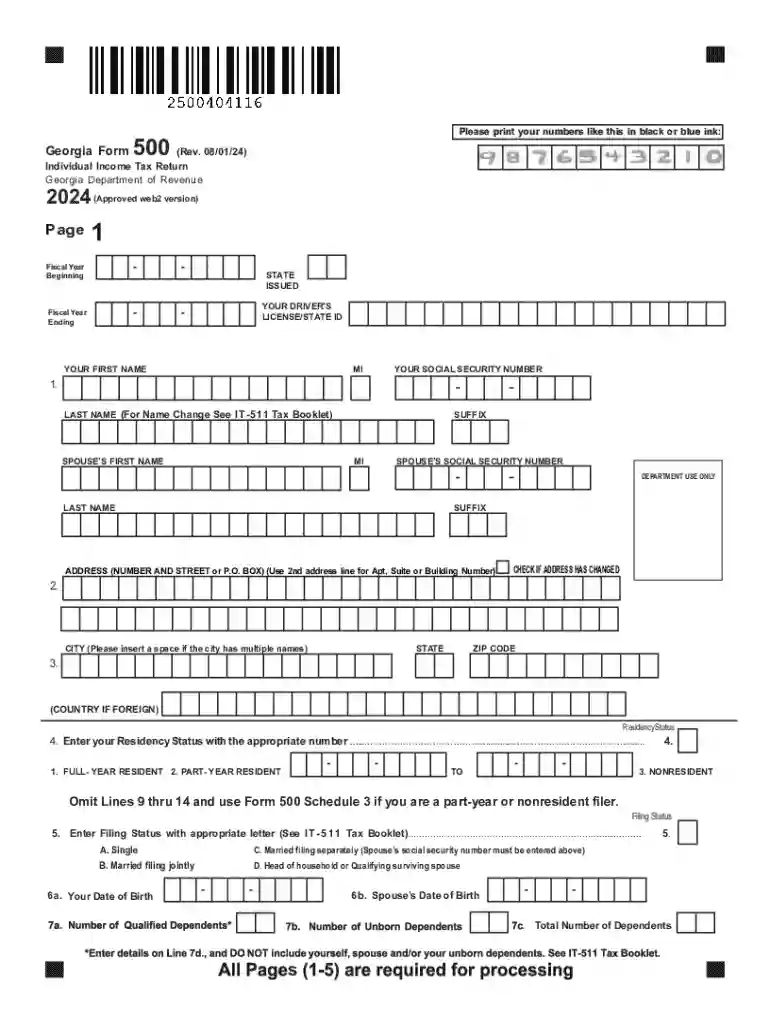
Type text, add images, blackout confidential details, add comments, highlights and more.

Draw your signature, type it, upload its image, or use your mobile device as a signature pad.

Send it via email, link, or fax. You can also download it, export it or print it out.
Forms online refer to an electronic version of documents that individuals or businesses can access, fill out, and submit through digital platforms. This system simplifies traditional paper-based processes, offering a more efficient way to handle various types of forms, such as tax, legal, application, and informational documents. By using forms online, users can save time, reduce errors, and manage submissions with greater ease. The advent of online forms has transformed how information is collected, processed, and utilized, making it especially beneficial for streamlining administrative and bureaucratic tasks.
Completing a form online involves several steps to ensure accuracy and proper submission.
Accessing the Form: Visit the relevant website, such as the Georgia Department of Revenue for tax forms, to locate the specific form you need. Ensure the site is official and secure.
Filling Out Information: Fill in the required fields with accurate and up-to-date information, including personal details and any necessary attachments.
Reviewing and Editing: Before submission, thoroughly review the form to correct any errors or omissions. Online platforms often provide tools to help highlight incomplete sections.
Submission: Submit the form electronically. Some systems provide a confirmation page or email to verify receipt and timestamp of your submission.
Saving Documentation: Save a digital copy of the submitted form for your records. It's advisable to store these in a secure location, such as cloud storage or an encrypted hard drive.
Understanding the terminology associated with forms online can aid users in navigating the process:
Online forms, such as those for tax and legal purposes, are subject to specific legal standards to ensure their validity. The ESIGN Act and other regulations stipulate that electronic forms and signatures are legally binding, provided they meet certain criteria, like clear consent and the ability to maintain records. Always ensure that the platform used complies with these legal frameworks to maintain the form’s integrity and legal standing.
Different states may have unique requirements for forms online, especially concerning tax and legal documentation. For instance, the Georgia Form 500 for individual income tax may have distinct instructions and fields compared to other states. It is crucial to consult localized resources or state department websites to adhere to specific regulations and filing procedures applicable to your state. This ensures compliance and avoids potential penalties or rejections.
Consider situations such as filing taxes or submitting a job application. Users can engage with forms online by:
When preparing to fill out a form online, it's important to have all necessary documents ready. These may include identification numbers, past records, and supporting evidence such as tax statements, financial reports, or residency proof. Gathering these before starting the form can prevent interruptions and ensure a smooth process. Documentation requirements vary depending on the form type and purpose.
Online forms offer a flexible approach to submissions. However, understanding available methods is key:
Many people rely on software like TurboTax or QuickBooks to fill out forms online, especially for financial-related documents. Compatibility with such software ensures seamless data import and export, enabling users to integrate financial data directly, thereby reducing errors and enhancing efficiency. Be sure to check the compatibility of your chosen online platform with such third-party software to optimize user experience and streamline form processing.
For forms associated with the IRS, adhering to guidelines is non-negotiable. IRS guidelines provide the framework for form completion, eligibility criteria, submission dates, and compliance requirements. Platforms offering IRS-related forms online should ensure they align with these standards to prevent legal issues and facilitate accurate tax submissions. Regularly reviewing IRS updates can help in maintaining compliance and avoiding penalties or audits.
We've got more versions of the Georgia Form 500 Individual Income Tax Return form. Select the right Georgia Form 500 Individual Income Tax Return version from the list and start editing it straight away!
| Versions | Form popularity | Fillable & printable |
|---|---|---|
| 2025 | 4.3 Satisfied (49 Votes) | |
| 2024 | 4.6 Satisfied (59 Votes) | |
| 2023 | 4.2 Satisfied (42 Votes) | |
| 2022 | 4.2 Satisfied (37 Votes) | |
| 2021 | 4.8 Satisfied (35 Votes) | |
| 2020 | 4.3 Satisfied (92 Votes) | |
| 2018 | 4.3 Satisfied (106 Votes) | |
| 2017 | 4.4 Satisfied (120 Votes) | |
| 2015 | 4.4 Satisfied (182 Votes) | |
| 2014 | 4.2 Satisfied (39 Votes) | |
| 2013 | 3.9 Satisfied (30 Votes) | |
| 2008 | 4.3 Satisfied (69 Votes) | |
| 2004 | 4.4 Satisfied (561 Votes) | |
| 2003 | 4 Satisfied (36 Votes) |
At DocHub, your data security is our priority. We follow HIPAA, SOC2, GDPR, and other standards, so you can work on your documents with confidence.



Complete, save and print the form online using your browser. An official website of the State of Georgia. Call 1-800-GEORGIA. Complete, save and print the form
The Georgia Form 500 Individual Tax Return form and instructions can be found on the Georgia Department of Revenue website.


