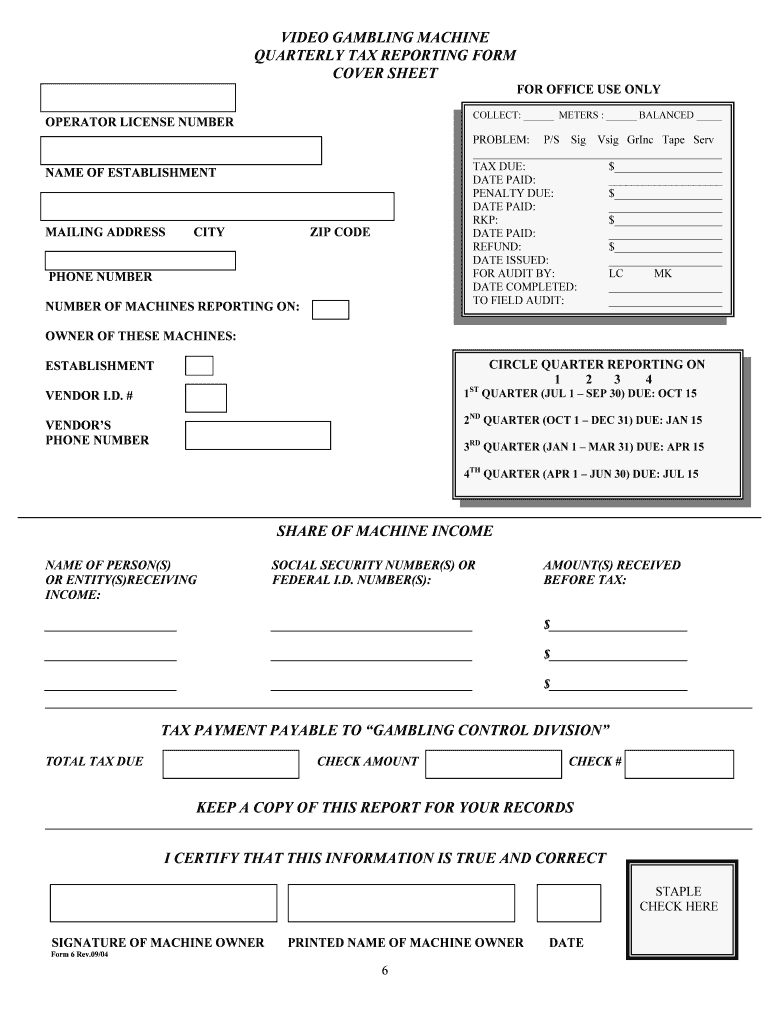
Video Gambling Machine Quarterly Tax Reporting Form 6 2026

Get Form
Video Gambling Machine Quarterly Tax Reporting Form 6 Preview on Page 1

Here's how it works

01. Edit your form online
Type text, add images, blackout confidential details, add comments, highlights and more.
02. Sign it in a few clicks
Draw your signature, type it, upload its image, or use your mobile device as a signature pad.
03. Share your form with others
Send it via email, link, or fax. You can also download it, export it or print it out.

How to use or fill out Video Gambling Machine Quarterly Tax Reporting Form 6 with our platform

Form edit decoration
9.5
Ease of Setup
DocHub User Ratings on G2
9.0
Ease of Use
DocHub User Ratings on G2
  1. Click ‘Get Form’ to open the Video Gambling Machine Quarterly Tax Reporting Form 6 in the editor.
  2. Begin by entering your Operator License Number at the top of the form. This is essential for identification purposes.
  3. Fill in the details regarding tax due, including amounts and dates paid. Ensure accuracy to avoid penalties.
  4. Complete the establishment information section, including name, mailing address, city, zip code, and phone number.
  5. Indicate the number of machines you are reporting on and circle the quarter for which you are filing (1 through 4).
  6. List all individuals or entities receiving income from machine operations along with their Social Security or Federal I.D. numbers and amounts received before tax.
  7. Finally, certify that all information is true by signing and printing your name at the bottom of the form.

Start using our platform today to fill out your Video Gambling Machine Quarterly Tax Reporting Form 6 easily and for free!

be ready to get more

Complete this form in 5 minutes or less

Get form