Type text, add images, blackout confidential details, add comments, highlights and more.

02. Sign it in a few clicks
Draw your signature, type it, upload its image, or use your mobile device as a signature pad.

03. Share your form with others
Send aetna 1099 hc via email, link, or fax. You can also download it, export it or print it out.

How to use or fill out Aetna Insurance Forms Capabilities and Limitations Worksheet
Ease of Setup
DocHub User Ratings on G2
Ease of Use
DocHub User Ratings on G2
Click ‘Get Form’ to open it in the editor.
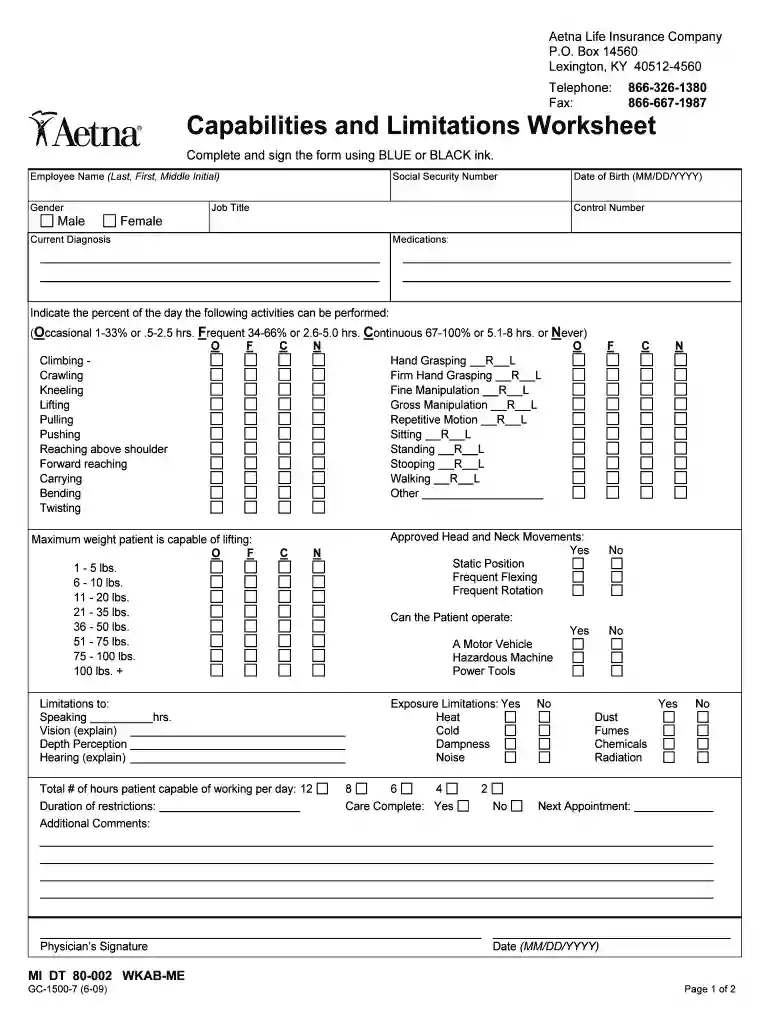
Begin by entering the Employee Name (Last, First, Middle Initial) in the designated field. Ensure accuracy as this is a required entry.
Select the Gender by checking either Male or Female. This helps in personalizing the insurance assessment.
Fill in the Social Security Number and Date of Birth (MM/DD/YYYY). These details are crucial for identification purposes.
Provide your Job Title and Control Number, if applicable, to assist with processing your claim.
In the Current Diagnosis section, briefly describe any medical conditions affecting your work capabilities.
List any Medications you are currently taking that may impact your performance at work.
Indicate the percentage of time you can perform various activities by marking O (Occasional), F (Frequent), C (Continuous), or N (Never) for each activity listed.
Specify the Maximum weight you can lift from the provided options. This helps assess physical limitations.
Complete any additional comments regarding limitations on speaking, vision, hearing, etc., as needed.
Finally, ensure to sign and date the form where indicated to validate your submission.
Start using our platform today to easily fill out your Aetna insurance forms for free!
Fill out aetna insurance forms capabilities and limitations worksheet online It's free
Aetna forms PDFAetna Prior Authorization form PDFAetna forms for providersAetna prior authorization form outpatient PDFAetna Medicare reimbursement form PDFPrintable Aetna formsAetna network deficiency form PDFAetna gap exception form PDF
Security and compliance
At DocHub, your data security is our priority. We follow HIPAA, SOC2, GDPR, and other standards, so you can work on your documents with confidence.
Limitations/Terms of Coverage. We do not Cover travel or transportation expenses, unless connected to an Emergency. Condition or due to a Facility transferRead more
General Information Manual Payroll and Labor Accounting
This form provides for the re- cording of one mans production on the jobs he per- forms in one day. A master labor specification card is punched and verifiedRead more
Cookie consent notice
This site uses cookies to enhance site navigation and personalize your experience.
By using this site you agree to our use of cookies as described in our Privacy Notice.
You can modify your selections by visiting our Cookie and Advertising Notice.