




01. Edit your form online
Type text, add images, blackout confidential details, add comments, highlights and more.

Type text, add images, blackout confidential details, add comments, highlights and more.

Draw your signature, type it, upload its image, or use your mobile device as a signature pad.

Send it via email, link, or fax. You can also download it, export it or print it out.
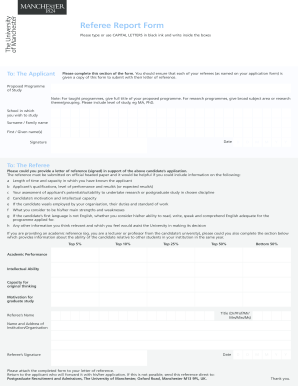
The "Your qualifications" form, often used in employment and recruitment contexts, serves as a comprehensive document to assess a candidate's match with employer requirements. It encapsulates various attributes and experiences that a candidate possesses, focusing on aligning those with the job specifications defined by employers. These qualifications often include educational background, work experience, skills, and personal characteristics essential for the job role. Understanding this form helps individuals and hiring managers evaluate candidate suitability based on specific competency areas.
To effectively use the "Your qualifications" form, candidates should carefully articulate their strengths and experiences that match the job description. Begin by thoroughly reading the job requirements and identifying key competencies desired by the employer. Fill out each section of the form with detailed, relevant examples that demonstrate your ability to fulfill these requirements. Highlight specific achievements and instances where you applied relevant skills successfully. The clarity and depth of this information ensure the employer can easily assess your suitability for the role.
The form typically includes several key sections that candidates need to address:
Understanding the terminology related to this form is crucial for both candidates and employers. Common terms include:
The information provided in the "Your qualifications" form must comply with legal standards regarding hiring practices, including non-discrimination regulations and privacy laws. Employers are required to use the information without bias and store personal data securely. Candidates should ensure that all information provided is truthful and accurate to avoid legal repercussions.
Primarily used by job seekers and employers, this form assists in:


Although the qualifications form is widely standardized, certain states may have specific requirements or mandates that influence how the form is completed or evaluated. Candidates should familiarize themselves with any state-specific rules, especially regarding education qualifications and professional certifications, to ensure compliance.
Consider a scenario where a candidate is applying for a managerial position. In the "Your qualifications" form, they may highlight:
Such examples demonstrate how qualifications directly align with job functions and expected outcomes.
We've got more versions of the Your qualifications form. Select the right Your qualifications version from the list and start editing it straight away!
At DocHub, your data security is our priority. We follow HIPAA, SOC2, GDPR, and other standards, so you can work on your documents with confidence.



The first step in making this impression is to create a list of the preferred qualifications for the ideal candidate for your target job.
Qualifications include your work experience (years, type of work), skills, education level and your overall knowledge of a specific field or topic.
He has attended no Bible college, taken no home Bible study courses, does not teach a Sunday School class, has not even taken first-year, basic Hebrew or Greek


