
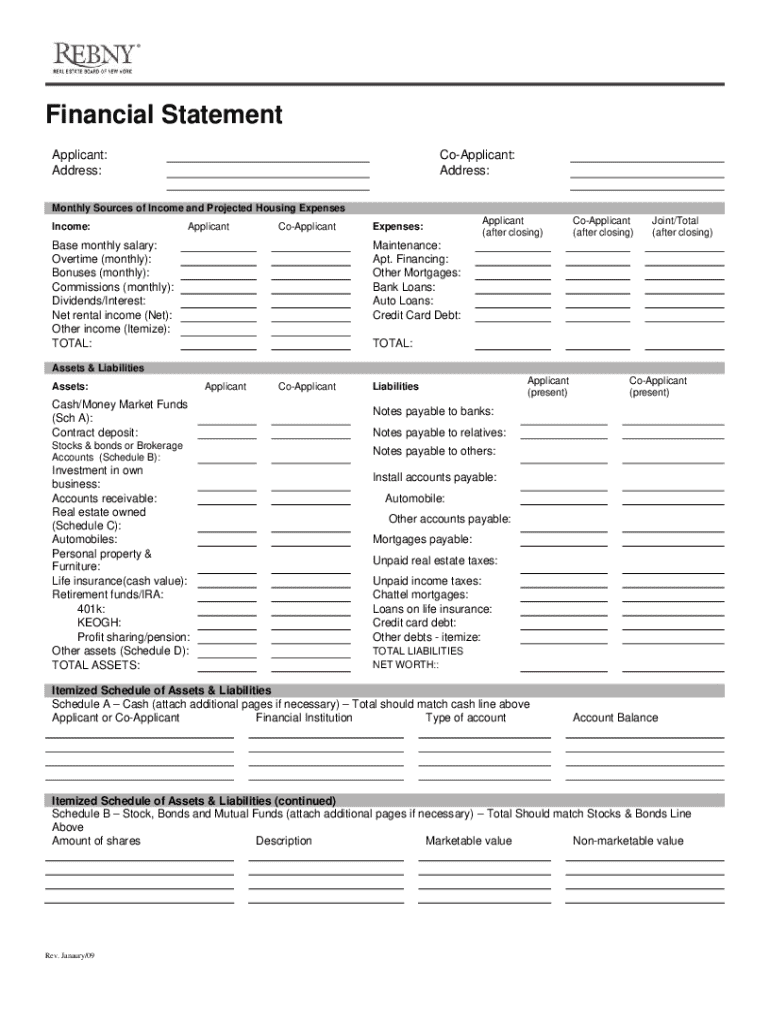







Definition and Meaning of the Real Estate Financial Statements PDF
Real estate financial statements PDFs are structured documents providing comprehensive details about the financial position of individuals or entities involved in real estate activities. These statements typically include sections on income, expenses, assets, and liabilities. Each section is essential for revealing the financial health and risk levels associated with real estate investments. Real estate financial statements can be used by property owners, investors, and financial institutions to make informed decisions about transactions, loans, and asset management.
Key Components of Real Estate Financial Statements
- Income: This section details all revenue streams from real estate activities, such as rental income or sales revenue. It helps assess the profitability of real estate ventures.
- Expenses: Expenses include operating costs, maintenance fees, property taxes, and loan interest payments. These are necessary to determine net profitability.
- Assets: This covers all owned real estate properties, investments in other properties, and liquid cash reserves. Assets are crucial for evaluating the overall wealth managed through real estate investments.
- Liabilities: Liabilities list outstanding debts and obligations, such as mortgages and loans, impacting the financial standing.
How to Use the Real Estate Financial Statements PDF
The real estate financial statements PDF is a crucial tool for organizing and assessing your financial position concerning real estate assets. Proper usage ensures enhanced decision-making and financial planning.
Best Practices for Using the PDF
- Regular Updates: Keep the document updated with recent financial activities, such as new property acquisitions or sales.
- Financial Analysis: Use the PDF to analyze trends in income and expenses over time, identifying areas for cost reduction or increased investment.
- Loan Applications: Present these financial statements to financial institutions when applying for loans, showcasing your assets and liabilities transparently.
- Investment Opportunities: Evaluate potential investment opportunities by projecting future income and analyzing existing financial health.
Steps to Complete the Real Estate Financial Statements PDF
Completing a real estate financial statements PDF requires a systematic approach to ensure accuracy and completeness. Each section demands precise data and thoughtful analysis.
Basic Steps for Completion
- Gather Income Data: Compile all sources of income related to real estate, including rent and sales.
- List Expenses: Document all costs incurred in the management and maintenance of real estate assets.
- Assess Asset Values: Evaluate the current market value of all owned properties and other related assets.
- Identify Liabilities: Catalog all outstanding debts and obligations linked to real estate holdings.
- Review for Accuracy: Cross-verify entries for any discrepancies or omissions, ensuring consistency and completeness.
Key Elements of the Real Estate Financial Statements PDF
Understanding the key elements of a real estate financial statements PDF helps users focus on the most critical areas that affect financial outcomes.
Core Elements to Consider
- Monthly Income Sources: Detailing rental, leasing, or any periodic income generated through real estate.
- Projected Expenses: Estimating future costs regarding maintenance, taxes, and loan interests.
- Itemized Schedule of Assets: A detailed listing of properties, holdings, and stocks related to real estate.
- Liability Breakdown: A clear classification of short-term and long-term liabilities affecting financial health.
Who Typically Uses the Real Estate Financial Statements PDF
Real estate financial statements PDFs are not confined to a specific type of user, highlighting their versatility and importance across various domains.


Common Users
- Property Owners: Individual owners use these statements to manage their personal real estate assets effectively.
- Real Estate Investors: Investors assess financial statements to make informed purchasing and selling decisions.
- Financial Institutions: Banks and lenders review these documents when evaluating loan applications for property purchases.
- Real Estate Professionals: Agents and brokers utilize these documents to suggest optimal property management strategies.

Important Terms Related to Real Estate Financial Statements PDF
Familiarity with specific terms is essential for accurately understanding and completing a real estate financial statements PDF.
Frequently Used Terms
- Net Operating Income (NOI): Calculated by subtracting operating expenses from gross income; a crucial metric for profitability.
- Capital Expenditures (CapEx): Long-term investments in property improvements that enhance value.
- Loan-to-Value Ratio (LTV): A ratio used by lenders to measure risk, comparing a loan amount to the appraised value of an asset.
- Equity: The owner’s value interest in the property, computed as the difference between the property’s current market value and any owed liabilities.
Legal Use of the Real Estate Financial Statements PDF
Legal compliance is paramount when dealing with real estate financial statements, as these documents can have significant legal implications.
Legal Considerations
- Disclosure Obligations: Ensures transparency when reporting financial status to potential buyers, investors, or regulatory bodies.
- Tax Reporting: Accurate financial statements are required for truthful reporting of real estate income and expenses.
- Loan Agreements: Lenders may demand financial statements as supporting documentation, making complete and accurate reports legally binding.
- Lease Agreements: Used when drafting and signing lease contracts, reflecting the financial position of parties involved.
Examples of Using the Real Estate Financial Statements PDF
Examples illustrate practical applications of how real estate financial statements PDFs optimize financial management and strategic planning.
Practical Use Cases
- Property Management Companies: Using financial statements to streamline budgeting, resource allocation, and forecast financial performance.
- Real Estate Investment Trusts (REITs): Employing these statements to disclose financial health to shareholders and attract investment.
- Residential Property Owners: Tracking income and expense patterns to make decisions on property retention or sale.
- Commercial Real Estate: Business entities utilize these financial statements to secure larger commercial loans for property purchases.




