
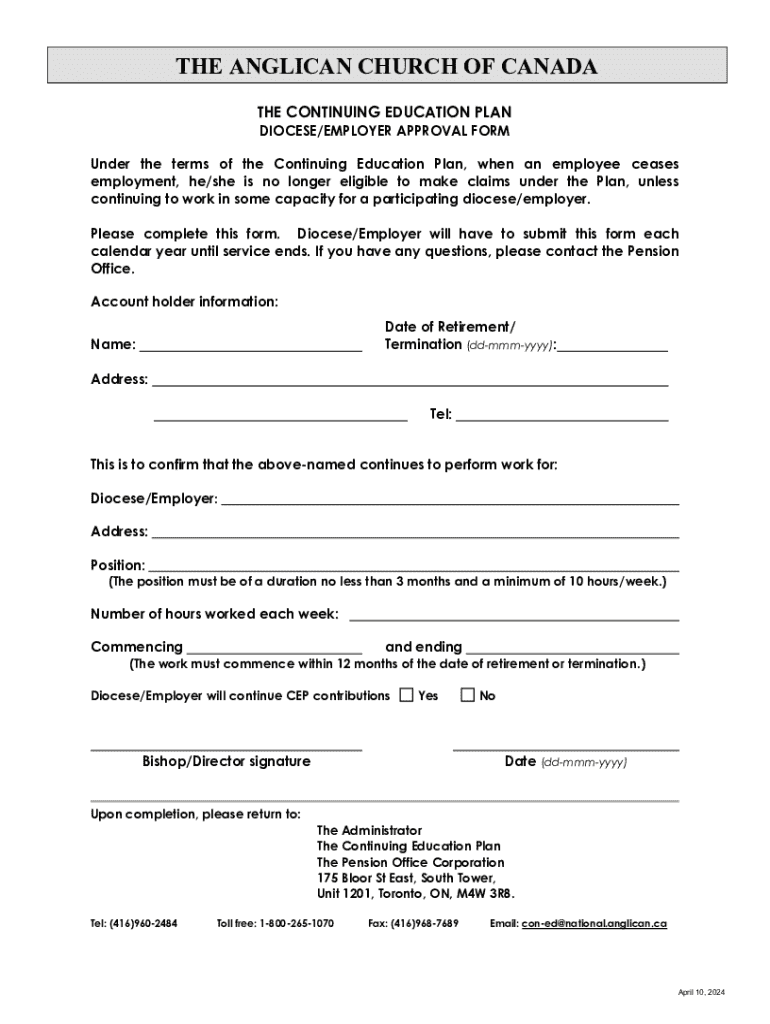







Understanding the Continuing Education Plan Retirement Termination Form
The Continuing Education Plan Retirement Termination Form is a crucial document used primarily within the context of the Anglican Church of Canada. It is designed to facilitate the transition of employees post-retirement or upon termination of their employment from participating dioceses. This form ensures that even after leaving active service, eligible employees can still access benefits as outlined by the Continuing Education Plan, provided they meet the specified criteria.
Purpose and Importance of the Form
The primary purpose of this form is to establish eligibility criteria for continuing education benefits for employees who have retired or been terminated. By submitting this form, employees confirm their eligibility, which includes maintaining employment with a participating employer and fulfilling other specified requirements. The form essentially acts as a safeguard, ensuring that benefits are only extended to those who genuinely qualify for them under the plan's guidelines.
Steps to Complete the Form
-
Gather Necessary Information: Before filling out the form, collect all relevant personal and employment details. This includes your name, contact information, and details about your former employer.
-
Complete the Account Holder Information: Fill out the section requiring your identification and contact details. Ensure accuracy to prevent delays in processing.
-
Detail Work Information: Provide details about your previous employment with the diocese or affiliated employer. This might include your job title, duration of employment, and confirmation of termination or retirement status.
-
Required Signatures: The form must be signed by the account holder and possibly by authorized personnel from the diocese to verify the details provided.
-
Submission: Submit the completed form to the designated address or through an official channel specified by the plan administrators.
Required Documents and Submission Methods
When submitting the Continuing Education Plan Retirement Termination Form, certain documents may be required to verify your status and eligibility:
- Proof of Employment Termination: A letter or official notice indicating termination or retirement.
- Identification Documents: Such as a driver’s license or passport, to confirm identity.
- Previous Employment Records: Document your tenure with the participating employer.
These documents can be submitted through various methods, including mailing to the official address, hand-delivering to the church's administration office, or uploading through an online portal if available.
Legal Considerations and Compliance
Importance of Legal Compliance
Complying with the legal requirements when submitting the Continuing Education Plan Retirement Termination Form is crucial. Adherence to these requirements ensures that your application for post-retirement benefits is valid and processed without hindrance. Additionally, submitting accurate and truthful information protects you from any legal repercussions and ensures compliance with the church's governance and regulations.
Key Elements and Terms in the Form
Understanding the specific elements of the form is vital:
- Account Holder Information: Details pertaining to the applicant.
- Employment Confirmation: Verification from the employer or diocese regarding the applicant's past employment status.
- Signatures: Required to certify the form’s accuracy and legitimacy.
These elements ensure that all necessary information is captured and that the applicant is eligible for claiming benefits under the plan.
Penalties for Non-Compliance
Failing to accurately complete the Continuing Education Plan Retirement Termination Form or deliberately providing false information can result in penalties. These might include disqualification from receiving education benefits, legal action for fraud, and possible repercussions from the diocese or participating employer. To avoid such consequences, ensure the form is correctly filled out with truthful information.
Examples and Scenarios
Real-World Applications
Imagine a scenario where a retired employee of a participating diocese completes this form annually to maintain eligibility for educational benefits. Despite being retired, the individual is planning to further their education in theological studies, necessitating access to Continuing Education Plan funds. By accurately filling out and submitting this form each year, they ensure they can take advantage of the plan benefits.
Variations and Exceptions
Different dioceses may have specific guidelines regarding eligibility for continuing education benefits post-retirement. It is crucial to understand any unique rules or variations that might apply in your specific situation. For instance, some dioceses might require additional verification or have unique clauses in their Continuing Education Plan.
Digital and Paper Versions
Advantages of a Digital Submission
Utilizing digital platforms to complete and submit the Continuing Education Plan Retirement Termination Form offers several benefits:
- Efficiency: Speeds up the submission process, ensuring faster processing times.
- Convenience: Allows applicants to complete forms from the comfort of their home or office.
- Environmentally Friendly: Reduces paper usage, contributing to sustainability efforts.
Considerations for Paper Submissions
For those opting for traditional paper submissions, it is important to ensure that:
- All sections of the form are legibly filled out in ink.
- Originals of required documents are included unless copies are specifically requested.
- The form is mailed to the correct address with sufficient postage.
Regardless of the submission method, retain a copy of the completed form and all accompanying documents for your records.
Conclusion
Understanding and accurately completing the Continuing Education Plan Retirement Termination Form is essential for retired employees wishing to continue receiving educational benefits. By adhering to the form’s specific requirements and submitting it through the designated channels, applicants can ensure seamless access to the benefits they are entitled to under the Continuing Education Plan.




