irs form 5227 Preview on Page 1

Form 5227, the Split-Interest Trust Information-2026

Here's how it works

  • 01. Edit your irs form 5227 online

    Type text, add images, blackout confidential details, add comments, highlights and more.

  • 02. Sign it in a few clicks

    Draw your signature, type it, upload its image, or use your mobile device as a signature pad.

  • 03. Share your form with others

    Send form 5227 form via email, link, or fax. You can also download it, export it or print it out.

Definition & Meaning

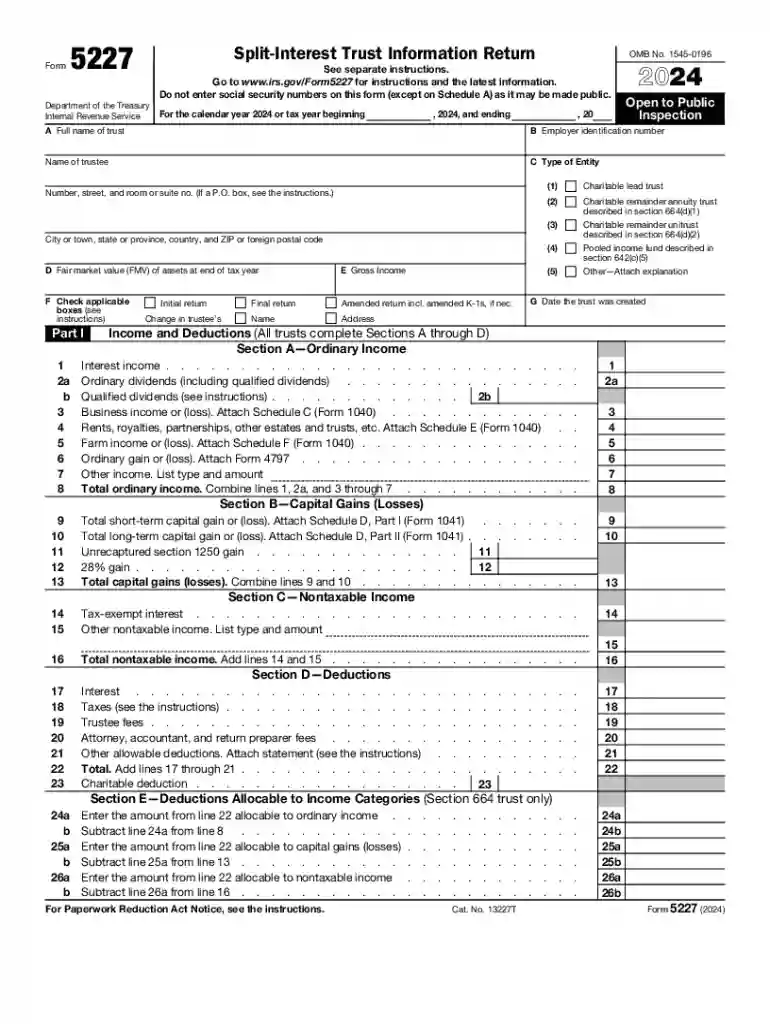
Form 5227, also known as the Split-Interest Trust Information Return, is a document required by the IRS for annual filing. This form is specifically used by split-interest trusts, which are arrangements that have both charitable and non-charitable beneficiaries. The primary purpose of Form 5227 is to report the income, deductions, and other significant financial activities of these trusts. It ensures compliance with the IRS regulations governing the management of trusts that combine elements of private trusts and public charity contributions.

Types of Split-Interest Trusts

  • Charitable Remainder Trusts (CRTs): Provide income to the non-charitable beneficiaries for a certain period, with the remainder going to a charitable organization.
  • Charitable Lead Trusts (CLTs): Offer income to the charitable beneficiary for a set term, with the remainder reverting to the non-charitable beneficiaries.
  • Pooled Income Funds (PIFs): Comprise contributions from multiple donors, with donors and their beneficiaries receiving income based on their proportionate share of the fund.

How to Obtain the Form 5227

Form 5227 is readily available through the IRS website. Individuals or entities can download it directly in PDF format from the IRS forms and publications page. Additionally, tax professionals and financial advisors often provide clients with the necessary forms during tax season, ensuring the correct documentation is used for each trust.

Online Resources for Acquisition

  • IRS Website: The primary destination for obtaining the official Form 5227.
  • Tax Preparation Software: Many tax software packages, such as TurboTax or QuickBooks, incorporate Form 5227 in their templates.
  • Financial Platforms: Some platforms that manage trust accounts may also offer direct access to essential forms like 5227.

Steps to Complete Form 5227

Filling out Form 5227 requires meticulous attention to detail and an understanding of the trust’s fiscal activities throughout the year. Here is a step-by-step process for completing the form:

  1. Gather Required Documents: Secure all relevant financial records, including income statements, expense reports, and trust agreements.
  2. Identify Trust Type: Determine whether the trust is a charitable remainder, charitable lead, or pooled income fund.
  3. Fill Out Trust Identification: Complete sections requiring the trust’s name, address, and EIN (Employer Identification Number).
  4. Report Income and Deductions: Input all relevant income, such as dividends and interest, while accounting for allowable deductions.
  5. Balance Sheet Details: Provide the balance sheet information, highlighting the trust's financial status at the beginning and end of the tax year.
  6. Charitable and Non-Charitable Beneficiaries: Specify the allocated portions of income and principal distributed to both charitable and non-charitable beneficiaries.
  7. Review and Submit: Double-check for accuracy and completeness before submitting to the IRS.

Filing Deadlines / Important Dates

Form 5227 has specific filing deadlines that must be adhered to avoid penalties. The form is generally due by April 15th of the year following the tax year the form pertains to. Extensions may be available upon filing a request via Form 8868, extending the deadline to November 15th.

Possible Extensions

  • Form 8868: Used to request an automatic 6-month extension.
  • Late Filing: If the trust does not file by the extended due date, penalties may apply.

Key Elements of Form 5227

Major Sections of the Form

  • Trust Identification: Basic information about the trust, including type and fiscal details.
  • Income and Deductions: Sections detailing various income sources and allowable deductions.
  • Distribution of Assets: Disclosure of assets distributed to beneficiaries.
  • Balance Sheets: Captures the trust's financial position at specific time periods.

Specific Considerations

  • Trustee’s Responsibilities: Trustees must be aware of their obligations to report accurately.
  • Beneficiary Designations: Accurate identification of all beneficiaries is essential for compliance.

IRS Guidelines

The IRS provides extensive guidelines for completing Form 5227, ensuring that the form aligns with current tax policies and regulations. It includes instructions for each section of the form and specifics about income reporting and beneficiary allocations.

Compliance with IRS Guidelines

  • Instruction Manual: Available on the IRS website for detailed section-by-section guidance.
  • Advisory Services: Consulting professional tax advisors can help ensure compliance and accuracy.

Penalties for Non-Compliance

Failing to file Form 5227 on time or providing incorrect information can lead to financial penalties and increased scrutiny from the IRS. The penalties are designed to encourage timely and accurate filings and are computed based on the duration of the delay and the nature of the misreporting.

Common Penalties

  • Financial Penalties: Fees calculated per day for late submissions.
  • Interest Charges: Accumulation of interest on unpaid penalties.

Software Compatibility

Form 5227 can be efficiently completed using various tax preparation software that supports detailed IRS form entry and submission. Many mainstream software applications ensure form accuracy and compliance by offering automated services and live updates.

Examples of Compatible Software

  • TurboTax: Provides in-depth support for trust tax forms.
  • QuickBooks: Offers flexibility in financial record keeping and form filing.
  • Specialized Trust Software: Designed specifically for handling complex trust accounting and IRS form integration.

Selecting the right software is crucial for streamlining the process while ensuring compliance with the IRS standards and deadlines.

See more irs form 5227 versions

We've got more versions of the irs form 5227 form. Select the right irs form 5227 version from the list and start editing it straight away!

VersionsForm popularityFillable & printable
20254.7 Satisfied (42 Votes)
20244.3 Satisfied (45 Votes)
20234.3 Satisfied (54 Votes)
20224.6 Satisfied (55 Votes)
20214.8 Satisfied (60 Votes)
20204.4 Satisfied (198 Votes)
20194.4 Satisfied (245 Votes)
20184.3 Satisfied (175 Votes)
20174.3 Satisfied (52 Votes)
20114 Satisfied (40 Votes)

be ready to get more

Complete this form in 5 minutes or less

Security and compliance

At DocHub, your data security is our priority. We follow HIPAA, SOC2, GDPR, and other standards, so you can work on your documents with confidence.

be ready to get more

Complete this form in 5 minutes or less

form 5227 pdf

2007 Instructions for Form 5227, Split-Interest Trust

Use Form 5227 to: Report the financial activities of a split-interest trust. Provide certain information regarding charitable deductions and distributions

Learn more
If you believe that this page should be taken down, please follow our DMCA take down process here