






Steps to Complete the City of Cincinnati Tax Connect
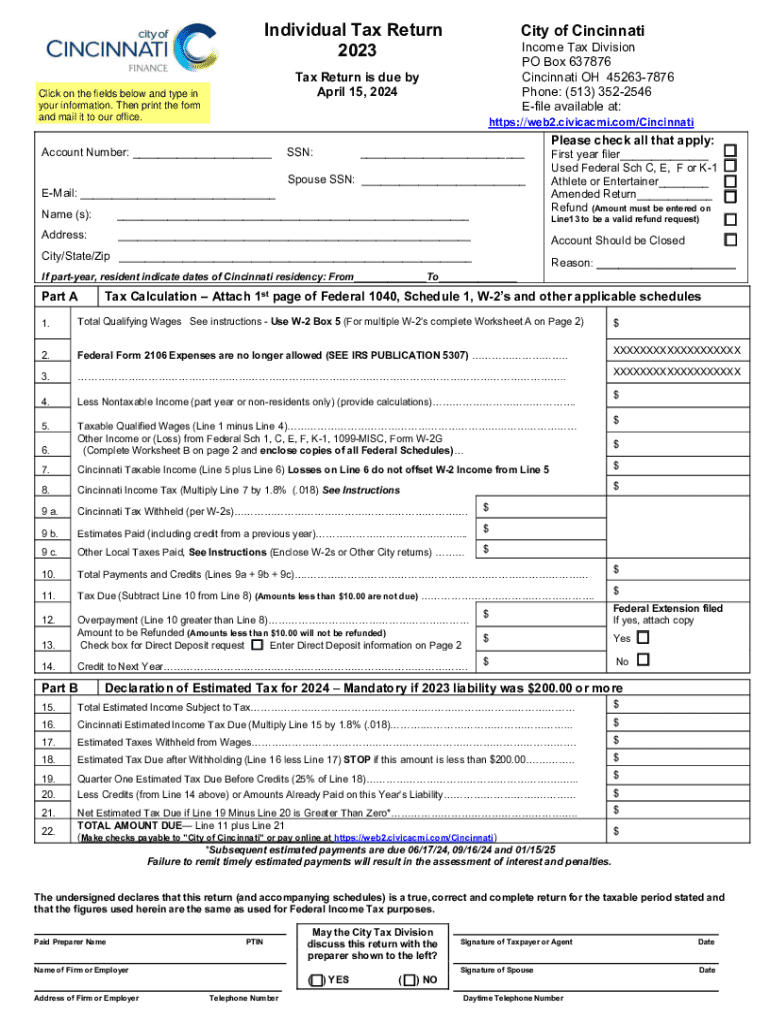
Completing the City of Cincinnati Tax Connect involves several steps aimed at ensuring accuracy and compliance.
-
Gather Necessary Documents: Gather all necessary documents related to income, deductions, and credits. This includes W-2s, 1099s, and documentation for deductible expenses.
-
Review Tax Rates: Review the applicable tax rates and forms specific to Cincinnati. This ensures accurate calculations of local income taxes.
-
Calculate Taxable Income: Accurately calculate your taxable income by considering all sources of revenue and eligible adjustments.
-
File Supporting Documents: Ensure all filled-out forms are accompanied by the required supporting documents, such as proof of income or deductible expenses.
-
Submission: Determine whether to submit electronically or by mail. Online submission through approved platforms streamlines processing and reduces errors.
Required Documents
Having the correct documents is crucial for successfully completing the City of Cincinnati Tax Connect.
- Income Statements: Include all W-2 and 1099 forms received throughout the year.
- Deduction Certificates: Provide documentation for deductions such as mortgage interest or student loans.
- Supporting Receipts: Gather any receipts relevant to deductible expenses or credits.
These documents not only verify the information reported but also ensure compliance with the regulations.
Filing Deadlines / Important Dates
The deadline for filing the City of Cincinnati Tax Connect aligns with federal tax deadlines.
- Standard Due Date: The form is typically due by April 15.
- Extensions: An extension may be requested if more time is needed, though this does not delay the payment deadline.
- Penalty Deadlines: Submit by the due date to avoid penalties.
Missing these dates can result in fines and interest on overdue taxes.
Penalties for Non-Compliance
Failing to adhere to the City of Cincinnati Tax Connect can lead to significant penalties.
- Late Filing Fees: If the form is filed after the deadline without an approved extension, a penalty applies.
- Interest on Unpaid Taxes: Interest accrues on any unpaid taxes, adding to the financial burden.
- Fraud Penalties: Deliberately falsifying information can result in severe fines and possible legal action.
Timely and accurate filing is crucial to prevent these penalties.
Legal Use of the City of Cincinnati Tax Connect
The City of Cincinnati Tax Connect facilitates legally compliant tax filings.
- Adheres to IRS Guidelines: Complies with federal regulations outlined by the IRS.
- Secures Data: Ensures user data is protected through encryption and secure authentication processes.
- Provides Audit Trails: Maintains a record of all submissions and changes, allowing for transparency in case of audits.
Proper use of the form supports legal compliance and reduces tax-related liabilities.
Important Terms Related to City of Cincinnati Tax Connect
Understanding key terms is vital when navigating the tax filing process.
- Taxable Income: The portion of income subject to tax after deductions and exemptions.
- Withholding: Amount withheld from a paycheck for tax purposes.
- Estimated Tax: Prepayments of expected tax liability during the year to avoid penalties.
These terms frequently appear in the form and guide accurate completion.
Software Compatibility
City of Cincinnati Tax Connect is compatible with various tax software, enhancing efficiency.
- TurboTax Compatibility: Integrates with TurboTax for streamlined preparation and submission.
- QuickBooks Use: Works with QuickBooks to easily import financial data, ensuring accuracy.
- Other Platforms: Compatible with several other tax-related software systems for diverse user needs.
Using these platforms can simplify the filing process.
Eligibility Criteria
Eligibility for using the City of Cincinnati Tax Connect is based on specific criteria.
- Resident Requirement: Primarily intended for individuals residing within Cincinnati.
- Income Thresholds: Filers must meet income specifications to be required to file.
Meeting these criteria is crucial for determining the need to file using this form.