
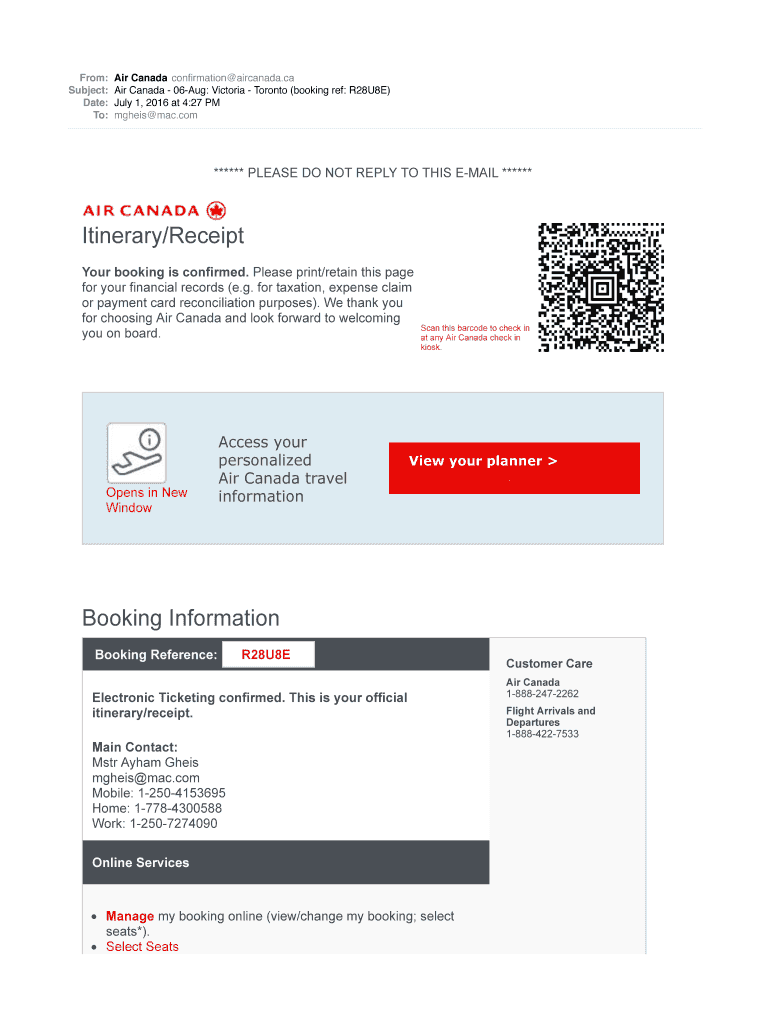







Definition and Meaning
Air Canada confirmation typically refers to the document you receive after booking a flight with Air Canada, detailing important travel information such as flight numbers, travel dates, passenger details, payment summaries, and baggage allowance. This document serves as a critical piece of evidence for your travel arrangements and should be retained for both travel and financial records. Ensuring you understand and adhere to any important travel policies outlined can help prevent future complications. The confirmation plays an essential role in verifying your travel plans and is commonly used to troubleshoot booking issues or verify payment and travel details with Air Canada's customer service team.
Key Elements of Air Canada Confirmation
Understanding the elements included in your Air Canada confirmation can help you ensure all details are correct. The confirmation generally includes:
- Flight Details: Lists all flights booked, including flight numbers, departure and arrival times, and any layovers or connections.
- Passenger Information: Contains the names and details of all travelers in the booking.
- Payment Summary: Provides an itemized list of charges, including fares, taxes, and fees, confirming how the booking was paid.
- Baggage Allowance: Describes the luggage capacity, such as how many bags are allowed and their respective weight limits.
- Travel Policies: References any airline-specific guidelines or regulations impacting your journey, such as cancellation rules or check-in procedures.
How to Use the Air Canada Confirmation
The Air Canada confirmation is not only a record of your flight booking but also a guide to ensure a smooth travel experience. Here's how to use it:
- Pre-Travel Preparation: Verify all flight and traveler details well before your departure date. This prevents last-minute issues.
- Check-In and Boarding: Use confirmation details to check in online or at the airport kiosk. Additionally, have the document ready to present at boarding.
- Customer Service Queries: In the event of flight changes or issues, use the confirmation to communicate with Air Canada's support team effectively.
- Expense Tracking: Retain the confirmation for record-keeping, especially for traveler reimbursement or tax filing purposes.
How to Obtain the Air Canada Confirmation
Upon successful booking, Air Canada provides a confirmation document via email, usually sent to the email address associated with the traveler’s account or entered during the booking process. For extra safeguarding:
- Check Spam or Junk Folders: Occasionally, email filters incorrectly categorize these confirmations.
- Access Through Air Canada Account: If registered, you can also view and download your confirmation directly from your profile on the Air Canada website by logging in and going to your booking history.
- Contact Customer Support: If all else fails, Air Canada's customer service can resend your confirmation to ensure you have the necessary information.
Steps to Complete the Air Canada Confirmation Process
Completing the Air Canada confirmation process is essential to secure your travel plans. Follow these detailed steps:
- Review Details Immediately: As soon as you receive the confirmation, check all provided information for errors or discrepancies.
- Verify Payment: Ensure that the payment summary aligns with your intended booking plan, including fare breakdowns and special services.
- Update Contacts: Add customer service contact details to your phone for immediate access.
- Secure a Backup Copy: Save a digital copy to your phone or cloud storage, ensuring quick access even without internet availability.
Important Terms Related to Air Canada Confirmation
Familiarize yourself with commonly used terminology related to Air Canada confirmations to better navigate your travel documents:
- Itinerary: Details the sequence of flights or travel segments in a booked journey.
- PNR (Passenger Name Record): A unique code for tracking your booking within airline systems.
- E-ticket: The electronic form of a traditional paper ticket, stored in airline systems and referenced in your confirmation.
- Upgrade and Change Fees: Charges associated with altering the travel class or schedule.
Legal Use of the Air Canada Confirmation
The Air Canada confirmation serves not only as a guide for travel but also as a legally binding agreement between the traveler and the airline. It is crucial in situations such as:
- Travel Disputes: To resolve issues concerning travel changes, cancellations, or disputes over fare conditions.
- Documentation for Travel Insurance Claims: Essential when filing claims for travel disruptions or lost baggage.
- Proof of Travel: Often required by customs or immigration authorities during international travel to verify onward or return trips.
Examples of Using Air Canada Confirmation
Understanding practical applications for your Air Canada confirmation can enhance your travel experience:
- Lost Luggage Situations: Provides essential documentation to airline staff for tracking lost or delayed baggage, using PNR.
- Travel Itinerary Adjustments: Useful in quickly altering travel plans by confirming changes directly with airline representatives.
- Expense Reimbursements: Serves as a crucial element for corporate travelers needing proof-of-travel for reimbursement.
Required Documents for Additional Travel Needs
Depending on travel plans, additional documentation may be required alongside your Air Canada confirmation, including:
- Visa and Passport: Ensure international travel requirements are met with up-to-date travel documents.
- Health Documents: Some destinations might require health certifications, such as vaccinations or negative COVID-19 tests.
- Secondary Identification: Have multiples forms of ID available in case of primary document issues.
Understanding and effectively managing your Air Canada confirmation aircanada contributes significantly to a hassle-free travel experience, enabling you to navigate your journey with confidence.




