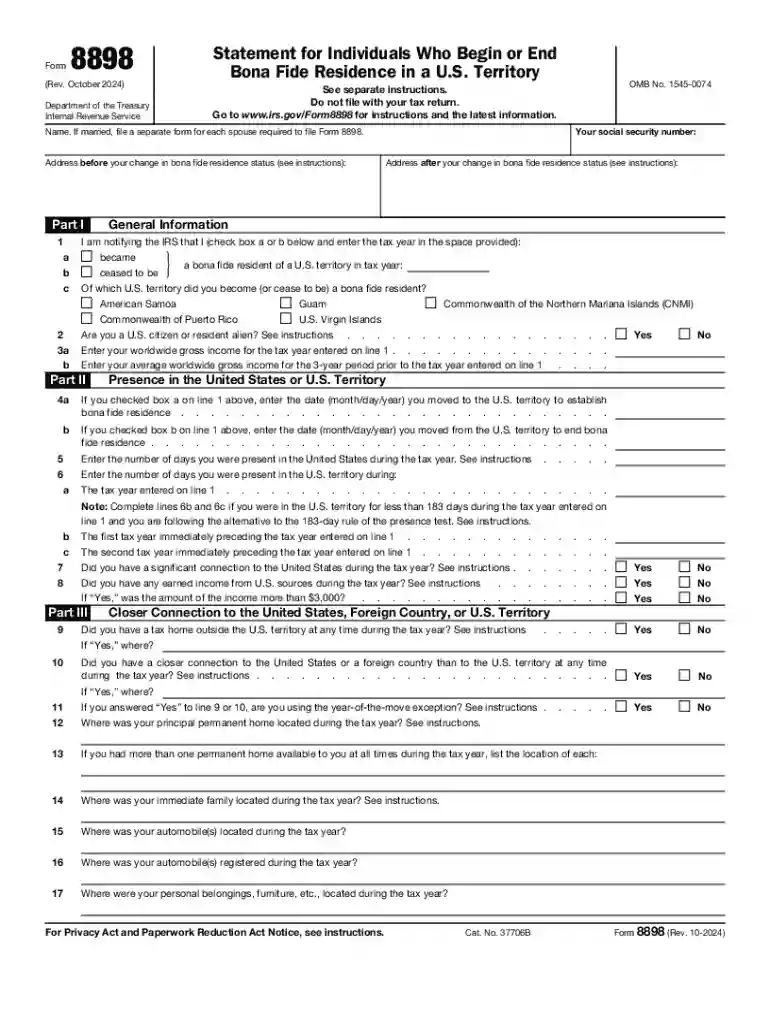
Form 8898 (Rev October 2024) Statement for Individuals Who Begin or End Bona Fide Residence in a U S-2026

Get Form
form 8898 Preview on Page 1

Here's how it works

01. Edit your form 8898 online
Type text, add images, blackout confidential details, add comments, highlights and more.

02. Sign it in a few clicks
Draw your signature, type it, upload its image, or use your mobile device as a signature pad.

03. Share your form with others
Send form 8898 pdf via email, link, or fax. You can also download it, export it or print it out.

Definition & Purpose of Form 8898

Form 8898, officially titled "Statement for Individuals Who Begin or End Bona Fide Residence in a U.S. Territory," plays a crucial role for those transitioning between U.S. residency and residency in a U.S. territory. This form is used to notify the Internal Revenue Service (IRS) about changes in an individual's residency status. It requires comprehensive personal information, including income details, the presence in the U.S. or U.S. territory, and connections to either location during the tax year. The form is separate from tax returns and requires submission directly to the IRS.

Key Elements Explained

  • Personal Information: Includes name, address, and social security number.
  • Income Details: Outlines earnings sourced from both the U.S. and the territory.
  • Residency Details: Documents the dates related to the beginning or end of bona fide residency.
  • Connections to the Location: Events or personal ties confirming residency status, such as property ownership or family location.

Eligibility Criteria for Using Form 8898

Form 8898 is intended for individuals moving in or out of bona fide residency in a U.S. territory. Criteria for determination include:


decoration image ratings of Dochub

Who Typically Uses This Form

  • U.S. Citizens or Resident Aliens: Individuals who are transitioning their residency status.
  • Income-Earners in U.S. Territories: Those earning income in territories like Puerto Rico, Guam, or the U.S. Virgin Islands.

Scenarios Needing Submission

  • Moving to a territory for employment.
  • Returning from a territory to reside in the continental U.S.
  • Staying beyond a year, affecting tax obligations.

Steps to Complete Form 8898

Filing Form 8898 involves multiple steps to ensure all necessary information is accurately reported. It's crucial to fill in all sections to prevent processing delays.

Step-by-Step Completion Guide

  1. Gather Required Information: Collect documents like previous tax returns, residency proof, and income statements.
  2. Fill Personal Details: Ensure all personal information is complete and correct.
  3. Document Residency Dates: Note the start or end date of residency.
  4. Detail Income Sources: Enter figures for all relevant income.
  5. Review for Accuracy: Double-check entries for errors or omissions.

Important Terms Related to Form 8898

Understanding certain terms is crucial for correctly filling out and comprehending Form 8898's stipulations.

Common Terms Explained

  • Bona Fide Resident: A person who qualifies as a resident of a U.S. territory under specific IRS guidelines.
  • U.S. Territory: Includes jurisdictions like Guam, the Northern Mariana Islands, and American Samoa which follow distinct tax laws.
  • Tax Year: The annual period used for reporting income, which impacts residency considerations.

Filing Deadlines and Important Dates

Timely filing of Form 8898 is essential for compliance and avoiding penalties. Understanding deadlines is critical.

Key Filing Information

  • Submission Deadline: File Form 8898 by the tax return due date for the period during which residency changes occur.
  • Penalty for Late Filing: Failure to file by the deadline can lead to fines or interest.

Legal Use and IRS Guidelines

The legal use of Form 8898 must align with IRS regulations to maintain compliance and avoid potential repercussions.

Compliance and Legal Framework

  • IRS Requirements: Form 8898 supports tax documentation and ensures accurate residency declarations.
  • Penalties for Non-Compliance: Misrepresentation or non-filing can lead to audits, penalties, or additional tax liabilities.

Examples of Using Form 8898

Practical applications of Form 8898 demonstrate its importance in maintaining accurate tax records.

Real-World Usage Scenarios

  • John's Job Transition: John, a U.S. citizen, moves to Puerto Rico for two years before returning to the U.S., necessitating Form 8898 to clarify residency status for that period.
  • Sarah's Retirement: Sarah retires to Guam and needs the form to accurately transition her tax obligations.

Penalties for Non-Compliance

Understanding the consequences of failing to submit Form 8898 ensures individuals adhere to IRS regulations.

Key Penalty Information

  • Financial Penalties: Fines can be applied for late or inaccurate filing.
  • Legal Repercussions: Misreporting can lead to audits and additional scrutiny from the IRS.
be ready to get more

Complete this form in 5 minutes or less

Get form

Got questions?

We have answers to the most popular questions from our customers. If you can't find an answer to your question, please contact us.
Contact us
Taxpayers and the ERO representative must always complete and sign Form 8879 or Form 8878 for the Practitioner PIN method of electronic signature. EROs must also sign with a PIN.
A corporate officer and an electronic return originator (ERO) use Form 8879-CORP when the corporate officer wants to use a personal identification number (PIN) to electronically sign a corporations electronic income tax return and, if applicable, consent to electronic funds withdrawal.
Generally, you are a bona fide resident of a U.S. territory if, during the tax year, you: Meet the presence test, Do not have a tax home outside that territory, and. Do not have a closer connection to the United States or to a foreign country than to that territory.
The Form 8995 is a form for your personal, individual tax return (Form 1040). It is generated when you have eligible business income such as income from an S Corp you own. The income from the S Corp goes into your Form 1040 when you enter the Schedule K-1 you received from your S Corp.
Sign form FTB 8879 and submit it to your ERO. Your tax return will not be transmitted to the Franchise Tax Board (FTB) until the ERO receives your signed form FTB 8879.

Security and compliance

At DocHub, your data security is our priority. We follow HIPAA, SOC2, GDPR, and other standards, so you can work on your documents with confidence.

Learn more
ccpa2
pci-dss
gdpr-compliance
hipaa
soc-compliance

People also ask

As of September 29, 2024, individual and business entity taxpayers applying for a United States Certification of Residency are required to upload a copy of Form 8802 application when making a payment via Pay.gov. Taxpayers can submit more than one application at a time.
Form 8879 is used to authorize the electronic filing (e-file) of original and amended returns. Use this Form 8879 (Rev. January 2021) to authorize e-file of your Form 1040, 1040-SR, 1040-NR, 1040-SS, or 1040- X, for tax years beginning with 2019.
An ERO can be the same person or entity as the preparer or they can be different. The person filing electronic returns using UltraTax CS is the ERO.

8898 form