





Definition & Meaning
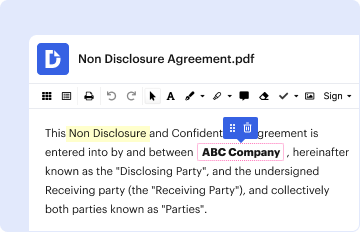
The concept of "form online" encompasses digital forms that are filled out and submitted electronically. This practice streamlines the process of data collection and reduces reliance on paper forms. Online forms can be employed across various sectors, including legal, business, and educational fields. Their main advantage is the ability to gather and process information efficiently and accurately. They are often integrated within platforms like DocHub to facilitate related document workflows such as editing, signing, and sharing.
Steps to Complete the Form Online
-
Access the Form: Begin by accessing the desired form online through your preferred digital platform or website. Platforms like DocHub allow users to import forms from cloud storage or start with a new template.
-
Fill in Required Fields: Enter the necessary information into the designated text boxes, dropdown menus, and other interactive fields. The form often indicates which fields are mandatory to ensure the completeness of the submitted information.
-
Upload Supporting Documents: If the form requires additional documentation, upload these files directly into the form interface. Platforms like DocHub allow you to attach files from your device or cloud storage.
-
Review and Edit: Before submission, review all entered data and make any necessary edits. DocHub's real-time editing and annotation tools can assist in clarifying or highlighting specific sections.
-
Submit the Form: Once satisfied with the form, submit it through the provided button or link. Ensure that you receive confirmation of submission, either via email or an on-screen notification.
-
Track Submission Status: Many online platforms offer a tracking feature that allows you to monitor the progress of your form submission, ensuring it reaches the intended recipient.
How to Use the Form Online
To effectively use a form online, familiarize yourself with the platform's interface and features. Ensure that you have a stable internet connection and necessary software or browser compatibility. Features such as autofill can speed up form completion, especially if your information is saved in your account settings. For collaborative efforts, use sharing features to distribute the form to other contributors, setting appropriate permissions for editing or viewing.
Key Elements of the Form Online
-
Interactive Fields: Online forms feature interactive elements such as text boxes, checkboxes, and dropdown menus, guiding users to provide information in a structured manner.
-
Validation Points: Forms include validation rules to check the accuracy of inputs, such as email formats or numerical ranges, reducing errors upon submission.
-
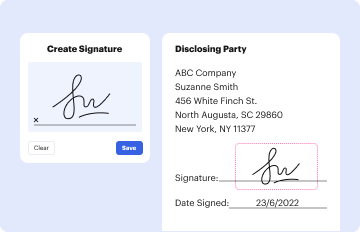
Electronic Signatures: The integration of electronic signature capabilities allows users to sign forms digitally, maintaining legal compliance and facilitating quick approvals.
-
Submission Confirmation: An essential part of using forms online is the confirmation process, which verifies that the form has been received and is under review or has been processed.
Important Terms Related to Form Online
-
eForm: A digital version of a paper form that can be filled and submitted online.
-
Fillable Fields: Interactive elements within an online form where users input their information.
-
Metadata: Data that provides information about other data, often used to track form submission details.
-
Validation: A process that ensures the information entered into a form meets the required format and conditions.
Legal Use of the Form Online
Forms completed online are regularly used in legal processes for filing documents, contracts, or applications. They adhere to legal standards, such as the ESIGN Act, ensuring that electronic signatures are binding. For legal matters, it is crucial to ensure that all fields are accurately completed and that the forms are submitted through secure platforms to protect sensitive information.
Software Compatibility
Online forms are often integrated with or supported by various software platforms, enhancing their functionality. For example, compatibility with Google Workspace allows users to import forms from Google Drive or Gmail and make use of cloud storage for document management. Compatibility with financial software such as QuickBooks or TurboTax can streamline processes for businesses, especially in tax-related filings.
State-Specific Rules for the Form Online
Regulations and requirements for filling forms online can differ by state, particularly with legal or tax-related documents. It's important to be aware of these variations to ensure compliance with local laws. The availability of state-specific forms and guidelines can often be found on official state websites or through the platform facilitating the form submission. Being informed of these differences will help in accurately completing and submitting forms without encountering legal discrepancies.




