







Definition & Meaning
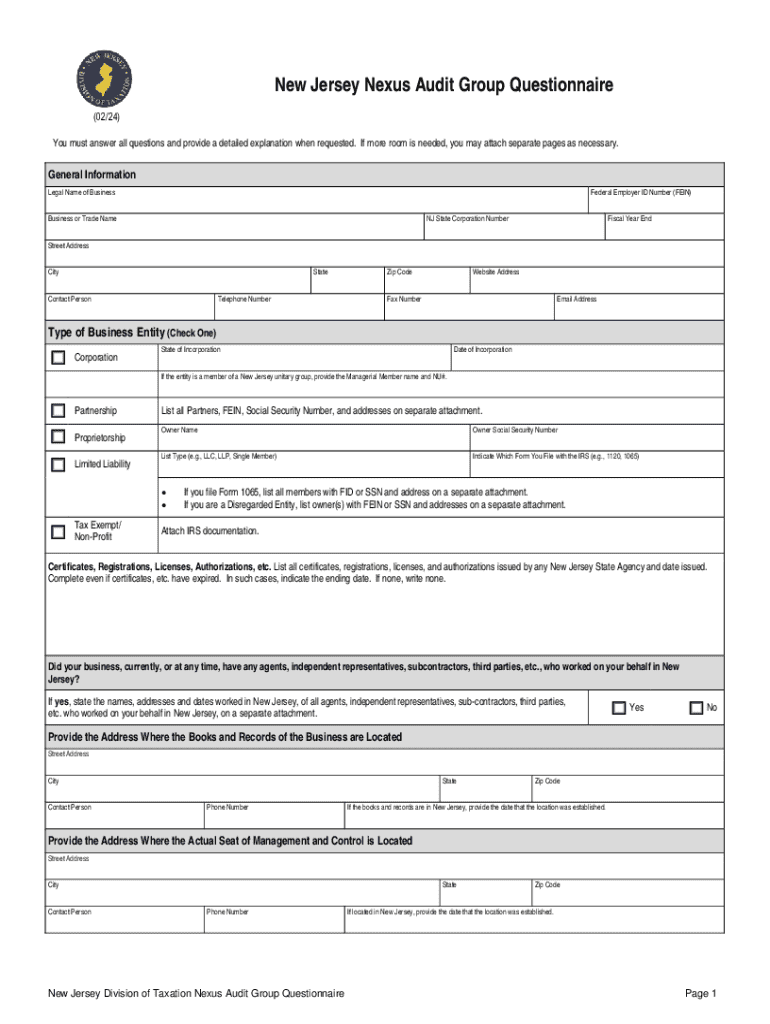
The 2023 Form NJ DoT Nexus Questionnaire is a critical document used by the New Jersey Division of Taxation to determine a business's tax obligations in the state. Nexus refers to the connection a business has with a state, which can mandate tax registration and payment. This form collects comprehensive data about a business's operations, presence, and transactions in New Jersey to assess whether it holds a taxable nexus. Understanding the term "nexus" is key, as it influences a company's tax liabilities and compliance obligations.
How to Use the 2023 Form NJ DoT Nexus Questionnaire Fill Online, Printable
The 2023 Form NJ DoT Nexus Questionnaire can be directly filled and submitted online through platforms that support digital documentation like DocHub. Users can utilize DocHub's editing tools to input information accurately into the required fields, ensuring data integrity and compliance. The ease of filling online also allows for any needed corrections before submission, which is especially beneficial in maintaining accurate records. For those who prefer traditional methods, a printable version is available to fill out manually.
Steps for Online Use
- Access the form through a compatible platform such as DocHub.
- Use the import function to upload the form from your device or cloud storage.
- Navigate through the questionnaire, entering relevant details in designated areas.
- Use annotation tools if additional clarification or emphasis on certain points is needed.
- Review the completed form for accuracy before submitting digitally to the designated New Jersey Division of Taxation system.
Steps to Complete the 2023 Form NJ DoT Nexus Questionnaire Fill Online, Printable
Completing the 2023 Form NJ DoT Nexus Questionnaire involves several stages that ensure all necessary information is provided. Each step in the process is designed to systematically collect every aspect of business activities that might establish a nexus.
-
General Information: Start by providing basic business details such as legal name, address, and federal identification number.
-
Business Activities: Describe the nature of your business operations conducted within New Jersey, including the type and frequency of transactions.
-
Physical Presence: Specify the physical presence within the state, such as ownership or leasing of property and usage of assets.
-
Employee Information: Report the number of employees working in New Jersey, even if temporarily, and the nature of their work.
-
Sales and Revenue: Declare the financial nuances involved in operating in New Jersey, such as income derived from sales within the state.
-
Compliance: Affirm adherence to existing tax obligations, demonstrating previous filings or tax payments applicable under state laws.
-
Signature and Declaration: Conclude with a signature, certifying all provided information is true to your knowledge. This also includes the date of submission.
Important Terms Related to 2023 Form NJ DoT Nexus Questionnaire Fill Online, Printable
Understanding key terms is crucial when engaging with this form to ensure compliance and accuracy.
- Nexus: A legal term indicating a significant presence that subjects a business to state tax obligations.
- Tax Liability: The total amount of tax a business must pay due to its operations.
- Jurisdiction: The power of the state to impose taxes due to business activities conducted within its borders.
- Apportionment: The division of income among different jurisdictions for tax purposes based on the nexus.
- Withholding Tax: Taxes deducted from payments to employees or other businesses, pertinent when a company operates within New Jersey.
Legal Use of the 2023 Form NJ DoT Nexus Questionnaire Fill Online, Printable
The 2023 Form NJ DoT Nexus Questionnaire is a legally mandated form for businesses operating in New Jersey. Its primary function is to evaluate tax duties based on business activities. Compliance with this form ensures businesses adhere to state laws governing tax registration and payment. Failing to accurately complete and submit the form can lead to legal repercussions and financial penalties.
Filing Deadlines / Important Dates
Timeliness in filing is critical for maintaining compliance. Although specific deadlines may vary yearly, typically:
- Initial Submission: Generally, the form should be submitted at the start of the fiscal year or when a business begins operations in New Jersey.
- Updated Submissions: If significant changes occur in business operations, entities must submit an updated questionnaire within a set timeframe following these changes.
Penalties for Non-Compliance
Businesses that neglect to submit the 2023 Form NJ DoT Nexus Questionnaire or provide inaccurately filled forms may face penalties in New Jersey. The repercussions could include fines, interest on unpaid taxes, and restrictions on business activities. Companies may also undergo rigorous audits, leading to increased scrutiny of financial records. To avoid these consequences, businesses must ensure meticulous completion and punctual submission of the form.
Required Documents
When completing the 2023 Form NJ DoT Nexus Questionnaire, the business may need to provide additional documents for clarity and evidence of claims:
- Business Registration Certificates: Proof of legal operation within federal and state requirements.
- Financial Statements: Documents such as balance sheets and income statements that outline monetary transactions and positions.
- Employee Records: Data involving payroll, job descriptions, and employee residency status.
- Property Leases: Any contractual agreements concerning premises operated within New Jersey.
Ensuring all documents are current and accurately reflect business activity is crucial for successful submission and consideration by authorities.




