







Definition & Meaning
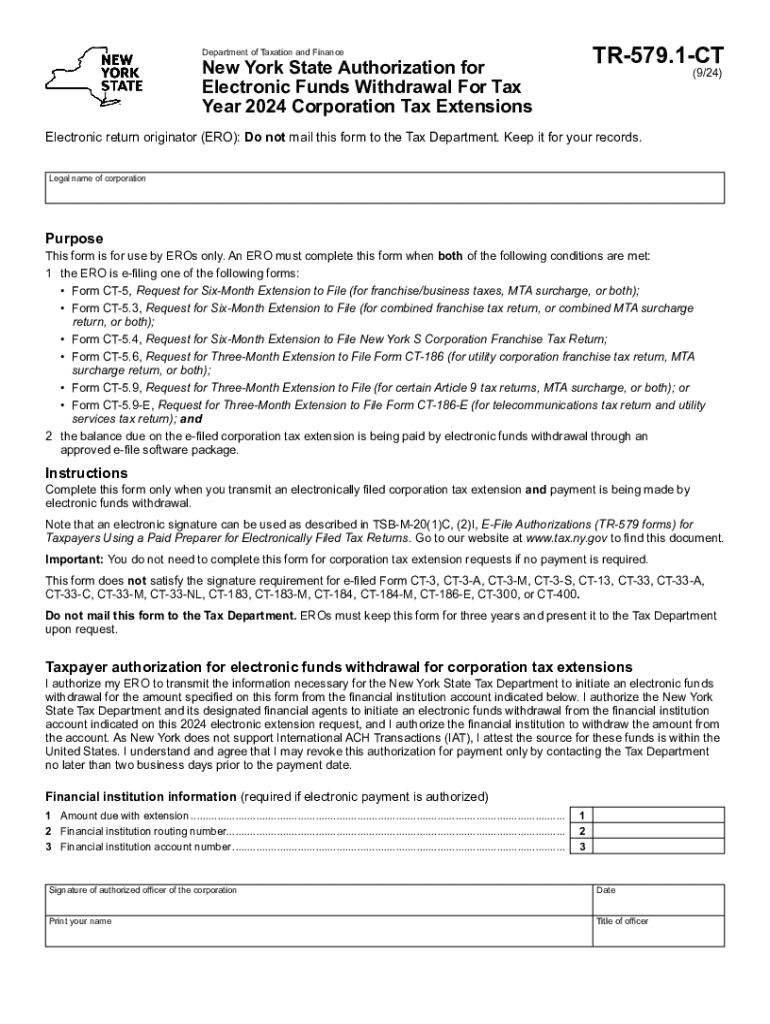
The Form TR-579.1-CT, officially known as the New York State Authorization for Electronic Funds Withdrawal, is a vital document provided by the New York State Department of Taxation and Finance. Its primary purpose is to authorize Electronic Return Originators (EROs) to initiate electronic funds withdrawals, specifically for extending corporation tax payments. This form becomes relevant when businesses opt to e-file their tax extensions and wish to make payments electronically. It is crucial to understand that while the form facilitates electronic funds withdrawal, it should not be physically mailed to the Tax Department. Instead, it serves as an electronic authorization maintained within the filing process.
Steps to Complete the Form TR-579 1-CT
The process of completing the Form TR-579.1-CT involves several detailed steps to ensure accurate authorization.
-
Taxpayer Information:
- Begin by entering the precise details of the taxpayer, including the name, address, and tax identification number. This section ensures that the form is linked to the correct entity.
-
Financial Institution Details:
- Provide the necessary banking information, such as the routing and account numbers. The accuracy of this section is critical as incorrect details could lead to payment processing failures.
-
Authorization Section:
- The taxpayer must sign this section to officially authorize the electronic funds withdrawal. Ensure the signature matches other tax documents to prevent discrepancies.
-
EROs Details:
- The form requires the details of the Electronic Return Originator, including their EFIN, to verify the legitimacy of the submission.
-
Verification:
- Review all entries for accuracy and completeness. Discrepancies or omissions could result in rejection or processing delays.
Importance of Using Form TR-579 1-CT
The Form TR-579.1-CT provides several advantages for businesses, enhancing the efficiency of tax processing.
-
Convenience: Automating tax payments through electronic funds withdrawal streamlines the payment process and reduces errors associated with manual payments.
-
Timeliness: By aligning the payment with the tax extension filing, businesses can ensure timely compliance and avoid penalties associated with late payments.
-
Security: Utilizing secure electronic systems minimizes the risk of fraud and misplacement often encountered with traditional payment methods.
Who Typically Uses the Form TR-579 1-CT
Certain groups frequently interact with Form TR-579.1-CT due to the nature of their filing requirements.
-
Corporations Seeking Extensions: Corporations that anticipate needing additional time to prepare their tax returns use this form to manage their payment responsibilities.
-
EROs: Electronic Return Originators submit the form on behalf of their corporate clients, facilitating electronic transactions within the e-filing process.
-
Financial Teams: Businesses with dedicated finance departments commonly utilize form filing software to coordinate their tax extension responsibilities.


Key Elements of the Form TR-579 1-CT
Understanding the key components of the form ensures proper completion and submission:
-
Taxpayer Authorization: This section emphasizes the consent needed for funds withdrawal, ensuring that all parties involved have agreed to the terms.
-
Financial Details: Accurate bank information is crucial, as incorrect entries could result in failed transactions.
-
EROs Information: Clearly identifies the responsibility for filing the form, which aids in verifying authorized actions.
State-Specific Rules for the Form TR-579 1-CT
While the Form TR-579.1-CT is specific to New York State, understanding local variations is essential for compliance.
-
New York's Unique Requirements: Unlike forms from other states, New York emphasizes electronic filing and payment options, reflecting the state's focus on digital efficiency.
-
Tax Regulation Adherence: Usage of this form must comply with New York State laws and the Department of Taxation and Finance’s guidelines.
Examples of Using the Form TR-579 1-CT
Real-world applications of the Form TR-579.1-CT highlight its utility:
-
Corporation XYZ: Opted for electronic funds withdrawal to manage liquidity efficiently while ensuring payment deadlines were met without the need for manual interventions.
-
Start-Up Enterprises: Benefited from using the form by avoiding penalties that could arise from late payments in their early fiscal years.
Software Compatibility
Given the digital nature of the form, software compatibility plays a significant role in its submission:
-
Integration with Tax Software: Compatibility with platforms like TurboTax and QuickBooks allows seamless processing and submission of the form.
-
Enhanced Workflow: For businesses using integrated accounting systems, compatibility ensures the entire e-filing process is streamlined, reducing both time and errors associated with manual entries.
Legal Use of the Form TR-579 1-CT
Understanding the legal framework surrounding the form is critical:
-
Compliance with ESIGN Act: The electronic authorization and filing process comply with legal standards, ensuring that electronic signatures and fund withdrawals are legally binding.
-
Audit Trails: Maintaining a detailed audit trail is necessary for legal verification purposes, helping businesses and the tax department track authorization actions.
Filing Deadlines / Important Dates
Awareness of relevant timeframes ensures compliance:
-
Establishing Payment Schedule: Aligning the form submission with filing deadlines avoids unnecessary penalties and maximizes cash flow management.
-
Extension Periods: Understanding the exact extension periods applicable under the New York tax law helps in strategic financial planning.
By closely following the structured guidelines of Form TR-579.1-CT, stakeholders can optimize their tax processes, ensuring accurate, timely, and secure handling of electronic payment authorizations.




