FLORIDA - Miami-Dade Portal 2025

Get Form
miamidadeschoolportal Preview on Page 1

Here's how it works

01. Edit your miamidadeschoolportal online
Type text, add images, blackout confidential details, add comments, highlights and more.
02. Sign it in a few clicks
Draw your signature, type it, upload its image, or use your mobile device as a signature pad.
03. Share your form with others
Send dadeschoolportal via email, link, or fax. You can also download it, export it or print it out.

How to use or fill out FLORIDA - Miami-Dade Portal with DocHub

Form edit decoration
9.5
Ease of Setup
DocHub User Ratings on G2
9.0
Ease of Use
DocHub User Ratings on G2
  1. Click ‘Get Form’ to open the FLORIDA - Miami-Dade Portal application in our editor.
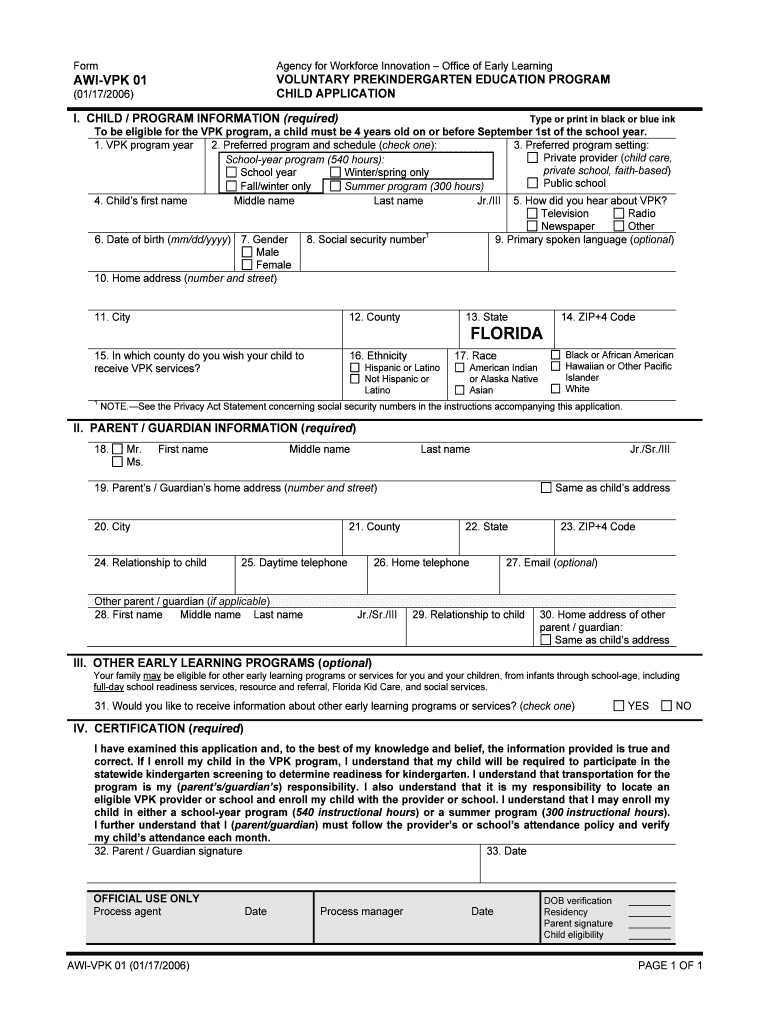
  2. Begin by filling out the 'Child / Program Information' section. Enter the child's first and last name, date of birth, and gender. Ensure that you check the preferred program setting and schedule.
  3. Next, provide the home address details including street number, city, county, and ZIP code. If applicable, include the child's social security number and primary spoken language.
  4. Proceed to the 'Parent / Guardian Information' section. Fill in your details such as name, address, relationship to the child, and contact information.
  5. If interested in other early learning programs, indicate your preference in Section III by checking 'YES' or 'NO'.
  6. Finally, review all entered information for accuracy before signing and dating the certification section at the end of the form.

Start using our platform today to streamline your document completion process for free!

be ready to get more

Complete this form in 5 minutes or less

Get form

Got questions?

We have answers to the most popular questions from our customers. If you can't find an answer to your question, please contact us.
Contact us
If you have forgotten or lost your MDID, you can log in to your myMDC portal to view it. You may also visit the Admissions Registration Office at whichever campus you attend and a staff member will supply it for you.
Overview of Miami-Dade County Public Schools Miami-Dade County Public Schools contains 542 schools and 334,090 students. The districts minority enrollment is 90%.
4 Go to .dadeschools.net and click on the Student tab. Click the Login to Student Portal link. When prompted, enter your username (student ID#) and password (default is MMDDYYinitials) and click Login.
1. Go to .dadeschools.net click on Portal and Select Parents. 2. Select Sign in with Apple if signing in with an Apple ID or Sign in with Google if signing in with a Google ID.
Miami-Dade County Miami / County

People also ask

Your email address is your StudentID@students.dadeschools.net. Your school and teachers may be connecting with you via email if we are unable to locate you through the information provided to us in the Electronic Grade Book. Please ensure you check your Student email periodically. Stay connected!

Related links