







Definition and Meaning
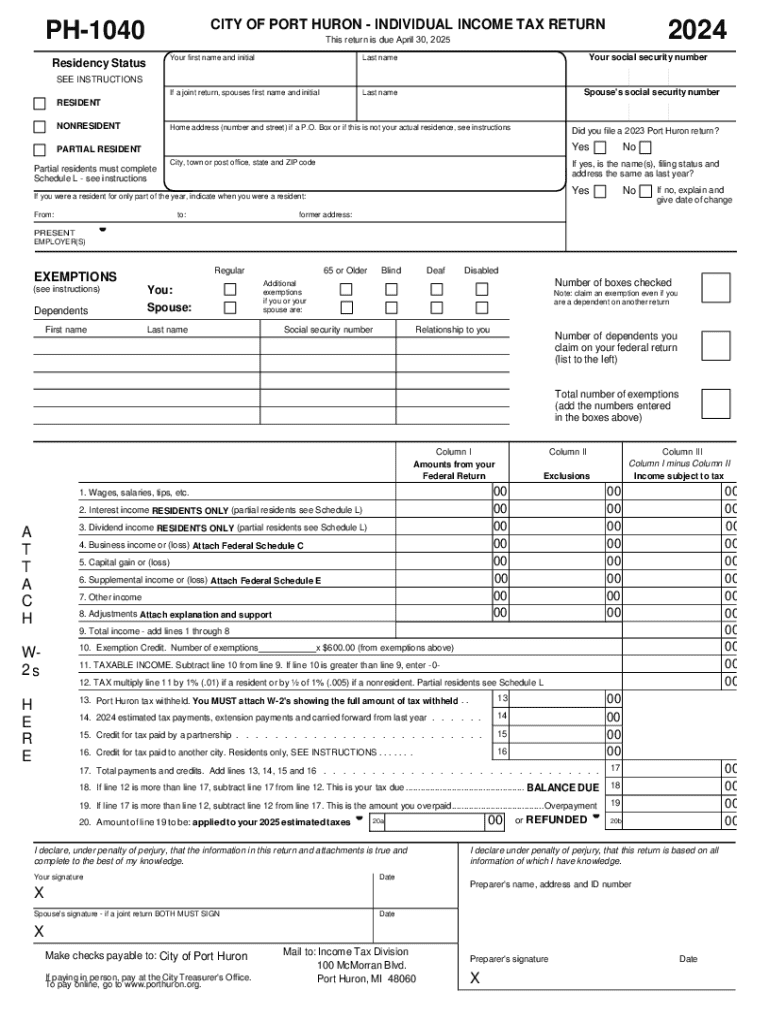
The City of Port Huron Individual Income Tax Return, referred to as PH-1040, is a document required for residents, nonresidents, and partial residents of Port Huron to report their income and compute taxes for the year 2024. This form encompasses multiple sections essential for personal information, residency status, exemption claims, income reporting, tax calculations, and payment summaries. The primary objective of this form is to ensure compliance with local tax regulations by accurately capturing financial activities of individuals within the jurisdiction of Port Huron.
How to Use the Port Huron Tax Forms: Fill Out and Sign Online
Using the Port Huron tax forms online involves several straightforward steps facilitated by DocHub's comprehensive tools. First, you must gather all necessary personal and financial information required by the PH-1040 form, which includes your Social Security Number, income details, and applicable deductions or credits. Then, access the form through DocHub and use the interactive fields to enter your data easily. The platform's annotation tools allow you to make corrections, add comments, or highlight important sections as needed. Once complete, utilize the platform’s digital signature options to sign the form electronically, ensuring your submission is legally binding.
Steps to Complete the Port Huron Tax Forms: Fill Out and Sign Online
- Gather Documentation: Ensure all necessary documents, such as W-2s, 1099s, and any relevant expense receipts, are readily available before starting.
- Access the Form: Open the PH-1040 form using DocHub by importing it from your device or connected cloud storage services like Google Drive.
- Enter Personal Information: Fill in the required personal details such as name, address, and Social Security Number accurately.
- State Residency Status: Indicate whether you are a resident, nonresident, or partial resident; this determines how your income sources are taxed.
- Report Income: Input all income sources, using documentation for accuracy, and calculate the total taxable income.
- Apply Deductions and Credits: Enter applicable deductions and credits to reduce your tax liability.
- Calculate Your Tax: Compute the amount of tax owed or the refund due based on your inputs.
- Sign the Form: Use DocHub to apply a legally binding electronic signature to finalize the form.
- Submit the Form: Choose to mail, submit online, or file in person by April 30, 2025, ensuring timely compliance.
Why Should You Use the Port Huron Tax Forms: Fill Out and Sign Online
Completing the PH-1040 tax form online offers numerous advantages. Primarily, it provides convenience and efficiency, allowing you to complete the process from anywhere without the need for printing or postage. Integrated digital tools help reduce errors by providing automatic calculations and validations. Safety is enhanced through DocHub's robust security protocols, ensuring your sensitive information remains confidential. Additionally, the ability to save and reuse your digital signature streamlines future filings, saving time and resources year after year.
Key Elements of the Port Huron Tax Forms: Fill Out and Sign Online
- Personal Information: Includes name, address, Social Security Number, and filing status.
- Residency Declaration: Captures whether you're a full-year resident, part-year resident, or nonresident.
- Income Section: Requires detailed entries of all income sources, such as wages, interest, or business earnings.
- Exemptions and Deductions: Allows the reporting of dependents and applicable deductions that can lower taxable income.
- Tax Calculation: Involves computing total taxes owed or identifying refund amounts.
- Signature Field: Essential for verifying the document’s authenticity and your consent to the details provided.
State-Specific Rules for Port Huron Tax Forms: Fill Out and Sign Online
Port Huron has specific requirements that differ from federal tax rules. For example, certain types of income may be taxed differently at the city level, or you may need to include specific local tax credits and exemptions. Residents must file annually by April 30, and they might be required to pay estimated taxes if they expect to owe more than $100. Understanding these local nuances can prevent non-compliance and associated penalties. Consulting with a local tax advisor or utilizing online resources from Port Huron’s tax department will provide clarity on unique local tax obligations.
Important Terms Related to Port Huron Tax Forms
- Tax Liability: The total tax owed to the taxing authority after all calculations.
- Exemption: Reduction in taxable income based on specific qualifying criteria such as dependents.
- Tax Credit: A direct reduction of the tax owed, differing from a deduction that lowers taxable income.
- Nonresident: Someone who does not permanently reside in Port Huron but earns income within the city.
- Part-Year Resident: Individuals who lived in Port Huron for a portion of the tax year.
- estimates Taxes: Payments made quarterly if anticipating a significant tax liability to avoid penalties.
Required Documents for Completing Port Huron Tax Forms
To accurately complete the PH-1040 form, you'll need various documents, including:
- W-2 Forms: Evidence of wages and withholding from employment.
- 1099 Forms: Reporting any additional income streams such as freelance or contract work.
- 1098 Forms: For reporting mortgage interest that may be deductible.
- Statements of Investment Income: Such as dividends or capital gains.
- Receipts for Deductions: Documentation that substantiates claims for business expenses, charitable donations, etc.
These documents ensure that all reported income and deductions are thoroughly documented, minimizing discrepancies or potential audits.




