




01. Edit your form online
Type text, add images, blackout confidential details, add comments, highlights and more.

Type text, add images, blackout confidential details, add comments, highlights and more.

Draw your signature, type it, upload its image, or use your mobile device as a signature pad.

Send it via email, link, or fax. You can also download it, export it or print it out.
A "form online" refers to a digital document that users can access, fill out, submit, and often sign electronically over the internet. Unlike traditional paper forms, online forms are designed for ease of access and efficiency, allowing users to interact with the form via various devices, such as computers, tablets, or smartphones. These forms are crucial in many sectors, including tax filings, application processes, and surveys, where they streamline data collection and reduce processing times.
Online forms are embedded with various interactive fields, including text boxes, checkboxes, dropdown menus, and signature fields, making them versatile tools for information collection. Whether used for business purposes, academic applications, government submissions, or personal tasks, online forms simplify the act of gathering, processing, and storing data digitally, minimizing the need for physical paperwork.
Access the Form: Visit the relevant website where the form is hosted. This could be a government site, business portal, or service provider like DocHub.
Review Instructions: Before filling out the form, carefully read any instructions provided. These might outline important guidelines or required documents.
Complete Required Fields: Start by filling in mandatory fields marked with an asterisk (*) or noted as required. This ensures all necessary information is provided.
Enter Optional Data: If applicable, fill in optional sections that might provide additional context or information.
Attach Supporting Documents: Upload any documents required to supplement your form submission, such as identification or financial records.
Review and Validate: Double-check all entries for accuracy. Utilize built-in validation tools often embedded in online forms to catch errors.
Submit: Once completed and reviewed, submit the form using the provided button or link.
Save Confirmation: Save the confirmation page or receipt of submission for your records, as it may be needed for future reference or follow-ups.
Interactive Fields: These include text boxes for entering data, checkboxes for selecting options, and dropdown menus for standardized responses.
Signature Fields: If needed, electronic signatures can be added to authenticate the form, ensuring legal compliance with digital regulations, such as the ESIGN Act.
Validation Mechanisms: Many online forms incorporate error-checking features that prompt users to correct mistakes before submission.
Guidance Sections: Some forms provide tooltips or additional guidance to assist users in correctly filling out complex sections.
Confirmation and Timestamp: Users receive confirmation upon successful submission, often with a timestamp to document submission time.
E-Signature: A digital version of a handwritten signature, used to sign online forms legally and securely.
Fillable PDF: A type of digital document format that allows users to enter information directly, often used in online forms.
Encryption: A security measure that protects data entered into an online form during transmission, ensuring privacy and preventing unauthorized access.
OAuth 2.0: An authentication protocol used to secure user access and maintain privacy across platforms and services.
Online forms must often be compatible with popular software applications to ensure seamless integration and data management. For financial and tax-related forms, compatibility with platforms like TurboTax and QuickBooks is crucial, as it allows for direct import and export of data between systems, minimizing the risk of data entry errors and enhancing efficiency.
Users should verify whether the online form is suited to work with these software applications, ensuring that they can integrate the completed forms into existing workflows. Certain forms may also offer export options to software used for accounting, document management, or customer relationship management.
Government Services: Filing taxes, applying for permits, or enrolling in social programs often requires using online forms that facilitate direct submission to government agencies.
Educational Applications: University admission processes frequently rely on online forms to manage applications, gather transcripts, and submit essay responses.
Business Contracts: Many businesses use digital forms to negotiate and finalize contracts, collecting signatures and approvals from all involved parties electronically.
Healthcare Records: Patient intake forms, consent documents, and medical history forms are increasingly managed using online forms to optimize data management.
The versatility of online forms means they are used by a wide array of individuals and organizations. These include:
Individuals: For personal matters such as job applications, loan applications, or renewing identification cards.
Businesses: To streamline processes such as employee onboarding, client feedback collection, and supply chain management.
Nonprofits: For donor registrations, volunteer sign-ups, and event planning.
Government Agencies: To facilitate efficient citizen services, from tax filings to public feedback mechanisms.


State regulations can affect how online forms need to be completed and submitted, particularly for legal and governmental processes. Requirements such as specific fields, submission deadlines, and accepted forms of identification might vary between states.
For example, certain states may have distinct formats for filing taxes or business licenses online, with unique authentication procedures. Understanding these state-specific rules is essential for ensuring compliance and avoiding penalties due to improper filing.
The legal use of online forms includes ensuring compliance with digital transaction laws, such as the ESIGN Act in the United States, which grants electronic signatures the same legal validity as handwritten ones. This is vital for making legally binding agreements when signing contracts, submitting tax documents, or entering into business deals electronically.
It is crucial to verify that online forms are used according to the legal provisions of the relevant jurisdiction to ensure their validity and effectiveness. Legal use also encompasses proper data handling and privacy protection, aligning with regulations like GDPR or CCPA when applicable.
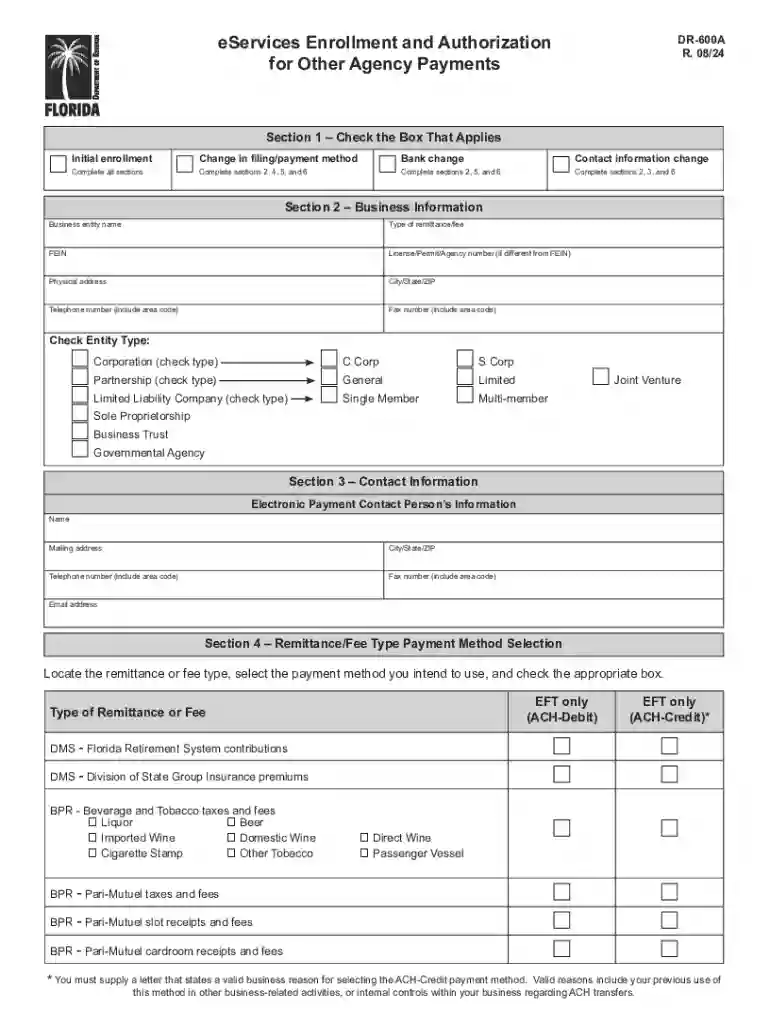
We've got more versions of the Florida DR-600A eServices Enrollment Form form. Select the right Florida DR-600A eServices Enrollment Form version from the list and start editing it straight away!
At DocHub, your data security is our priority. We follow HIPAA, SOC2, GDPR, and other standards, so you can work on your documents with confidence.




Access online data, tools and applications that help gain insight on your property. Property Search. Search by address, name, folio or subdivision to viewRead more
Complete Form DR-600, Enrollment and Authorization for eServices Program (incorporated by reference in Rule 12-24.011, F.A.C.), as provided in Rule 12-24.004,Read more


