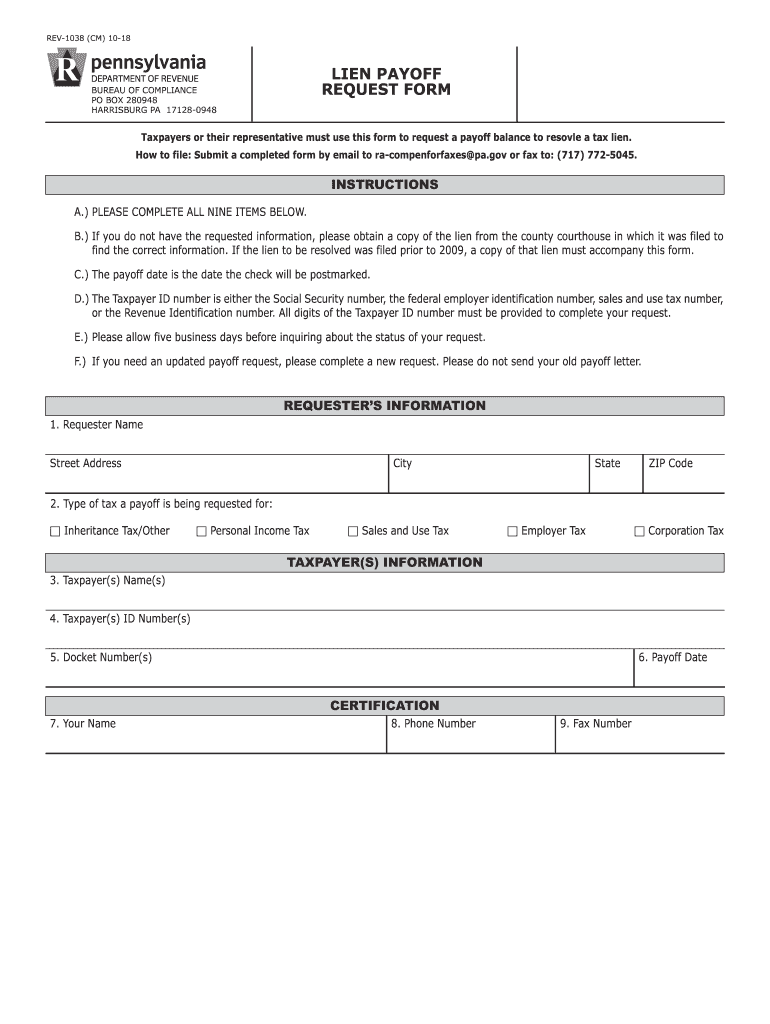
Pa department of revenue lien section 2026

Get Form
pa lien payoff request form Preview on Page 1

Here's how it works

01. Edit your pa lien payoff request form online
Type text, add images, blackout confidential details, add comments, highlights and more.
02. Sign it in a few clicks
Draw your signature, type it, upload its image, or use your mobile device as a signature pad.
03. Share your form with others
Send 1038 via email, link, or fax. You can also download it, export it or print it out.

How to use or fill out PA Department of Revenue Lien Section

Form edit decoration
9.5
Ease of Setup
DocHub User Ratings on G2
9.0
Ease of Use
DocHub User Ratings on G2
  1. Click ‘Get Form’ to open it in the editor.
  2. Begin by filling out the Requester’s Information section. Enter your name, street address, city, state, and ZIP code accurately.
  3. Next, specify the type of tax for which you are requesting a payoff. Choose from options such as Inheritance Tax, Personal Income Tax, Sales and Use Tax, Employer Tax, or Corporation Tax.
  4. In the Taxpayer(s) Information section, provide the names of the taxpayer(s), their ID numbers (which can be a Social Security number or other relevant identifiers), and any applicable docket numbers.
  5. Indicate the desired payoff date in MM/DD/YYYY format. This is crucial as it represents when the check will be postmarked.
  6. Complete the Certification section by entering your name, phone number, and fax number to ensure proper communication regarding your request.

Start using our platform today to streamline your document editing and form completion for free!

See more pa department of revenue lien section versions

We've got more versions of the pa department of revenue lien section form. Select the right pa department of revenue lien section version from the list and start editing it straight away!
Versions Form popularity Fillable & printable
2018 4.9 Satisfied (47 Votes)
2016 4.3 Satisfied (37 Votes)
be ready to get more

Complete this form in 5 minutes or less

Get form

Got questions?

We have answers to the most popular questions from our customers. If you can't find an answer to your question, please contact us.
Contact us
Lien ClaimAll claimants must file a Lien Claim in the prothonotarys (court clerks) office within six months of last work and serve notice of the lien claim on owner within one month after that. An affidavit of service then must be filed with the court within 20 days after service of the written notice on the owner.
You can conduct a federal tax lien search at the following places: State Recorders office. Secretary of States office. IRS Automated Lien System database. Private third-party database search services like Lien Solutions.
A tax lien search in Pennsylvania can be conducted through the Prothonotary Office in the county where the property is located or where the taxpayer resides or does business.
When a lien is filed, it becomes a matter of public record. The lien ensures the Commonwealth of Pennsylvania is listed as a priority creditor that must be paid before other financial transactions can take place (home sales, business transfer, obtaining a loan, etc.).
For assistance with the personal income tax, please call 717-787-8201. Business owners or representatives can call 717-787-1064 for assistance. Additional assistance is also available through departments Online Customer Service Center at .

Security and compliance

At DocHub, your data security is our priority. We follow HIPAA, SOC2, GDPR, and other standards, so you can work on your documents with confidence.

Learn more
ccpa2
pci-dss
gdpr-compliance
hipaa
soc-compliance
be ready to get more

Complete this form in 5 minutes or less

Get form

People also ask

The Department of Revenue files a lien with the county Prothonotary Office when an individual or business has unpaid delinquent taxes. When a lien is filed, it becomes a matter of public record.

lien payoff request form pdf