




01. Edit your form online
Type text, add images, blackout confidential details, add comments, highlights and more.

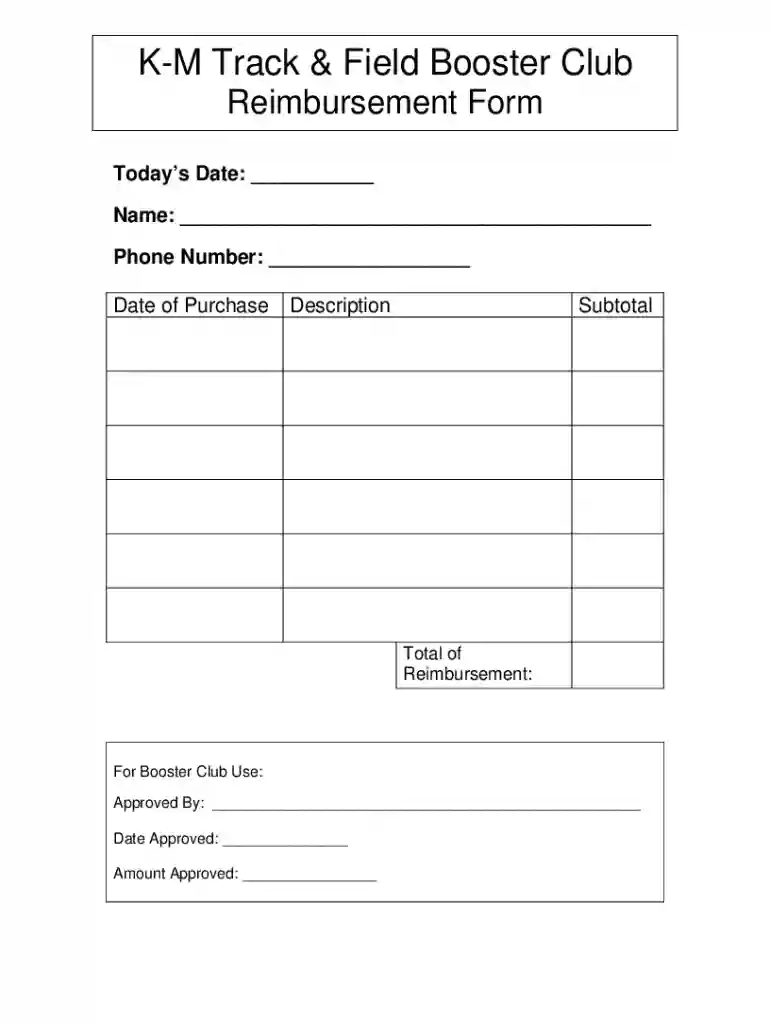
Type text, add images, blackout confidential details, add comments, highlights and more.

Draw your signature, type it, upload its image, or use your mobile device as a signature pad.

Send it via email, link, or fax. You can also download it, export it or print it out.
The "Booster Club - Reimbursement Form doc" is a specialized document utilized by members of a Booster Club, such as the K-M Track & Field Booster Club, to request reimbursement for expenses that have been incurred in relation to club activities. This form plays a crucial role in managing the financial transactions of the club, ensuring that funds are appropriately allocated and accounted for. The form typically includes sections for personal information of the requester, details of the purchase, and spaces for necessary approval signatures to validate the reimbursement request.
The form is composed of several essential components designed to capture comprehensive information necessary for reimbursement processing. Key elements include:
Personal Information Section: Collects the contact details of the individual requesting reimbursement, such as name, address, phone number, and email.
Expense Details: Requires specifics about the expense, including date, description, amount, and the vendor or service provider involved. It may also ask for the reason or purpose of the expense.
Approval Signatures: Includes designated spaces for authorized signatures to confirm approval of the reimbursement. This often involves signatures from club officials or financial officers to ensure accountability.
Attachments Field: Space to attach receipts or any supporting documents that are required to authenticate the reimbursement claim.
Gather Required Information: Collect all relevant receipts and supporting documentation related to the incurred expenses.
Fill Out Personal Details: Start by entering your personal information at the top of the form, ensuring accuracy to avoid processing delays.
Detail the Expense: Clearly document the details of each expense. Be specific and concise, providing an accurate description along with the exact expense amounts.
Attach Supporting Documents: Include and securely attach any necessary receipts and documentation that support your reimbursement request.
Submit for Approval: Present the completed form to the designated club officials for signature and approval.
Track Processing: After submission, keep a copy of the form and track the processing status to ensure timely reimbursement.
This form is generally used by members of a Booster Club who have personally incurred expenses related to club activities. This includes:
Coaches: Who may have purchased equipment or materials for team training.
Club Members: Such as volunteers or committee members who have made purchases to support club events or operations.
Parents and Guardians: Who are involved in Booster Club activities and have covered costs related to events or fundraisers.


To acquire the "Booster Club - Reimbursement Form doc," members can typically access it through:
Club Website or Portal: Many Booster Clubs provide downloadable forms on their official websites.
Direct Request: Members can request a copy from club officials or financial officers.
Club Meetings or Events: Forms might be distributed during attendance at club gatherings for easy access.
Here are a couple of real-world scenarios where the form might be used:
Equipment Purchase: A track coach buys hurdles and uses the form to request reimbursement, providing receipts and a summary of the purchase for documentation.
Event Supplies: A club volunteer buys decorations and snacks for a fundraising event, completing the form with detailed expense descriptions and attaching their receipts.
The Booster Club - Reimbursement Form doc is often provided in formats compatible with common document processing software. Examples include:
DocHub: Allows for easy editing, signing, and sharing of the form.
Microsoft Word: Supports DOC formats for those preferring offline editing capabilities.
Google Docs: Facilitates online access and collaborative editing, ideal for clubs utilizing Google Workspace.
It is important to ensure that the use of the reimbursement form aligns with legal and financial policies specific to the Booster Club, which may include:
Authorization Requirements: Ensuring the form is signed by authorized personnel before processing.
Expense Policies: Adhering to club-specific guidelines regarding eligible expenses and reimbursement limits.
Recordkeeping: Retaining copies of submitted forms and supporting documents for a set period for auditing purposes as required by club bylaws.
We've got more versions of the Booster Club - Reimbursement Form doc form. Select the right Booster Club - Reimbursement Form doc version from the list and start editing it straight away!
| Versions | Form popularity | Fillable & printable |
|---|---|---|
| 2007 | 4.4 Satisfied (56 Votes) |
At DocHub, your data security is our priority. We follow HIPAA, SOC2, GDPR, and other standards, so you can work on your documents with confidence.
Fundraising Forms: Fundraising Activity Approval Form 2024-2025 Fundraising Activity Recap Evaluation Form. All other forms may be accessed by Carroll ISDRead more
A booster club with a 501(c) federal exemption should complete Form AP-204, Texas Application for Exemption Federal and All Others (PDF), and submit it,


