




01. Edit your operating statement template online
Type text, add images, blackout confidential details, add comments, highlights and more.

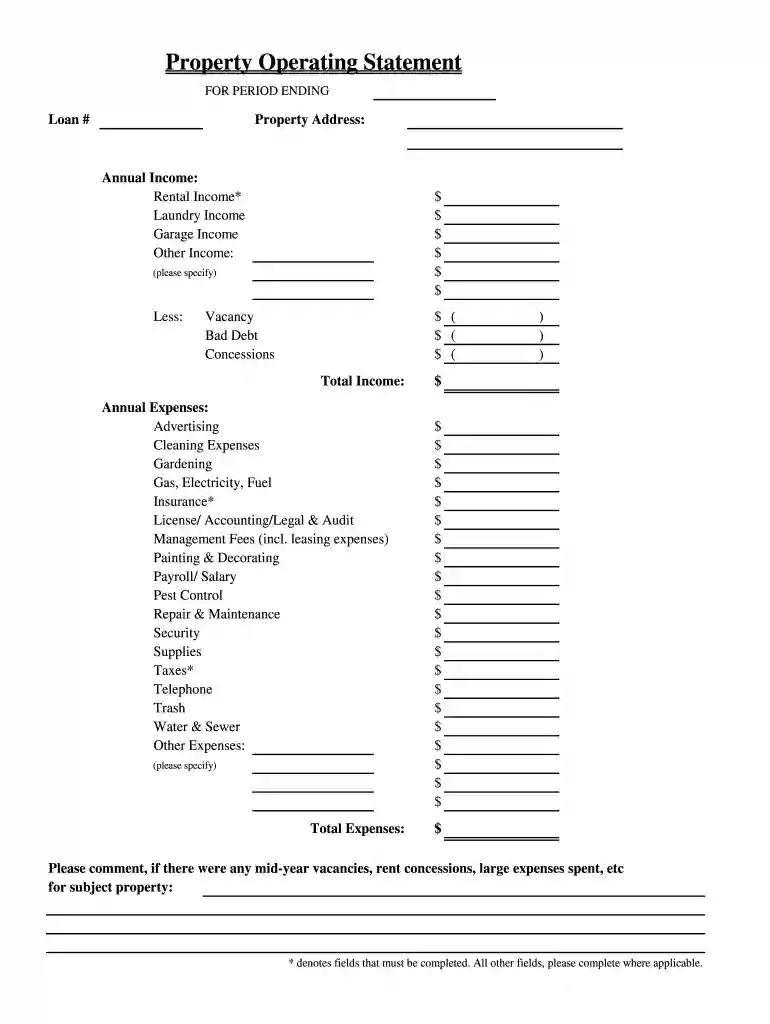
Type text, add images, blackout confidential details, add comments, highlights and more.

Draw your signature, type it, upload its image, or use your mobile device as a signature pad.

Send calculate monthly income via email, link, or fax. You can also download it, export it or print it out.
The operating statement template serves as a vital document for real estate professionals, providing a comprehensive overview of a property's financial performance within a defined timeframe. This document is crucial for both property owners and investors, detailing income sources and expenses associated with managing rental or commercial properties.
The key components of an effective operating statement include:
Understanding these components is critical for assessing a property's overall financial health and making informed investment decisions.
The operating statement template can be effectively utilized by following these steps:
Input Income Data:
Document Expenses:
Calculate NOI:
Analyze Results:
Using the template in this structured manner ensures all essential financial data is consolidated and readily accessible for review and future planning.
A well-structured operating statement template includes various essential elements that enhance clarity and utility. Key elements to incorporate include:
Property Information:
Income Block:
Expenses Block:
Profitability Metrics:
Visual Aids:
Designing an operating statement template with these elements aids clarity and ensures adherence to best practices in real estate financial reporting.
Completing an operating statement template requires careful attention to detail. Here are the step-by-step instructions:
Gather Financial Records:
Fill in Property Information:
Input Monthly Income Data:
Record Monthly Expenses:
Calculate Totals:
Review for Accuracy:
Following these steps will help ensure that the operating statement is complete, accurate, and reflective of the property's financial performance.
Familiarity with important terms related to the operating statement template is essential for effectively understanding and utilizing the document. Some key terms include:
Net Operating Income (NOI): A measure of a property's income after deducting operating expenses but before depreciation and taxes.
Gross Income: The total revenue generated by the property before any deductions are made.
Operating Expenses: All costs incurred through the routine operation of the property, including maintenance, utilities, and property management fees.
Vacancy Rate: The percentage of a property that is unoccupied and not generating revenue, crucial for understanding potential income loss.
Capital Expenditures: Significant investments made to enhance a property's value, such as major repairs or upgrades, often excluded from operational costs.
Understanding these terms enhances the user's ability to engage effectively with the operating statement template and make informed decisions.
At DocHub, your data security is our priority. We follow HIPAA, SOC2, GDPR, and other standards, so you can work on your documents with confidence.


All the movements in Net assets are explained in various Statements and Notes in the. Financial Operating Report, in particular: a) Statement II Statement ofRead more
Operating Expenses: Depreciation expense. 100. Wages expenses. 1,200. Supplies expenses. 60. Total operating expenses. 1,360. Operating Income. 1,390. OtherRead more


