







Definition and Purpose of ING Australia Change of Personal Details Form
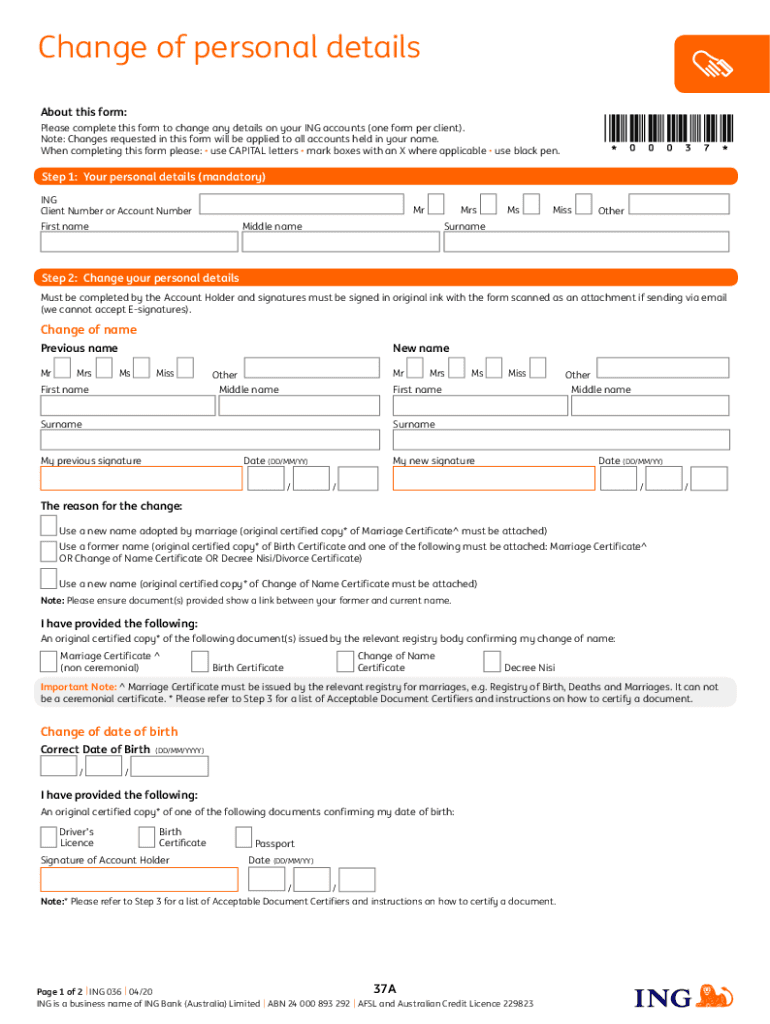
The ING Australia Change of Personal Details form is designed for clients wishing to update their personal information with ING. This form facilitates changes such as name, date of birth, and contact information in ING’s records. Completing this form ensures that personal information remains current and accurate for transactions and communications.
To use this form effectively:
- It must be filled out in capital letters.
- Original ink signatures are required for validation.
- Supporting documents, such as certified copies, are essential for specific changes like name updates.
How to Obtain the ING Australia Change of Personal Details Form
The ING Change of Personal Details form can be accessed through the ING Australia website or requested from their customer service. Clients can download a PDF version for printing and manual completion or complete it online if available.
Steps to obtain the form include:
- Navigating to the ING Australia website.
- Going to the forms or document section.
- Searching for the 'Change of Personal Details Form.'
- Downloading or accessing the form directly from the website.
Steps to Complete the ING Change of Personal Details Form
Filling out the form requires careful attention to detail:
-
Section A - Personal Information:
- Provide your current personal details including full legal name and date of birth.
-
Section B - Updates Required:
- Indicate the personal details you wish to update (e.g., name, address).
-
Section C - Documentation:
- Attach certified copies of relevant documents, especially for name changes.
-
Section D - Signatures:
- Sign in original ink; electronic signatures are not typically accepted.
-
Section E - Submission:
- Follow instructions for submission, either by mail or through appropriate ING channels.
Who Uses the ING Change of Personal Details Form?
This form is primarily used by ING Australia account holders needing to update their details. Typical users include:
- Individuals who have legally changed their name.
- Clients updating their contact information due to relocation.
- Account holders correcting birth date discrepancies.
Important Terms Related to the ING Change of Personal Details Form
- Certified Copy: A copy of a document that has been certified as a true reproduction of the original by an authorized person.
- Original Ink Signature: A wet signature required on legal forms for authenticity.
Understanding these terms ensures correct form completion and submission.
Required Documents for the ING Change of Personal Details Form
Depending on the updates, various documents are required:
-
Name Change:
- Certified copies of a marriage certificate, court order, or deed poll.
-
Address Change:
- Recent utility bills or lease agreements as proof of new address.
Ensure all documents comply with ING's certification requirements.
Form Submission Methods
ING provides several submission options for the form:
- Online Submission: For authorized users who have an online banking setup.
- Mail Submission: Traditional mailing of the completed form to the specified ING address.
- In-Person Submission: Available at select branches for real-time processing.
Review the form’s submission guidelines to select the most convenient method.
Penalties for Non-Compliance with Personal Detail Updates
Failing to update personal details with ING can lead to:
- Miscommunication on account matters.
- Delays in transaction processing.
- Potential security risks due to outdated information.
Understanding these consequences emphasizes the importance of timely updates.
Legal Use of the ING Change of Personal Details Form
The form serves as a legal document to authorize the update of personal details within ING’s systems. It acts as a binding request by the account holder under Australian law. Proper completion and submission are necessary to maintain the legal integrity of the form and ensure compliance with specific regulatory standards.
By addressing these areas, clients can confidently use the ING Change of Personal Details form to ensure their information with the bank remains accurate and up to date.




