




01. Edit your 11652 form online
Type text, add images, blackout confidential details, add comments, highlights and more.

Type text, add images, blackout confidential details, add comments, highlights and more.

Draw your signature, type it, upload its image, or use your mobile device as a signature pad.

Send it via email, link, or fax. You can also download it, export it or print it out.
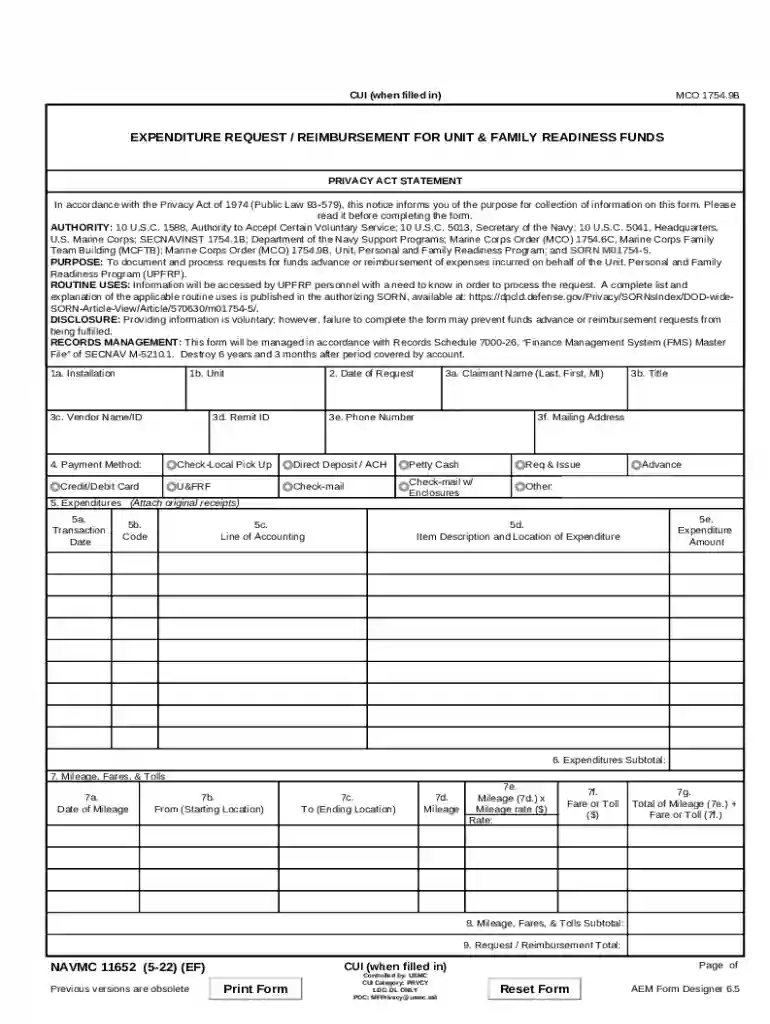
The "Expenditure Request Reimbursement for Unit and Family Readiness Funds - NAVMC 11652 (5-22)" is a form used by the U.S. Marine Corps to manage and request reimbursements related to Unit, Personal, and Family Readiness Programs. It provides a structured method for capturing essential information about expenditures, ensuring that they align with the approved parameters defined by Marine Corps regulations. This form serves the dual purpose of documenting detailed financial transactions and facilitating efficient reimbursements while ensuring compliance with relevant policies.
Expenditure Details: Every request must include specific information about the expenditures, such as amounts, purpose, and dates. This ensures transparency and facilitates accurate financial tracking.
Mileage Information: For reimbursements related to travel, mileage details are crucial. This includes the starting point, destination, and total miles traveled.
Approval Signatures: Critical for compliance, the form requires signatures from authorized personnel, ensuring that the expenditures have been officially sanctioned.
Supporting Documents: Attachments supporting the expenditure, such as receipts or invoices, are necessary for processing the reimbursement request.
Gather Documentation: Collect all relevant documents, including receipts and proof of expenditures, before beginning the completion of the form.
Fill Personal Information: Begin by entering personal details, such as the requester's name, rank, and contact information, to identify the person filing the request.
Detail Expenditures: Clearly outline each financial transaction, including dates, descriptions, and the exact amounts involved.
Obtain Necessary Approvals: Secure the required signatures from authorizing officials to confirm that the requests meet the necessary criteria.
Attach Supporting Documents: Ensure all documents that substantiate the expense claims, such as receipts and travel logs, are attached.
Submit the Form: Once completed, submit the form through the designated channels, whether online or in person, depending on specific unit procedures.
Those needing to obtain the NAVMC 11652 (5-22) form can access it through several methods.
Official Marine Corps Websites: The form is available for download from authoritative Marine Corps portals, providing easy access to a digital version.
Direct Unit Requests: Members can also request the form directly from their administrative units, where physical copies may be available.
Online Submission: In some cases, units may allow online submission via their secure platforms. Ensure all scanned documents are legible to facilitate processing.
In-Person Submission: Alternatively, forms can be submitted in person at designated administrative branches, ensuring direct handling by the unit's administrative personnel.
NAVMC 11652 (5-22) is predominantly used by members of the U.S. Marine Corps involved in Unit and Family Readiness activities. These members include:
Unit Leaders: Responsible for managing financial aspects related to readiness programs.
Administrative Personnel: Who handle the logistical side of expenditure management.
Family Readiness Officers: Engaged in organizing and overseeing readiness-related financial transactions.
Active Duty Status: Typically, the form is filled out by active duty members responsible for Unit and Family Readiness Programs.
Approval Requirement: Only expenses approved following Marine Corps regulations qualify for reimbursement requests.


Real-world scenarios exemplify the importance of NAVMC 11652 (5-22):
Travel Reimbursement: A Marine travels for a family readiness meeting and submits the form to recoup travel expenses.
Supply Purchasing: The unit buys necessary supplies for a readiness event, detailing costs in the form for reimbursement purposes.
Event Organization: Family Readiness Officers use the form to track and request reimbursement for expenditures related to a family engagement event.
Understanding form changes over time is crucial for accurate documentation:
Previous Versions: NAVMC forms have evolved. Awareness of changes helps ensure compliance and correct form usage.
Form Updates: Regularly check for new versions as procedural updates can introduce changes in form requirements.
This comprehensive guide to NAVMC 11652 (5-22) ensures effective reimbursement management in compliance with Marine Corps regulations, addressing every aspect critical to its use and submission.
We've got more versions of the 11652 form form. Select the right 11652 form version from the list and start editing it straight away!
At DocHub, your data security is our priority. We follow HIPAA, SOC2, GDPR, and other standards, so you can work on your documents with confidence.


