
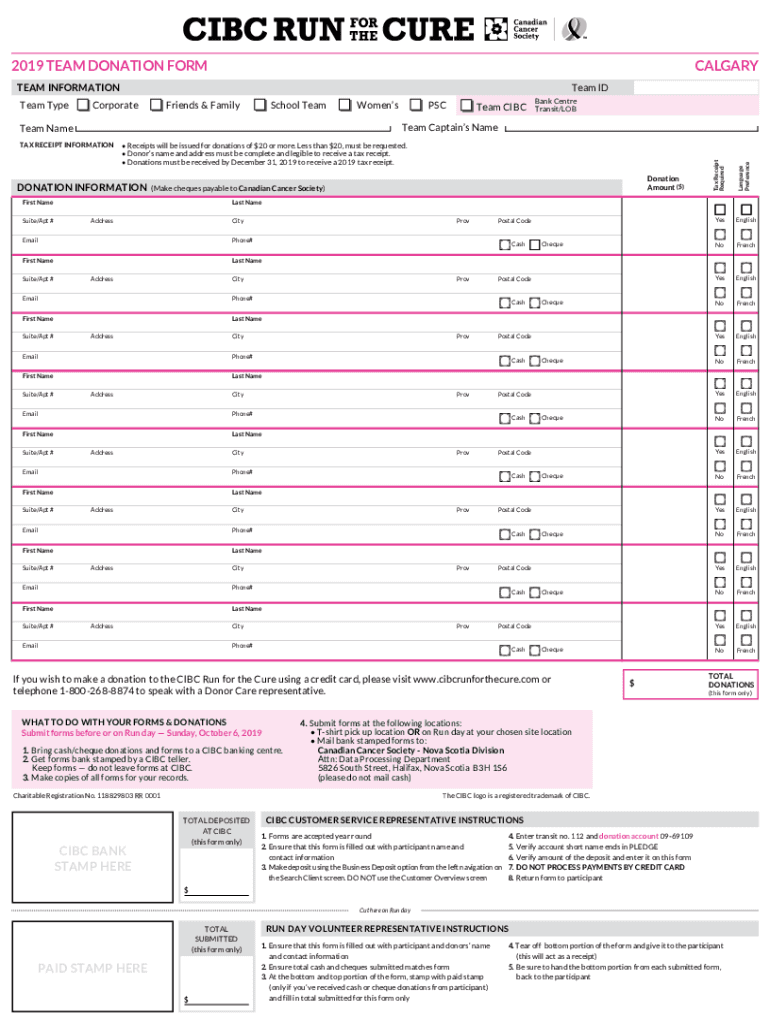







Understanding the TEAMCharity Donation Form
The TEAMCharity Donation Form is a pivotal document designed to simplify the process of making tax-deductible donations to charities. Its structured format ensures that donors provide essential information required for processing the donation and issuing a tax receipt. The form includes fields for donor details, donation amount, and specific instructions for the allocation of funds. It serves as both a record for the donor and the charity, ensuring transparency and compliance with tax regulations.
How to Use the TEAMCharity Donation Form
To effectively use the TEAMCharity Donation Form, start by carefully reading each section to understand what information is required. Use the text boxes provided to fill in your personal details, such as your name, address, and contact information. Ensure that the donation amount is clearly stated and aligns with your intended contribution. If the form includes a section for specifying the purpose of the donation, detail how you would like your funds to be utilized. Once completed, review your entries for accuracy before submission.
Obtaining the TEAMCharity Donation Form
The TEAMCharity Donation Form can be accessed through various channels. It is commonly available on the charity's official website, where it can be downloaded as a PDF. Some organizations also distribute it via email upon request or through direct mail. Additionally, forms may be available at charity events or fundraising campaigns, ensuring donors can easily find and complete them at their convenience.
Completing the TEAMCharity Donation Form: Step-by-Step
- Personal Information: Begin by entering your full name, address, and email or phone number in the designated fields.
- Donation Amount: Clearly specify the amount you wish to donate. Ensure the figure is correct and matches your intended contribution.
- Donation Purpose: If applicable, fill out the section where you can detail how your donation should be directed within the organization.
- Payment Method: Indicate your preferred payment method, such as credit card, check, or direct debit. Ensure your payment details are entered accurately.
- Signatures: If the form requires a signature, provide it in the designated area to validate your donation.
- Review and Submit: Carefully check all entries for accuracy before submitting the form via your chosen method.
Importance of the TEAMCharity Donation Form
The TEAMCharity Donation Form is vital for both donors and charities. It provides a structured way to capture donor information and ensures the correct processing of donations. By completing the form, donors can claim tax deductions, making their contributions financially beneficial. For charities, the form facilitates record-keeping and reporting, which are crucial for maintaining trust and compliance with financial regulations.
Common Users of the TEAMCharity Donation Form
This form is typically used by individual donors, corporations, and philanthropic organizations who are interested in making financial contributions to charitable causes. It's also utilized by accounting and financial professionals who assist clients in managing their charitable donations for tax purposes. Additionally, event organizers and volunteers who coordinate fundraising activities frequently distribute and collect these forms.


Key Elements of the TEAMCharity Donation Form
- Donor Information: Fields for name, address, and contact details.
- Donation Amount: Section to specify the total contribution.
- Payment Information: Options for payment method and details.
- Allocation Instructions: Area to indicate donation purpose or department allocation.
- Signature and Date: Required fields for validating the form.
Digital vs. Paper Version of the Donation Form
The TEAMCharity Donation Form is available in both digital and paper formats, providing flexibility to donors. The digital version can be filled out and submitted online, offering convenience and speed. It also reduces the environmental impact associated with paper forms. On the other hand, the paper version is useful for those who prefer traditional methods or lack access to digital tools. Each version is designed to accommodate different user preferences while maintaining the integrity and security of donor information.




