





Definition & Meaning
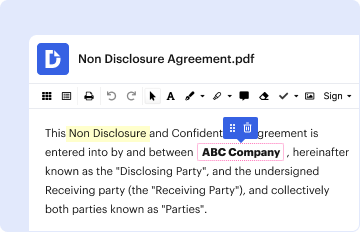
Filling out a form online refers to the process of completing documents or applications through an internet-connected platform. Unlike traditional paper forms, online forms are digital versions that you can access and submit via a computer or mobile device. These forms can cover a wide range of purposes, such as tax filings, business registrations, or personal information updates. The convenience of online forms means they often have built-in verification checks and interactive features that ensure greater accuracy and efficiency compared to their paper counterparts.
- Efficiency: Online forms can be completed faster as they often include functionalities such as drop-down menus, auto-fill options, and immediate validation of the entered data.
- Accessibility: Since they are available on the internet, these forms can be accessed by anyone with an internet connection, breaking geographical barriers.
- Environmentally Friendly: Reduces the need for paper, printing, and physical storage.
How to Use the Form Online
Using a form online involves several steps aimed at ensuring the form is filled out accurately and thoroughly. Here’s a general process:
- Access the Form: Open the form on a web browser. In some cases, you'll need to log in to a platform that hosts the form.
- Read Instructions: Before filling out the form, review any instructions provided to understand what is required.
- Complete Required Fields: Focus on filling out mandatory fields. Many online forms won’t allow you to proceed without these.
- Attach Documents: If necessary, upload any supporting documents as attachments.
- Review Your Information: Double-check all entries for accuracy.
- Submit the Form: Once satisfied, submit the form using the provided button or link.
- Tips for Accuracy: Some forms offer the option to save and resume later, allowing you more time to gather information.
- Technical Support: If you encounter issues, many platforms have support functions like chat or email assistance.
Steps to Complete the Form Online
Completing an online form efficiently requires understanding the steps involved:
- Preparation: Gather all necessary information and documents.
- Create an Account: Some services require you to have an account for form submission.
- Fill the Form: Start entering data, ensuring each field is correctly filled.
- Validation: Use the in-built validation features to catch any errors.
- Save Progress: Many forms offer an option to save your progress, ensuring that you don’t lose information in case of internet disruption.
- Final Review: Check for complete and accurate input before submitting.
- Submit: Confirm submission and keep a record of any confirmation messages or emails received.
- Real-life Example: Completing a job application form online often requires personal details, resume uploads, and cover letters, all common elements of online forms.
Why Should You Form Online
Using forms online provides significant advantages:
- Time Savings: Eliminating the need for physical mail reduces wait times and can expedite processes.
- Cost-effective: There’s typically no need for postage, printing, or travelling to submit forms.
- Automated Processes: Many online forms offer real-time feedback and automated workflows which reduce manual errors.
- Integration with Other Services: Online forms can often be integrated with other digital services for seamless data processing.
Who Typically Uses the Form Online
Online forms have a broad range of users due to their versatility:
-
Individuals: Common uses include online banking applications, tax filings, and social security requests.
-
Businesses: Use forms for registrations, compliance submissions, and customer surveys.
-
Educational Institutions: Students use online forms for applications and enrollment.
-
Illustration: A small business owner might use an online form for state registration and tax filings, facilitating easy compliance and efficient data management.


Key Elements of the Form Online
Understanding the key components of online forms can enhance their utility:
-
Form Fields: Include text boxes, checkboxes, radio buttons, and dropdown menus.
-
Instructions and Guidelines: Provide specifics on how to fill out the form accurately.
-
Submission Button: A crucial element that allows the form to be sent electronically upon completion.
-
Security Features: Encryption and secure login mechanisms protect user data.
-
Real-world Scenario: In a mortgage application form online, key elements include income details, property information, and personal identification fields.
Legal Use of the Form Online
Legal considerations for using forms online are paramount:
- Compliance: Online forms must comply with federal laws, such as the ESIGN Act, ensuring electronic signatures have the same legal standing as written ones.
- Data Protection: Forms should meet data protection regulations, safeguarding personal data under acts like GDPR or CCPA for international applications.
- Authenticity Verification: Many forms require identity verification processes to ensure the legitimacy of the submission.
Software Compatibility
When dealing with online forms, software compatibility can be crucial. Many forms can connect with popular software products, expanding their functional capabilities:
-
Integration with Software: Forms that integrate with software applications such as TurboTax for tax filing or QuickBooks for business accounting make data transfer seamless.
-
Systems Used: Most forms work in common web browsers but may also require plugins or applications for compatibility.
-
Device Compatibility: Online forms are generally accessible on a range of devices, including smartphones, tablets, and desktops.
-
Example: An accountant might use an online tax form that integrates with financial software to streamline the submission process.
Examples of Using the Form Online
Examples of online forms illustrate their practical applications:
-
Tax Filing: IRS tax forms submitted electronically for speedier processing and refund issuance.
-
Job Applications: Forms filled online for employment opportunities to streamline HR processes.
-
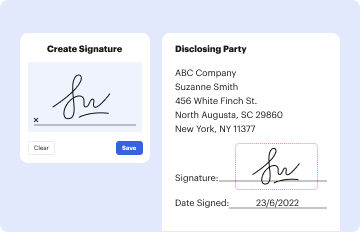
Loan Applications: Forms used in securing mortgages or personal loans, often include fields for financial details and digital signature capabilities.
-
Case Study: A university using online enrollment forms that automatically sync with student records, providing efficient admissions processing.