Record of Job Applications 2025

Get Form
Record of Job Applications Preview on Page 1

Here's how it works

01. Edit your form online
Type text, add images, blackout confidential details, add comments, highlights and more.

02. Sign it in a few clicks
Draw your signature, type it, upload its image, or use your mobile device as a signature pad.

03. Share your form with others
Send it via email, link, or fax. You can also download it, export it or print it out.

How to use or fill out Record of Job Applications with our platform

Form edit decoration
9.5
Ease of Setup
DocHub User Ratings on G2
9.0
Ease of Use
DocHub User Ratings on G2
  1. Click ‘Get Form’ to open the Record of Job Applications in the editor.
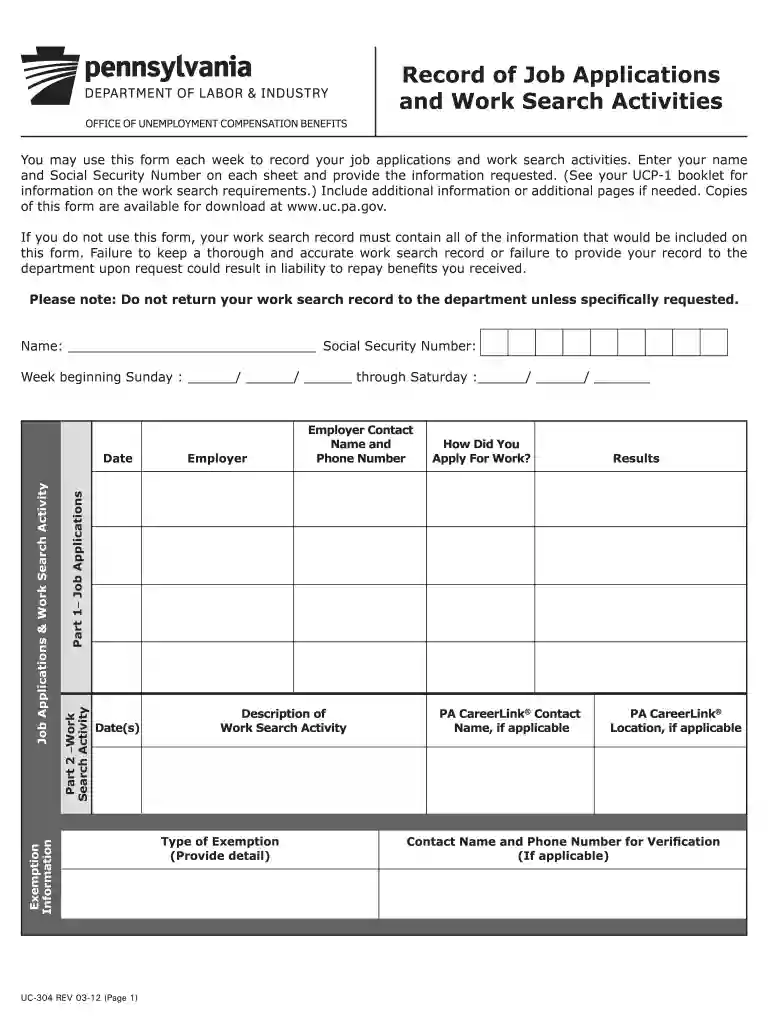
  2. Begin by entering your name and Social Security Number at the top of the form. This information is essential for identification purposes.
  3. Fill in the week beginning and ending dates to specify the time frame for your job search activities.
  4. In Part 1, record each job application by entering the employer's contact name and phone number, how you applied for work, and the results of your application.
  5. In Part 2, document your work search activities. Include dates, descriptions of activities, and any exemption information if applicable.
  6. Finally, certify that all provided information is correct by signing and dating the form at the bottom before saving or exporting it.

Start using our platform today to streamline your job application tracking for free!

See more Record of Job Applications versions

We've got more versions of the Record of Job Applications form. Select the right Record of Job Applications version from the list and start editing it straight away!
Versions Form popularity Fillable & printable
2018 4.9 Satisfied (46 Votes)
2014 4.3 Satisfied (24 Votes)
2012 4 Satisfied (22 Votes)
be ready to get more

Complete this form in 5 minutes or less

Get form

Got questions?

We have answers to the most popular questions from our customers. If you can't find an answer to your question, please contact us.
Contact us
How to Keep Track of Job Applications: 9 Tips Create a Job Application Tracker. Use Job Search Tools and Apps. Save Job Descriptions. Categorize Applications by Priority. Customize Folders for Applications. Develop an Email System. Track Networking Efforts. Set Reminders for Follow-Ups.
If you are unable to accurately recall details about all your past positions, you can obtain a work history report using resources such as Social Security records, credit report, IRS records or online records.
There is no express exemption from disclosure for job applications. Disclosure of information as to education, training, experience, awards, previous positions and publications by the employee has been held to implicate no privacy or public policy exemption.
10000 per week jobs CDL A Driver. Ace Hardware Gansevoort, NY3.7. CDL A Driver. Ace Hardware Wilton, NY3.7. CDL A Driver. Hazmat Over the road Driver. Pharmacist. Truck Driver - Local Class A - $10K Retention Bonus - Penske Logistics. HOUSEKEEPER | Full Time | No Weekends. Hazmat Over the road driver.
A spreadsheet will be great for tracking basic information, but you will need a secondary tool, like a notebook or a text file, to keep detailed research. So, it is possible to track your job search with a spreadsheet.
be ready to get more

Complete this form in 5 minutes or less

Get form

People also ask

Heres an overview of why you should always track your job applications: Make sure nothing slips through the cracks. Keeping all your job details in one place helps you avoid missing important things, like an interview invite buried in your inbox or forgetting which version of your resume you submitted.
With Huntrs Job Application Autofill tool, youll gain access to a free Chrome extension that simplifies the job application process. Besides filling out application forms, it will automatically save company, job title, location, links, and descriptions when applying to jobs online.

Related links