




Here's how it works

01. Edit your national honor society recommendation letter from teacher online
Type text, add images, blackout confidential details, add comments, highlights and more.

02. Sign it in a few clicks
Draw your signature, type it, upload its image, or use your mobile device as a signature pad.

03. Share your form with others
Send nhs teacher recommendation form via email, link, or fax. You can also download it, export it or print it out.
How to use or fill out NTHS Teacher Recommendation Form.pdf with DocHub

- Click ‘Get Form’ to open the NTHS Teacher Recommendation Form in our editor.
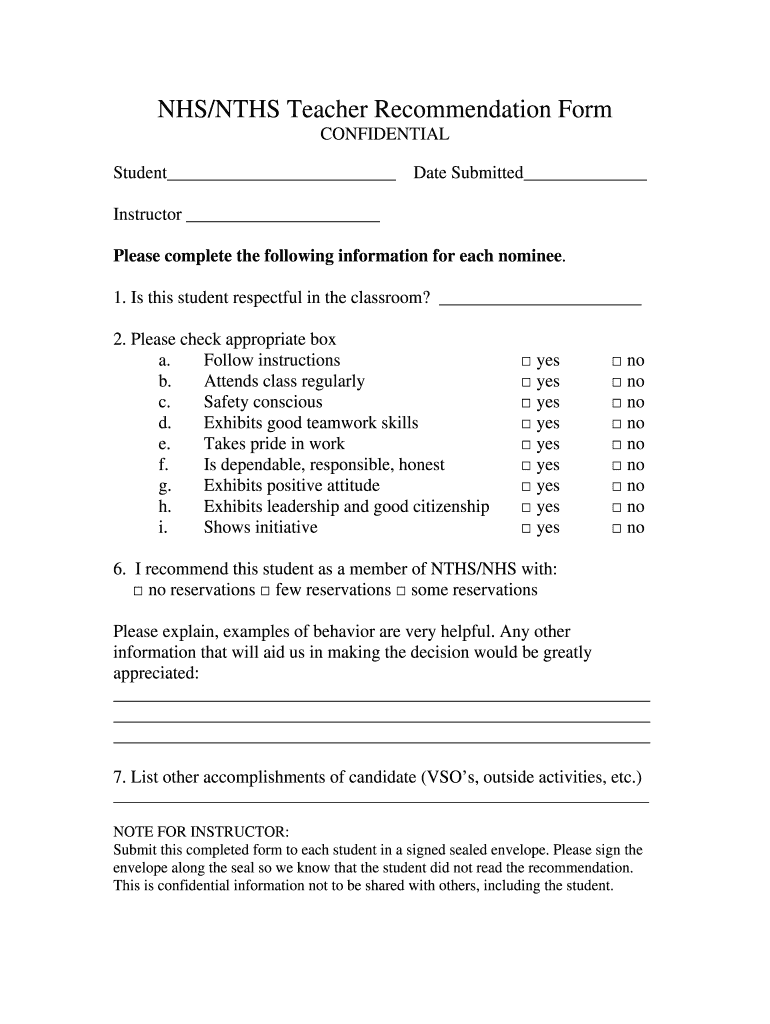
- Begin by entering the student's name and the date submitted at the top of the form. This personalizes the recommendation.
- In the section regarding classroom behavior, answer whether the student is respectful by filling in your response next to 'Is this student respectful in the classroom?'.
- For each characteristic listed (e.g., follows instructions, attends class regularly), check 'yes' or 'no' based on your assessment of the student.
- Indicate your level of recommendation by selecting one of the options: 'no reservations', 'few reservations', or 'some reservations'.
- Provide detailed explanations and examples of behavior in the space provided to support your recommendation.
- List any other accomplishments of the candidate in the designated area, such as volunteer service organizations or outside activities.
- Once completed, ensure you submit this form in a signed sealed envelope as instructed for confidentiality.
Start using our platform today to effortlessly complete and submit your NTHS Teacher Recommendation Form for free!
Fill out NTHS Teacher Recommendation Form.pdf online
It's free
It's free
Security and compliance
At DocHub, your data security is our priority. We follow HIPAA, SOC2, GDPR, and other standards, so you can work on your documents with confidence.
Learn more




