




Here's how it works



How to use or fill out aota fieldwork performance evaluation sample with our platform

- Click ‘Get Form’ to open the aota fieldwork performance evaluation sample in the editor.
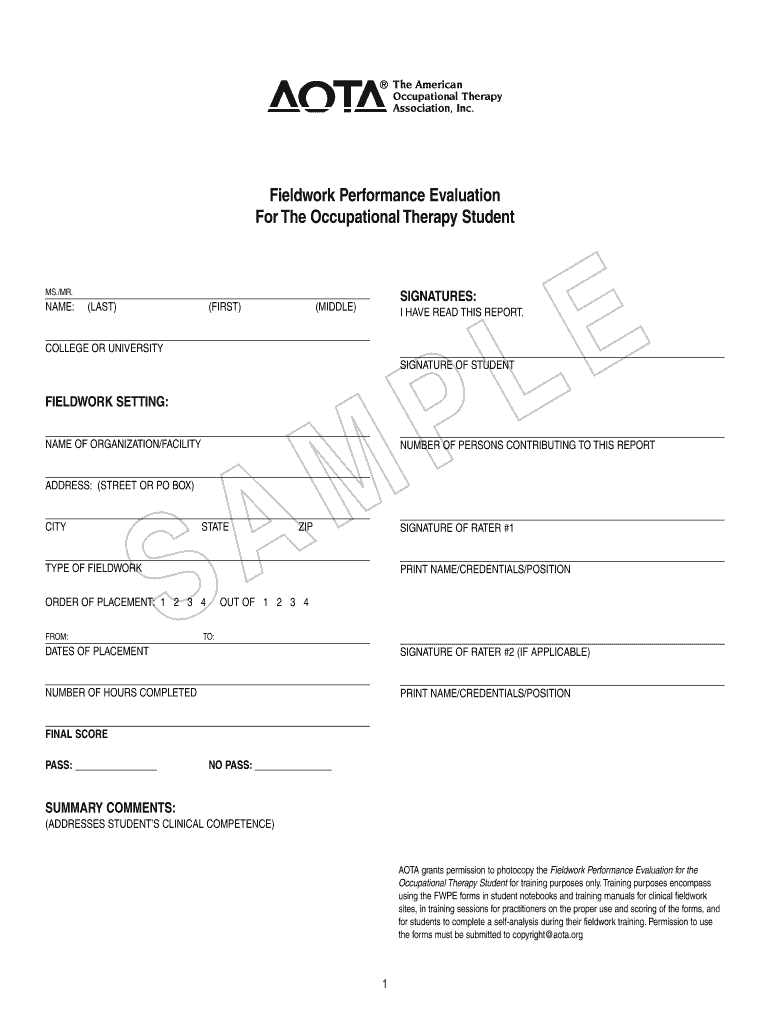
- Begin by entering the student's name in the designated fields for LAST, FIRST, and MIDDLE names. Ensure accuracy as this will be part of the official record.
- In the 'FIELDWORK SETTING' section, input the name of the organization or facility where the fieldwork took place, along with its address and city.
- Specify the type of fieldwork and order of placement (1, 2, 3, or 4) as applicable. Fill in the dates of placement to provide context for the evaluation period.
- For each performance item listed in the evaluation, circle the rating that best reflects student performance using the provided scale from 1 to 4. Be sure to review definitions at the top of each page for clarity.
- Complete both midterm and final ratings on the Performance Rating Summary Sheet. This includes recording scores and providing summary comments on strengths and areas for improvement.
Start using our platform today to streamline your document editing and form completion process for free!
It's free
Got questions?
Can I sign my aota fieldwork performance evaluation pdf in electronic format?
Based on eSignature laws, forms approved digitally have the same validity as those approved with pen and paper. You can electronically sign almost any business and personal documentation. Four types of documents still require wet signatures only - wills and testamentary trusts, court orders and other court forms, state statutes governing divorce, adoption, or other family law, and notice of cancellation of utility services. If you adhere to the rules and use a reliable and compliant software solution, like DocHub, you can eSign your aota fieldwork performance evaluation pdf without printing it.
Do I need to set up software to edit my aota 2022 pdf?
If you edit your aota 2022 pdf with DocHub, you only need a stable web connection and virtually any web browser installed on your device. No need to set up any third-party software or research tutorials. Just open a tab with DocHub, drag and drop your file, and edit it immediately.
What score do you need to pass Aota fieldwork?
What does Sefwe stand for?
How do occupational therapists prepare for fieldwork?
Security and compliance
At DocHub, your data security is our priority. We follow HIPAA, SOC2, GDPR, and other standards, so you can work on your documents with confidence.
Learn more


