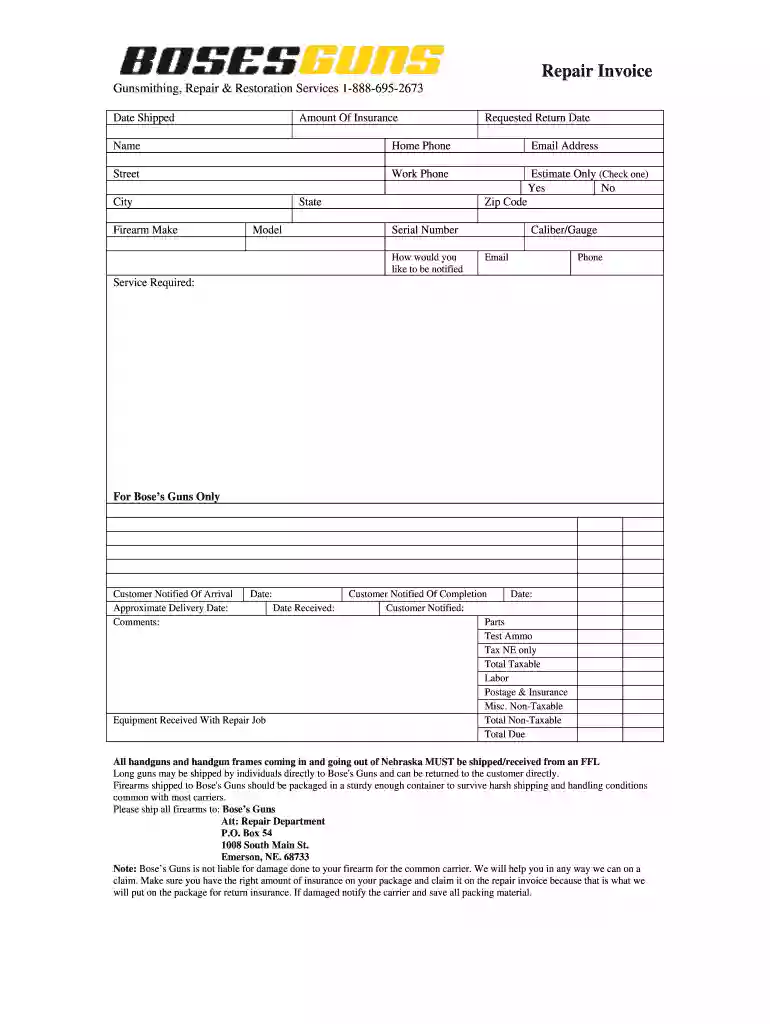
Boses invoice 2026

Get Form
boses invoice Preview on Page 1

Here's how it works

01. Edit your form online
Type text, add images, blackout confidential details, add comments, highlights and more.

02. Sign it in a few clicks
Draw your signature, type it, upload its image, or use your mobile device as a signature pad.

03. Share your form with others
Send it via email, link, or fax. You can also download it, export it or print it out.

How to use or fill out boses invoice with our platform

Form edit decoration
9.5
Ease of Setup
DocHub User Ratings on G2
9.0
Ease of Use
DocHub User Ratings on G2
  1. Click ‘Get Form’ to open the boses invoice in the editor.
  2. Begin by entering the 'Date Shipped' and 'Amount Of Insurance' in the designated fields. This information is crucial for tracking your shipment.
  3. Fill in your personal details, including 'Name', 'Home Phone', 'Work Phone', and 'Email Address'. Ensure accuracy for effective communication.
  4. Provide your address by completing the 'Street', 'City', 'State', and 'Zip Code' fields. This ensures proper delivery of your firearm.
  5. Specify the firearm details such as 'Make', 'Model', and 'Serial Number'. This information is essential for identification during repairs.
  6. Indicate how you would like to be notified about your repair status by checking either 'Email' or 'Phone'.
  7. Complete the section on services required, ensuring you select all applicable options related to your firearm repair needs.
  8. Review all entries for accuracy before saving or sending the completed invoice. Use our platform’s features to easily modify any sections if needed.

Start using our platform today to streamline your boses invoice process for free!

be ready to get more

Complete this form in 5 minutes or less

Get form

Got questions?

We have answers to the most popular questions from our customers. If you can't find an answer to your question, please contact us.
Contact us
What to include in an invoice 1. Invoice A unique invoice number. Your company name and address. The company name and address of the customer. A description of the goods and services. The date of supply. The date of the invoice. The amount of the individual goods or services to be paid.
To check for invoice fraud, carefully examine the formatting and quality of invoices for inconsistencies and errors. Verify details: Cross-check vendor and payment information against verified records. Check formatting: Look for design inconsistencies, poor-quality logos, or unprofessional formatting.
Invoice verification checklist Vendor name and address. Invoice date and unique invoice number. Description of goods or services. Tax details (VAT, GST, or tax ID) Payment terms and due date. Payment details (bank account, UPI, etc.)
Invoices - what they must include a unique identification number. your company name, address and contact information. the company name and address of the customer youre invoicing. a clear description of what youre charging for.
The best way to identify invoices is to: Verify vendor information. Review the invoice carefully. Check for official branding and logos. Look for typos and grammatical errors. Check payment instructions. Review payment history. Use fraud detection software. Stay vigilant.

Security and compliance

At DocHub, your data security is our priority. We follow HIPAA, SOC2, GDPR, and other standards, so you can work on your documents with confidence.

Learn more
ccpa2
pci-dss
gdpr-compliance
hipaa
soc-compliance

People also ask

To verify an invoice, youll need vendor information, invoice details (include a description of goods or services, cost, payment terms, due date, and PO reference) along with banking details and delivery details.

Related links