Caps payroll state id number 2026

Get Form
newcaps login Preview on Page 1

Here's how it works

01. Edit your newcaps login online
Type text, add images, blackout confidential details, add comments, highlights and more.

02. Sign it in a few clicks
Draw your signature, type it, upload its image, or use your mobile device as a signature pad.

03. Share your form with others
Send caps login payroll via email, link, or fax. You can also download it, export it or print it out.

How to use or fill out caps payroll state id number with our platform

Form edit decoration
9.5
Ease of Setup
DocHub User Ratings on G2
9.0
Ease of Use
DocHub User Ratings on G2
  1. Click ‘Get Form’ to open the caps payroll state id number form in the editor.
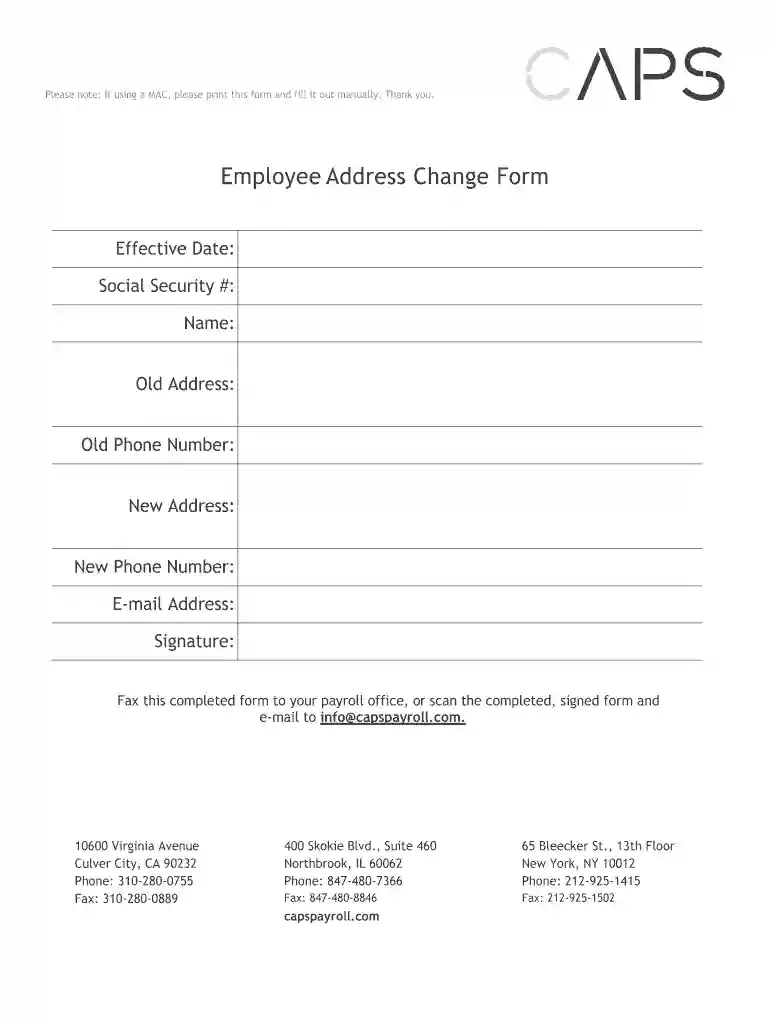
  2. Begin by entering the 'Effective Date' at the top of the form. This is crucial for record-keeping purposes.
  3. Fill in your 'Social Security #' accurately, as this will be used for identification and verification.
  4. Enter your 'Name' as it appears on official documents to ensure consistency across records.
  5. Provide your 'Old Address' and 'Old Phone Number' to help update your records effectively.
  6. Next, input your 'New Address' and 'New Phone Number'. Double-check these details for accuracy.
  7. Include your 'E-mail Address' for any future correspondence regarding your payroll information.
  8. Finally, sign the form electronically within the editor to validate your submission before sending it off.

Start using our platform today to streamline your document editing and signing process for free!

be ready to get more

Complete this form in 5 minutes or less

Get form

Got questions?

We have answers to the most popular questions from our customers. If you can't find an answer to your question, please contact us.
Contact us
You may or may not also have info in lines 18 20. If there are state amounts to enter, your employer must have a state ID number. If your paper or electronic W-2 doesnt have one, call your employer or your state department of revenue or taxation.
You can find an employers state ID number on Form W-2, state agency correspondence, or by contacting the employer directly. Each state assigns its own format and name for the state ID, such as withholding number or employer account number.
While both the SEIN and EIN are essential for tax and business identification, they serve different purposes. To start with, the EIN is issued by the IRS and is used mainly for federal tax reporting. The SEIN, however, is issued by the state of California and is specifically used for state tax and payroll obligations.
Once you have registered your business with the Employment Development Department (EDD), you will be issued an eight-digit employer payroll tax account number (example: 000-0000-0), also known as a State Employer Identification Number(SEIN) or State ID number.
A payroll number is a unique identifier for each employee used to process their wages and salary. Its typically associated with the employees name and can be found on a payslip, a document that summarises how much an employee has earned. It may always appear differently depending on the company.

Security and compliance

At DocHub, your data security is our priority. We follow HIPAA, SOC2, GDPR, and other standards, so you can work on your documents with confidence.

Learn more
ccpa2
pci-dss
gdpr-compliance
hipaa
soc-compliance
be ready to get more

Complete this form in 5 minutes or less

Get form

People also ask

Through Your States DMV Website To access your states Department of Motor Vehicles (DMV) website, just enter your Social Security number (SSN) or another identifying number. When you log in, your state ID number should be displayed in your account along with other important information.

caps payroll login