






Definition & Meaning
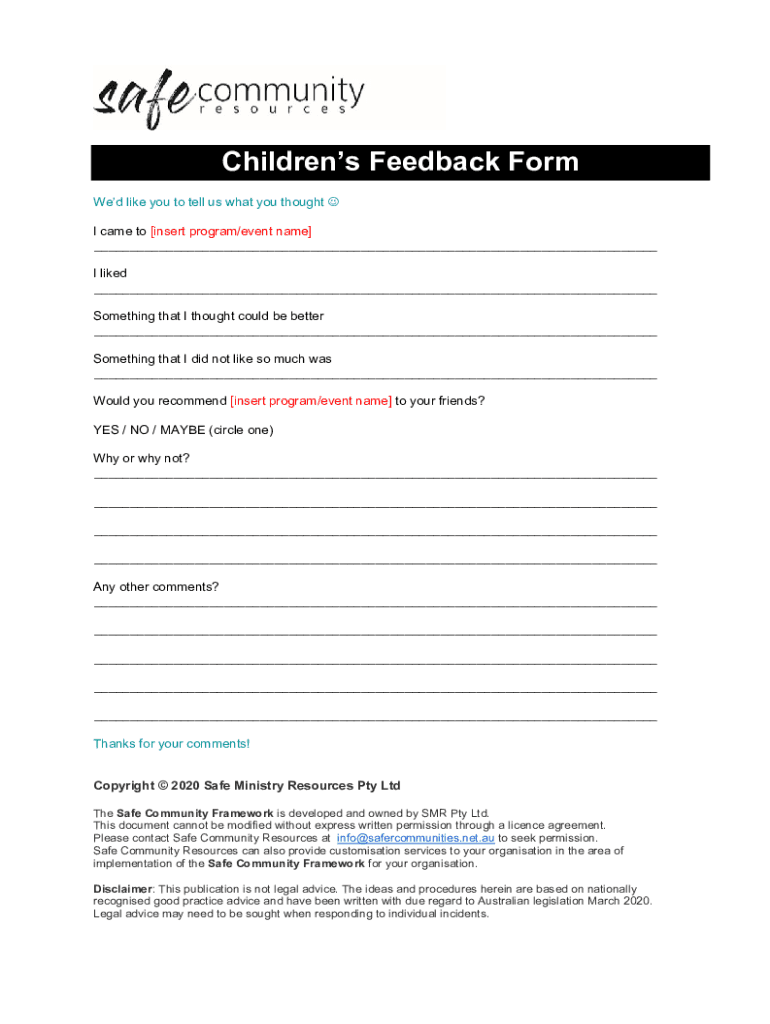
The Children's Feedback Form is an interactive tool designed to collect valuable opinions and insights from young participants after they engage in specific programs or events. This form encourages children to express what they liked, disliked, or felt could be improved, offering organizers a comprehensive view of their experiences. By focusing on the voices of children, this form serves as a vital instrument for refining future activities to better meet the needs and expectations of young attendees.
Key Elements of the Children's Feedback Form
The form typically consists of several key elements that facilitate comprehensive feedback collection. These include:
- Likes and Enjoyments: Fields where children can specify what they enjoyed most about the event. This section helps to identify successful aspects of the program.
- Suggestions for Improvement: A segment dedicated to capturing children's ideas on how to enhance the experience. This feedback is crucial for continuous improvement.
- Dislikes and Issues: Here, participants can point out elements they didn't like, allowing organizers to address potential problem areas.
- Overall Recommendations: A space for general recommendations or any additional thoughts the children might have. This encourages open communication and creative feedback.
How to Use the Children's Feedback Form
Using the Children's Feedback Form involves several steps aimed at ensuring the process is smooth and effective:
- Identify Participants: Determine which event attendees should fill out the form, ensuring you have a representative sample of feedback.
- Distribute the Form: Choose a distribution method, such as handing out physical copies during the event or sending digital forms via email afterward.
- Provide Guidance: Offer instructions or a brief overview so that children understand how to complete the form, highlighting the importance of their honest feedback.
- Collect and Analyze Feedback: Gather completed forms and analyze the data to identify patterns, strengths, and areas needing improvement.
Steps to Complete the Children's Feedback Form
Children can complete the form by following these straightforward steps:
- Read through the Form: Encourage participants to carefully read each section to understand what information is being requested.
- Fill in the Details: Guide them to fill in each section, ensuring they provide thoughtful and honest feedback.
- Review Responses: Before submission, ask children to review their responses for completeness and accuracy.
- Submit the Form: Instruct them on how to submit the form, whether placing it in a collection box or sending it back electronically.
Importance of the Children's Feedback Form
Using the Children's Feedback Form is fundamental for several reasons:
- Enhanced Program Development: Insights gleaned from the form aid in tailoring future programs and events to better suit children's preferences.
- Child-Centered Improvements: Prioritizing children's voices ensures developments are aligned with their needs and expectations.
- Increased Engagement: When children see their feedback being utilized, it fosters a sense of inclusion and encourages active participation in future programs.
Who Typically Uses the Children's Feedback Form
This form is widely used by organizations that focus on child-centered activities, including:
- Schools: After school programs or extracurricular activities, schools use forms to gather student feedback.
- Summer Camps: Ensuring camps provide enjoyable and enriching experiences for campers.
- Youth Organizations: Nonprofits and community-based groups use these forms to enhance program offerings and outreach initiatives.


Software Compatibility for Children's Feedback Form
Digital versions of the Children's Feedback Form offer compatibility across various platforms, making it flexible for different users:
- DocHub: With DocHub, users can edit, distribute, and manage forms seamlessly online.
- Google Workspace: Users can import and export forms directly through Google Drive, adding efficiency to document management.
- Cloud Storage Services: Compatibility extends to services like Dropbox and OneDrive, further broadening accessibility.
Digital vs. Paper Version
Choosing between digital and paper versions of the Children's Feedback Form depends on several factors:
- Accessibility: Digital forms can be accessed and filled out from anywhere with an internet connection, offering convenience for remote participation.
- Ease of Analysis: Digital submissions simplify data collection and analysis, often automatically aggregating responses for easier interpretation.
- Environmental Impact: Digital forms are more sustainable, reducing paper waste and the carbon footprint associated with physical distribution and collection process.