Debit pad 2026

Get Form
pre authorized debit form rbc Preview on Page 1

Here's how it works

01. Edit your pre authorized debit form rbc online
Type text, add images, blackout confidential details, add comments, highlights and more.
02. Sign it in a few clicks
Draw your signature, type it, upload its image, or use your mobile device as a signature pad.
03. Share your form with others
Send rbc pre authorized debit form via email, link, or fax. You can also download it, export it or print it out.

How to use or fill out debit pad with our platform

Form edit decoration
9.5
Ease of Setup
DocHub User Ratings on G2
9.0
Ease of Use
DocHub User Ratings on G2
  1. Click ‘Get Form’ to open the debit pad in the editor.
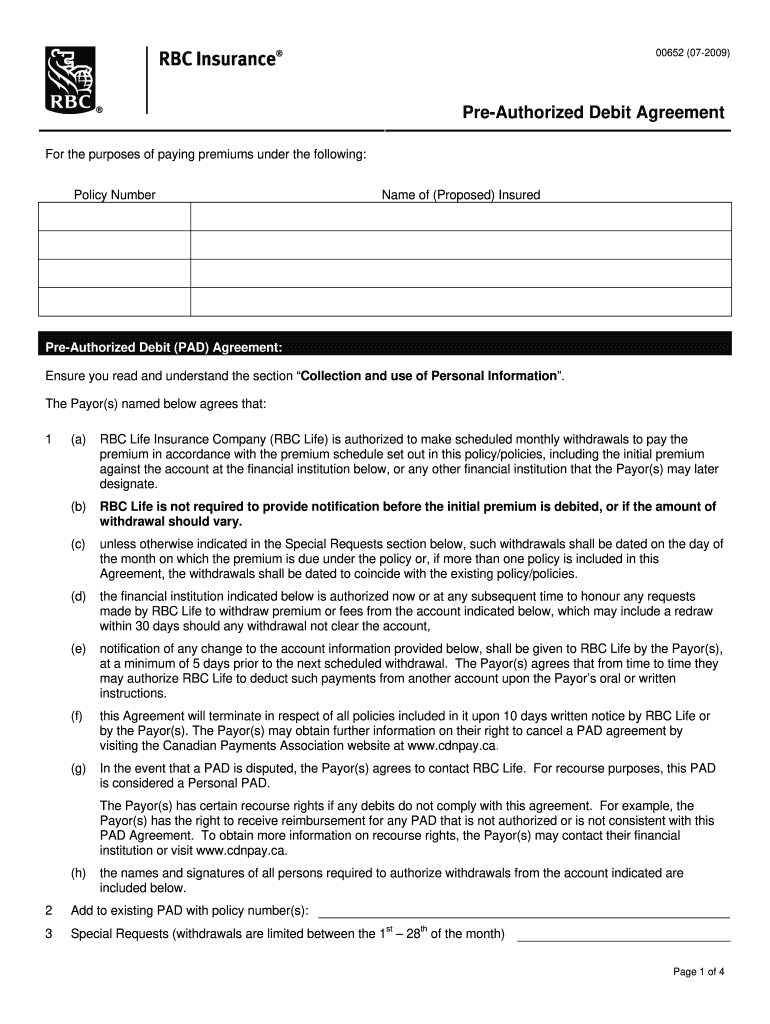
  2. Begin by entering the Policy Number and the Name of the Proposed Insured in the designated fields.
  3. In the Pre-Authorized Debit (PAD) Agreement section, review each clause carefully. Ensure you understand your rights and obligations regarding scheduled withdrawals.
  4. Fill in your Bank Information, including the Name of Bank or Financial Institution, Transit Number, Bank Number, and Account Number. Remember to attach a sample void cheque if required.
  5. Complete the Special Requests section if you have specific instructions regarding withdrawal dates.
  6. Finally, print and sign your name as well as any additional payors' names in the signature fields provided.

Start using our platform today for free to streamline your document editing and signing process!

be ready to get more

Complete this form in 5 minutes or less

Get form

Got questions?

We have answers to the most popular questions from our customers. If you can't find an answer to your question, please contact us.
Contact us
Pre-authorized debit agreement: PAD lets businesses automatically withdraw payments from customers accounts, ensuring secure and efficient financial management.
A pre-authorized debit allows the biller to withdraw money from your bank account when a payment is due. Pre-authorized debits may be useful when you want to make payments from your account on a regular basis. For example, you may want to use pre-authorized debit for the following: mortgage payments. utility payments.
PAD stands for Pre-Authorized Debit which is sometimes called direct debit. It is a type of payment method that allows customers to give permission for a business to debit their bank account automatically on a recurring basis.
Pre-authorized debits (PADs) are a convenient way to pay bills and make other payments automatically. Instead of sending a payment, a company withdraws funds from your bank account.
To cancel a pre-authorized debit agreement, you must notify the biller in writing. Make sure you keep a copy of this notice. Your agreement should have details on how to cancel a pre-authorized debit. Once you cancel the agreement, check your account records to confirm that the pre-authorized debits stop.

Security and compliance

At DocHub, your data security is our priority. We follow HIPAA, SOC2, GDPR, and other standards, so you can work on your documents with confidence.

Learn more
ccpa2
pci-dss
gdpr-compliance
hipaa
soc-compliance

People also ask

Pre-authorized debit. Pre-authorized debits (PADs) are a convenient way to pay bills and make other payments automatically. Instead of sending a payment, a company withdraws funds from your bank account.
Definition of a Void Cheque Void Cheque is being replaced by the term Pre-authorized Debit form or PAD. Lenders use a void cheque or a PAD for much the same reason that employers use it, so they may withdraw or deposit funds to your account as required. Welcome to the convinience of Internet banking.
ACH credit: An ACH credit payment, also called a push, is when the sender initiates the transfer, such as an employer sending a direct deposit. ACH debit: An ACH debit, or pull transaction, is when the recipient requests the money, as in the case of a pre-authorized debit (PAD) transaction.

Related links